 Addy Osmani [X](https://twitter.com/addyosmani) [GitHub](https://github.com/addyosmani) [Bluesky](https://bsky.app/profile/addyosmani.bsky.social)  Jason Miller [X](https://twitter.com/_developit) [GitHub](https://github.com/developit) [Homepage](https://jasonformat.com)
Published: February 6, 2019, Last updated: January 5, 2026
One of the core decisions web developers must make is where to implement logic
and rendering in their application. This can be difficult because there are so
many ways to build a website.
Our understanding of this space is informed by our work in Chrome talking to
large sites over the past few years. Broadly speaking, we encourage developers
to consider server-side rendering or static rendering over a full rehydration
approach.
To better understand the architectures we're choosing from when we make this
decision, we need [consistent terminology](https://web.dev/articles/rendering-on-the-web.md.txt#terminology) and a shared framework
for each approach. Then, you can better evaluate the tradeoffs of each rendering
approach from the perspective of page performance.
## Terminology
First, we define some terminology we will use.
### Rendering
Server-side rendering (SSR)
: Rendering an app on the server to send HTML, rather than JavaScript, to the client.
Client-side rendering (CSR)
: Rendering an app in a browser, using JavaScript to modify the DOM.
Prerendering
: Running a client-side application at build time to capture its initial state as static HTML. *Note "prerendering" in this sense is different to [browser prerendering of future navigations](https://developer.chrome.com/docs/web-platform/prerender-pages).*
Hydration
: Running client-side scripts to add application state and interactivity to
server-rendered HTML. Hydration assumes the DOM doesn't change.
Rehydration
: While often used to mean the same thing as hydration, rehydration implies
regularly updating the DOM with the latest state, including after the initial
hydration.
### Performance
[Time to First Byte (TTFB)](https://web.dev/articles/ttfb.md.txt)
: The time between clicking a link and the first byte of content loading on the
new page.
[First Contentful Paint (FCP)](https://web.dev/articles/fcp.md.txt)
: The time when requested content (article body, etc) becomes visible.
[Interaction to Next Paint (INP)](https://web.dev/articles/inp.md.txt)
: A representative metric that assesses whether a page consistently responds
quickly to user inputs.
[Total Blocking Time (TBT)](https://web.dev/articles/tbt.md.txt)
: A [proxy metric for INP](https://almanac.httparchive.org/en/2022/performance#inp-and-tbt)
that calculates how long the main thread was blocked during page load.
## Server-side rendering
Server-side rendering generates the full HTML for a page on the server in
response to navigation. This avoids additional round trips for data fetching and
templating on the client, because the renderer handles them before the browser
gets a response.
Server-side rendering generally produces a fast FCP. Running page logic and
rendering on the server lets you avoid sending lots of JavaScript to the client.
This helps to reduce a page's TBT, which can also lead to a lower INP, because
the main thread isn't blocked as often during page load. When the main thread is
blocked less often, user interactions have more opportunities to run sooner.
This makes sense, because with server-side rendering, you're really just sending
text and links to the user's browser. This approach can work well for a variety
of device and network conditions and opens up interesting browser optimizations,
such as streaming document parsing.
 FCP and TTI with server-side rendering.
With server-side rendering, users are less likely to be left waiting for
CPU-bound JavaScript to run before they can use your site. Even when you can't
avoid [third-party JavaScript](https://web.dev/articles/optimizing-content-efficiency-loading-third-party-javascript.md.txt),
using server-side rendering to reduce your own first-party
[JavaScript costs](https://medium.com/@addyosmani/the-cost-of-javascript-in-2018-7d8950fbb5d4)
can give you more [budget](https://medium.com/@addyosmani/start-performance-budgeting-dabde04cf6a3)
for the rest. However, there is one potential trade-off with this approach:
generating pages on the server takes time, which can increase your page's TTFB.
Whether server-side rendering is enough for your application largely depends on
what type of experience you're building. There's a long-standing debate over the
correct applications of server-side rendering versus client-side rendering, but
you can always choose to use server-side rendering for some pages and not
others. Some sites have adopted hybrid rendering techniques with success.
For example, [Netflix](https://medium.com/dev-channel/a-netflix-web-performance-case-study-c0bcde26a9d9)
server-renders its relatively static landing pages, while
[prefetching](https://dev.to/addyosmani/speed-up-next-page-navigations-with-prefetching-4285)
the JavaScript for interaction-heavy pages, giving these heavier client-rendered pages a
better chance of loading quickly.
With many modern frameworks, libraries, and architectures, you can render the same
application on both the client and the server. You can use these techniques for
server-side rendering. However, architectures where rendering happens both on
the server *and* on the client are their own class of solution with very
different performance characteristics and tradeoffs. React users can use
[server DOM APIs](https://react.dev/reference/react-dom/server) or solutions
built on them like [Next.js](https://nextjs.org/) for server-side rendering. Vue
users can use Vue's [server-side rendering guide](https://vuejs.org/guide/scaling-up/ssr.html) or [Nuxt](https://nuxtjs.org). Angular has [Universal](https://angular.io/guide/universal).
Most popular solutions use some form of hydration, though, so be aware of the
approaches your tool uses.
## Static rendering
[Static rendering](https://frontarm.com/james-k-nelson/static-vs-server-rendering/)
happens at build time. This approach offers a fast FCP, and also a lower TBT and
INP, as long as you limit the amount of client-side JavaScript on your pages. Unlike
server-side rendering, it also achieves a consistently fast TTFB, because the
HTML for a page doesn't have to be dynamically generated on the server.
Generally, static rendering means producing a separate HTML file for each URL
ahead of time. With HTML responses generated in advance, you can deploy static
renders to multiple CDNs to take advantage of edge caching.
 FCP and TTI with static rendering.
Solutions for static rendering come in all shapes and sizes. Tools like
[Gatsby](https://www.gatsbyjs.org) are designed to make developers feel like
their application is being rendered dynamically, not generated as a build step.
Static site generation tools such as [11ty](https://www.11ty.dev/),
[Jekyll](https://jekyllrb.com), and [Metalsmith](https://metalsmith.iooperationalizing-node-js-for-server-side-rendering-c5ba718acfc9speedier-server-side-rendering-in-react-16-with-component-caching-e8aa677929b1)
embrace their static nature, providing a more template-driven approach.
> [!NOTE]
> **Note:** Abstractions of popular frameworks such as Next.js or Nuxt offer both static rendering and server-side rendering. This lets developers opt into static rendering for pages that qualify, or use server-side rendering for pages that need to be dynamically generated in response to a request.
One of the downsides to static rendering is that it must generate individual
HTML files for every possible URL. This can be challenging or even infeasible
when you need to predict those URLs ahead of time and for sites with
a large number of unique pages.
React users might be familiar with Gatsby,
[Next.js static export](https://nextjs.org/learn/excel/static-html-export/), or
[Navi](https://frontarm.com/navi/), all of which make it convenient to create
pages from components. However, static rendering and prerendering behave
differently: statically rendered pages are interactive without needing to
execute much client-side JavaScript, whereas prerendering improves the FCP of a
Single Page Application that must be booted on the client to make pages truly
interactive.
If you're unsure whether a given solution is static rendering or prerendering,
try disabling JavaScript and load the page you want to test. For statically
rendered pages, most interactive features still exist without JavaScript.
Prerendered pages might still have some basic features like links with
JavaScript disabled, but most of the page is inert.
Another useful test is to use
[network throttling in Chrome DevTools](https://developer.chrome.com/docs/devtools/device-mode/#network)
and see how much JavaScript downloads before a page becomes interactive.
Prerendering generally needs more JavaScript to become interactive, and that
JavaScript tends to be more complex than the
[progressive enhancement](https://developer.mozilla.org/docs/Glossary/Progressive_Enhancement)
approach used in static rendering.
## Server-side rendering versus static rendering
Server-side rendering isn't the best solution for everything, because its
dynamic nature can have significant compute overhead costs. Many server-side
rendering solutions don't flush early, delay TTFB, or double the data being sent
(for example, inlined states used by JavaScript on the client). In React,
`renderToString()` can be slow because it's synchronous and single-threaded.
[Newer React server DOM APIs](https://react.dev/reference/react-dom/server)
support streaming, which can get the initial part of an HTML response to the
browser sooner while the rest of it is still being generated on the server.
Getting server-side rendering "right" can involve finding or building a solution
for [component caching](https://medium.com/@reactcomponentcaching/), managing
memory consumption, using [memoization](https://speakerdeck.com/maxnajim/hastening-react-ssr-with-component-memoization-and-templatization) techniques,
and other concerns. You're often processing or rebuilding the same app twice,
once on the client and once on the server. Server-side rendering showing content
sooner doesn't necessarily give you less work to do. If you have a lot of work
on the client after a server-generated HTML response arrives on the client,
this can still lead to higher TBT and INP for your website.
Server-side rendering produces HTML on demand for each URL, but it can be slower
than just serving static rendered content. If you can put in the additional
legwork, server-side rendering plus [HTML caching](https://freecontent.manning.com/caching-in-react/)
can significantly reduce server render time. The upside to server-side rendering
is the ability to pull more "live" data and respond to a more complete set of
requests than is possible with static rendering. Pages that need personalization
are a concrete example of the type of request that doesn't work well with static
rendering.
Server-side rendering can also present interesting decisions when building a
[PWA](https://web.dev/explore/progressive-web-apps). Is it better to use full-page
[service worker](https://developer.chrome.com/docs/workbox/service-worker-overview)
caching, or server-render individual pieces of content?
## Client-side rendering
Client-side rendering means rendering pages directly in the browser with
JavaScript. All logic, data fetching, templating, and routing are handled on the
client instead of on the server. The effective outcome is that more data is
passed to the user's device from the server, and that comes with its own set of
tradeoffs.
Client-side rendering can be difficult to make and keep fast for mobile devices.
With a little work to keep a [tight JavaScript budget](https://mobile.twitter.com/HenrikJoreteg/status/1039744716210950144)
and deliver value in as few [round-trips](https://en.wikipedia.org/wiki/Round-trip_delay_time)
as possible, you can get client-side rendering to almost replicate
the performance of pure server-side rendering. You can get the parser to work
for you faster by delivering critical scripts and data using ``
We also recommend considering using patterns like [PRPL](https://web.dev/articles/apply-instant-loading-with-prpl.md.txt)
to ensure that initial and subsequent navigations feel instant.
 FCP and TTI with client-side rendering.
The primary downside to client-side rendering is that the amount of JavaScript
required tends to grow as an application grows, which can impact a page's INP.
This becomes especially difficult with the addition of new JavaScript libraries,
polyfills, and third-party code, which compete for processing power and must
often be processed before a page's content can render.
Experiences that use client-side rendering and rely on large JavaScript bundles
should consider [aggressive code-splitting](https://web.dev/articles/reduce-javascript-payloads-with-code-splitting.md.txt)
to lower TBT and INP during page load, as well as lazy-loading JavaScript to
serve only what the user needs, when it's needed. For experiences with little or
no interactivity, server-side rendering can represent a more scalable solution
to these issues.
For folks building single page applications, identifying core parts of the user
interface shared by most pages lets you apply the
[application shell caching](https://developer.chrome.com/blog/app-shell)
technique. Combined with service workers, this can dramatically improve
perceived performance on repeat visits, because the page can load its
application shell HTML and dependencies from `CacheStorage` very quickly.
## Rehydration combines server-side and client-side rendering
[Hydration](https://react.dev/reference/react-dom/client/hydrateRoot#hydrating-server-rendered-html)
is an approach that mitigate the tradeoffs between client-side and server-side
rendering by doing both. Navigation requests, like full page loads or
reloads, are handled by a server that renders the application to HTML. Then the
JavaScript and data used for rendering is embedded into the resulting document.
When done carefully, this achieves a fast FCP like server-side rendering, then
"picks up" by rendering again on the client.
This is an effective solution, but it can have considerable performance
drawbacks.
The primary downside of server-side rendering with rehydration is that it can
have a significant negative impact on TBT and INP, even if it improves FCP.
Server-side rendered pages can appear to be loaded and interactive, but can't
actually respond to input until the client-side scripts for components are
executed and event handlers have been attached. On mobile, this can take
minutes, confusing and frustrating the user.
### A rehydration problem: One app for the price of two
For the client-side JavaScript to accurately take over where the server left off,
without re-requesting all the data the server rendered its HTML with, most
server-side rendering solutions serialize the response from a UI's data
dependencies as script tags in the document. Because this duplicates a lot of
HTML, rehydration can cause more problems than just delayed interactivity.
 HTML document containing serialized UI, inlined data and a bundle.js script.
The server is returning a description of the application's UI in response to a
navigation request, but it's also returning the source data used to compose that
UI, and a complete copy of the UI's implementation which then boots up on the
client. The UI doesn't become interactive until after `bundle.js` has finished
loading and executing.
Performance metrics collected from real websites using server-side rendering and
rehydration indicate that it's rarely the best option. The most important reason
is its effect on the user experience, when a page looks ready but none of its
interactive features work.
 The negative effects of client-side rendering on TTI.
There's hope for server-side rendering with rehydration. In the short
term, only using server-side rendering for highly cacheable content can reduce
TTFB, producing similar results to prerendering. Rehydrating
[incrementally](https://www.emberjs.com/blog/2017/10/10/glimmer-progress-report.html),
progressively, or partially might be the key to making this technique more
viable in the future.
## Stream server-side rendering and rehydrate progressively
Server-side rendering has had a number of developments over the last few years.
[Streaming server-side rendering](https://mxstbr.com/thoughts/streaming-ssr)
lets you send HTML in chunks that the browser can progressively render as it's
received. This can get markup to your users faster, speeding up your FCP. In
React, streams being asynchronous in `renderToPipeableStream()`, compared to
synchronous `renderToString()`, means backpressure is handled well.
[Progressive rehydration](https://www.patterns.dev/react/progressive-hydration/)
is also worth considering
([React has implemented it](https://github.com/facebook/react/pull/14717)). With this
approach, individual pieces of a server-rendered application are "booted up"
over time, instead of the current common approach of initializing the entire
application at once. This can help reduce the amount of JavaScript needed to
make pages interactive, because it lets you defer client-side upgrading of
low-priority parts of the page to prevent it from blocking the main thread,
letting user interactions happen sooner after the user initiates them.
Progressive rehydration can also help you avoid one of the most common
server-side rendering rehydration pitfalls: a server-rendered DOM tree gets
destroyed and then immediately rebuilt, most often because the initial
synchronous client-side render required data that wasn't quite ready, often a
`Promise` that hasn't resolved yet.
### Partial rehydration
Partial rehydration has proven difficult to implement. This approach is an
extension of progressive rehydration that analyzes individual pieces of the page
(components, views, or trees) and identifies the pieces with little
interactivity or no reactivity. For each of these mostly-static parts, the
corresponding JavaScript code is then transformed into inert references and
decorative features, reducing their client-side footprint to nearly zero.
The partial rehydration approach comes with its own issues and compromises. It
poses some interesting challenges for caching, and client-side navigation means
we can't assume that server-rendered HTML for inert parts of the application are
available without a full page load.
### Trisomorphic rendering
If [service workers](https://developer.chrome.com/docs/workbox/service-worker-overview)
are an option for you, consider *trisomorphic* rendering. This technique
lets you use streaming server-side rendering for initial or non-JavaScript
navigations, and then have your service worker take on rendering of HTML for
navigations after it has been installed. This can keep cached components and
templates up to date and enable SPA-style navigations for rendering new views in
the same session. This approach works best when you can share the same
templating and routing code between the server, client page, and service worker.
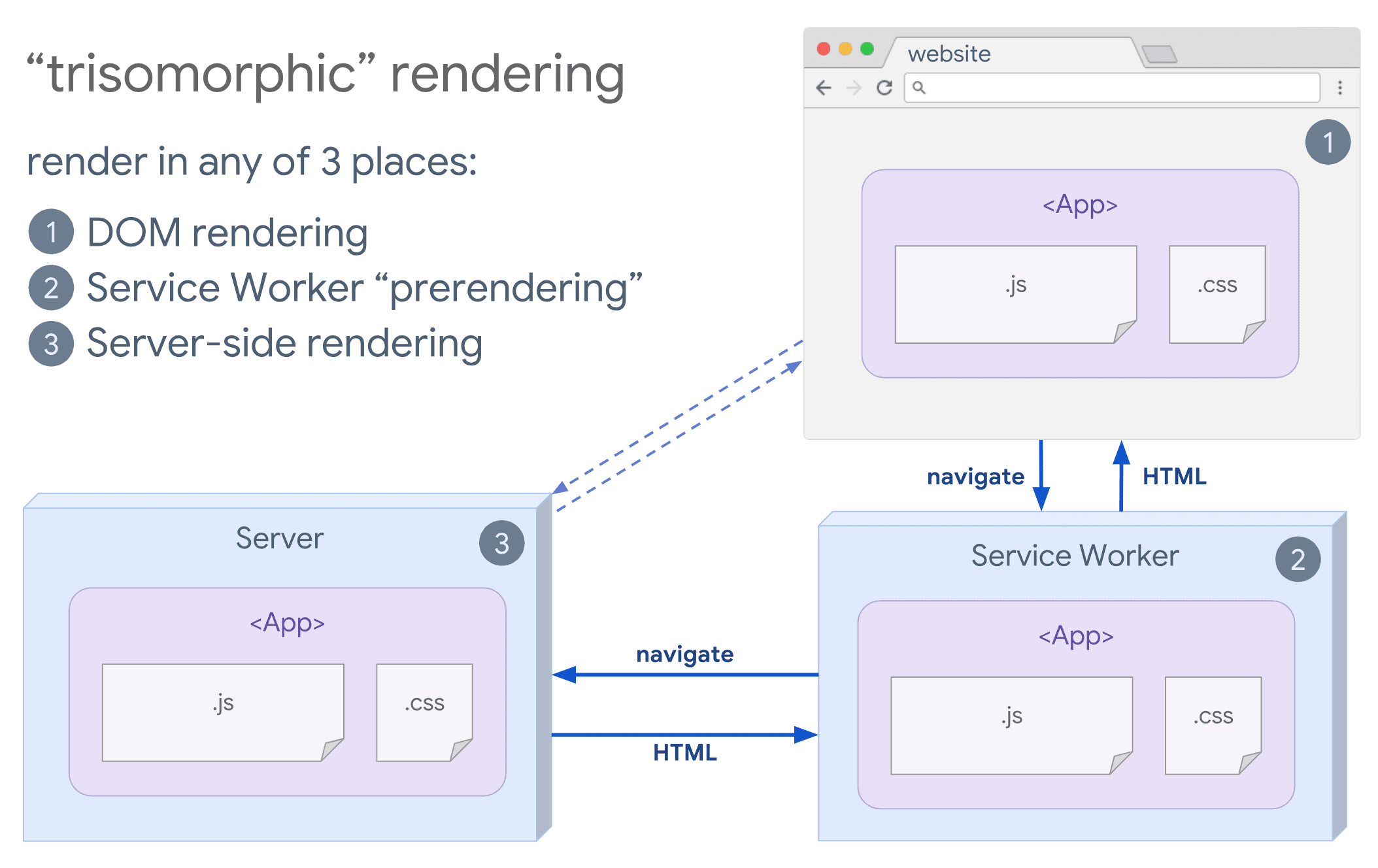 Trisomorphic rendering, demonstrating a browser and service worker communicating with the server.
## SEO considerations
When choosing a web rendering strategy, teams often consider the impact of SEO.
Server-side rendering is a popular choice for delivering a "complete looking"
experience that crawlers can interpret. Crawlers [can understand JavaScript](https://web.dev/articles/how-search-works.md.txt),
but there are often [limitations](https://developers.google.com/search/docs/guides/rendering)
to how they render. Client-side rendering can work, but often needs additional
testing and overhead. More recently,
[dynamic rendering](https://developers.google.com/search/docs/advanced/javascript/dynamic-rendering)
has also become an option worth considering if your architecture depends heavily
on client-side JavaScript.
## Conclusion
When deciding on an approach to rendering, measure and understand what your
bottlenecks are. Consider whether static rendering or server-side rendering can
get you most of the way there. It's fine to mostly ship HTML with minimal
JavaScript to get an experience interactive. Here's a handy infographic showing
the server-client spectrum:
 Rendering options and their tradeoffs.
## Credits
Thanks to everyone for their reviews and inspiration:
Jeffrey Posnick, Houssein Djirdeh, Shubhie Panicker,
Chris Harrelson, and Sebastian Markbåge.