Within a couple of months the leading UK news website managed to improve their
75th percentile CLS by 250% from 0.25 to 0.1.
 Chris Boakes [X](https://twitter.com/cboakes) [GitHub](https://github.com/chrisboakes) [LinkedIn](https://www.linkedin.com/in/chris-boakes)
> [!NOTE]
> **Note:** Chris is a principal software engineer at [The Telegraph](https://www.telegraph.co.uk/).
## The visual stability challenge
Layout shifts can be very disruptive. At Telegraph Media Group (TMG) visual stability
is particularly important because readers predominantly use our applications to
consume the news. If the layout shifts while reading an article, the reader will
likely lose their place. This can be a frustrating and distracting experience.
From an engineering perspective, ensuring the pages don't shift and interrupt
the reader can be challenging, especially when areas of your application are
loaded asynchronously and added to the page dynamically.
At TMG, we have multiple teams contributing code client-side:
- **Core engineering.** Implementing third-party solutions to power areas such as content recommendations and commenting.
- **Marketing.** Running A/B tests to assess how our readers interact with new features or changes.
- **Advertising.** Managing advert requests and advert pre-bidding.
- **Editorial.** Embedding code within articles such as tweets or videos, as well as custom widgets (for example, Coronavirus case tracker).
Ensuring each of these teams do not cause the layout of the page to jolt can be
difficult. Using the [Cumulative Layout Shift](https://web.dev/articles/cls.md.txt) metric to measure how
often it's occurring for our readers, the teams got more insight into the real
user experience and a clear goal to strive to. This resulted in our 75th
percentile CLS improving from 0.25 to 0.1 and our passing bucket growing from
57% to 72%.
250~%~
75th percentile CLS improvement
15~%~
More users with good CLS score
## Where we started
Using [CrUX dashboards](https://developer.chrome.com/blog/chrome-ux-report-looker-studio-dashboard) we were able
to establish that our pages were shifting more than we'd like.
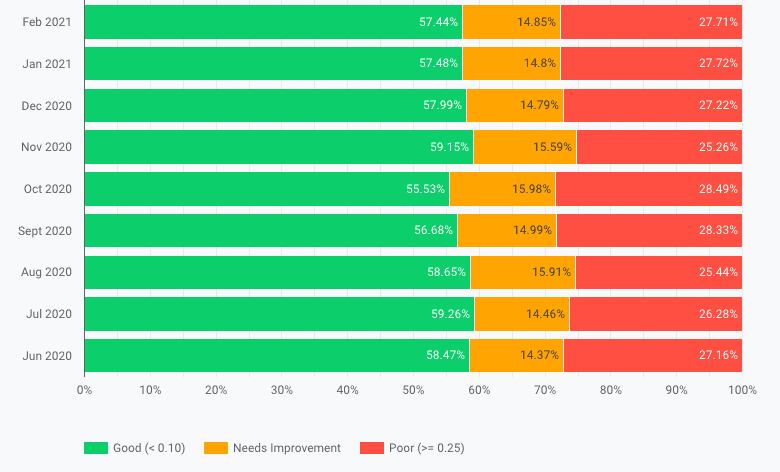 Our Cumulative Layout Shift scores between June 2020 and February 2021.
We ideally wanted at least 75% of our readers to have a "good" experience so we
started identifying the causes of the layout instability.
## How we measured the layout shifts
We used a combination of [Chrome
DevTools](https://developer.chrome.com/docs/devtools) and
[WebPageTest](https://www.webpagetest.org/) to help recognize what was causing
the layout to shift. In DevTools, we used the [Experience
section](https://developer.chrome.com/blog/new-in-devtools-84#cls) of the
[Performance](https://developer.chrome.com/docs/devtools/evaluate-performance)
tab to highlight individual instances of shifting layout and how they
contributed to the overall score.
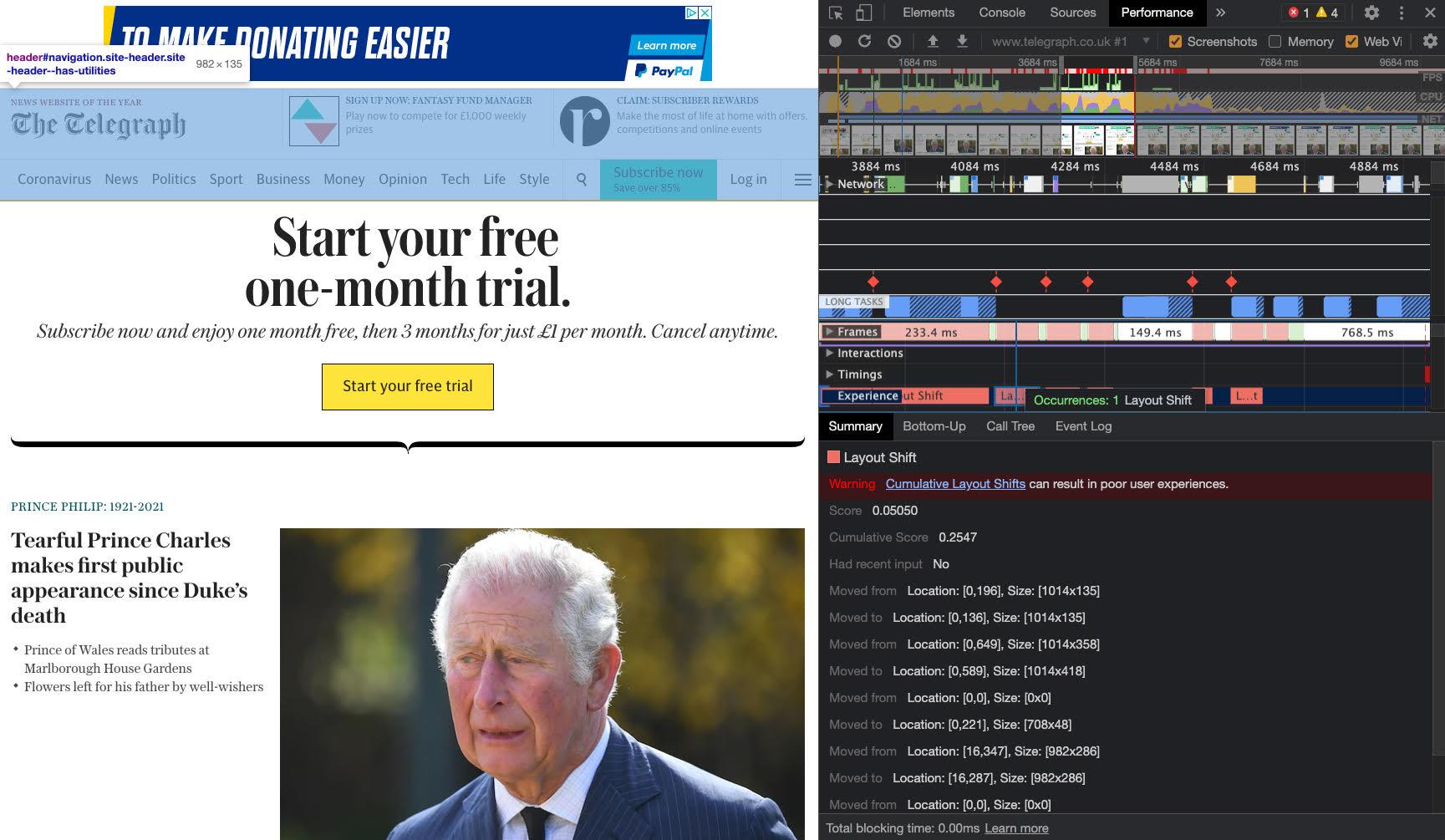 Identifying a layout shift caused by the advert loading client-side above the header using the Experience section of Chrome DevTools.
[WebPageTest](https://www.webpagetest.org/) helpfully highlights where the
layout shift occurs in the timeline view when "Highlight Layout Shifts" is
selected.
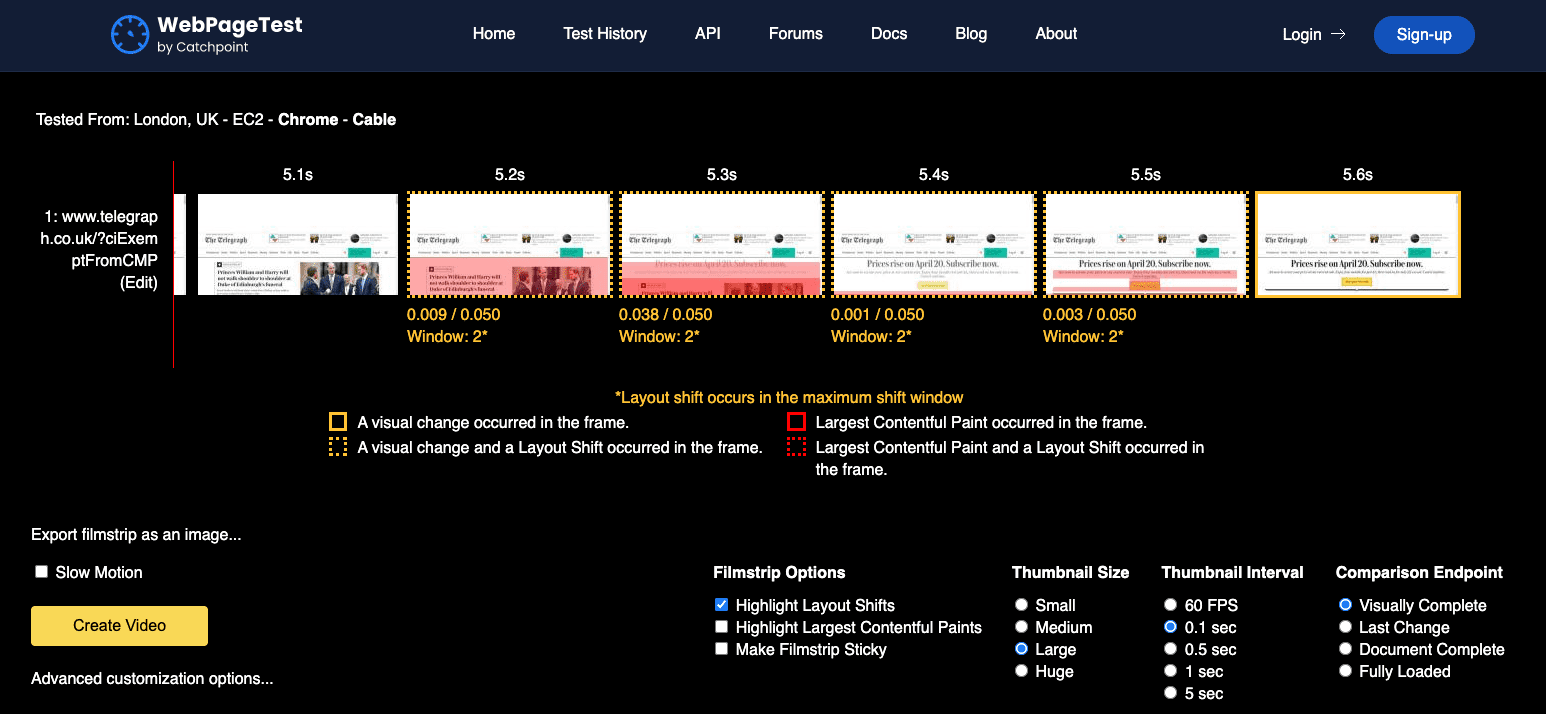 WebPageTest highlighting where the layout shifted.
After reviewing each shift across our most visited templates we came up with a
list of ideas as to how we could improve.
## Reducing layout shifts
We focused on four areas where we could reduce layout shifts:
- adverts
- images
- headers
- embeds
### Adverts
The adverts load after the initial paint via JavaScript. Some of the containers
they loaded in did not have any reserved height on them.
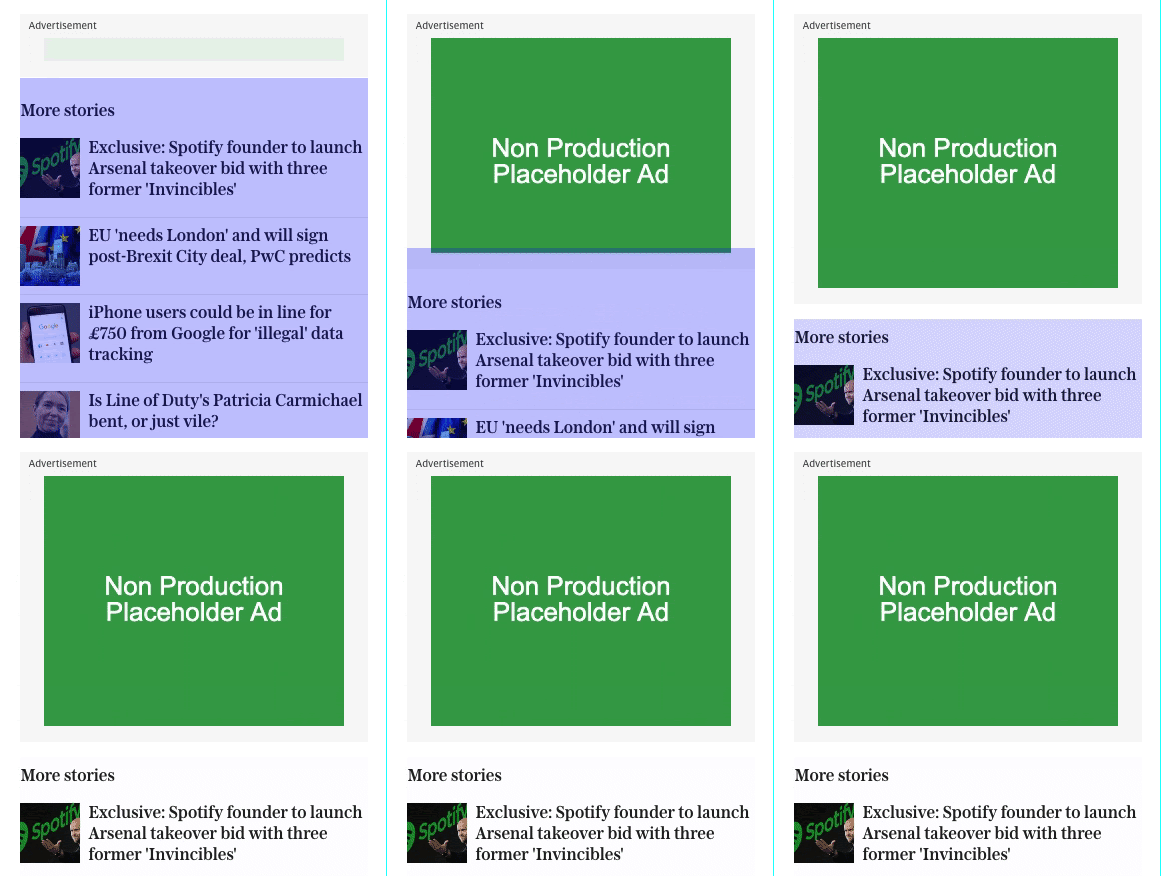 The "More stories" block below the advert is shifted down after the advert loads.
Although we don't know the exact height, we're able to reserve space by using
the most common advert size loaded in the slot.
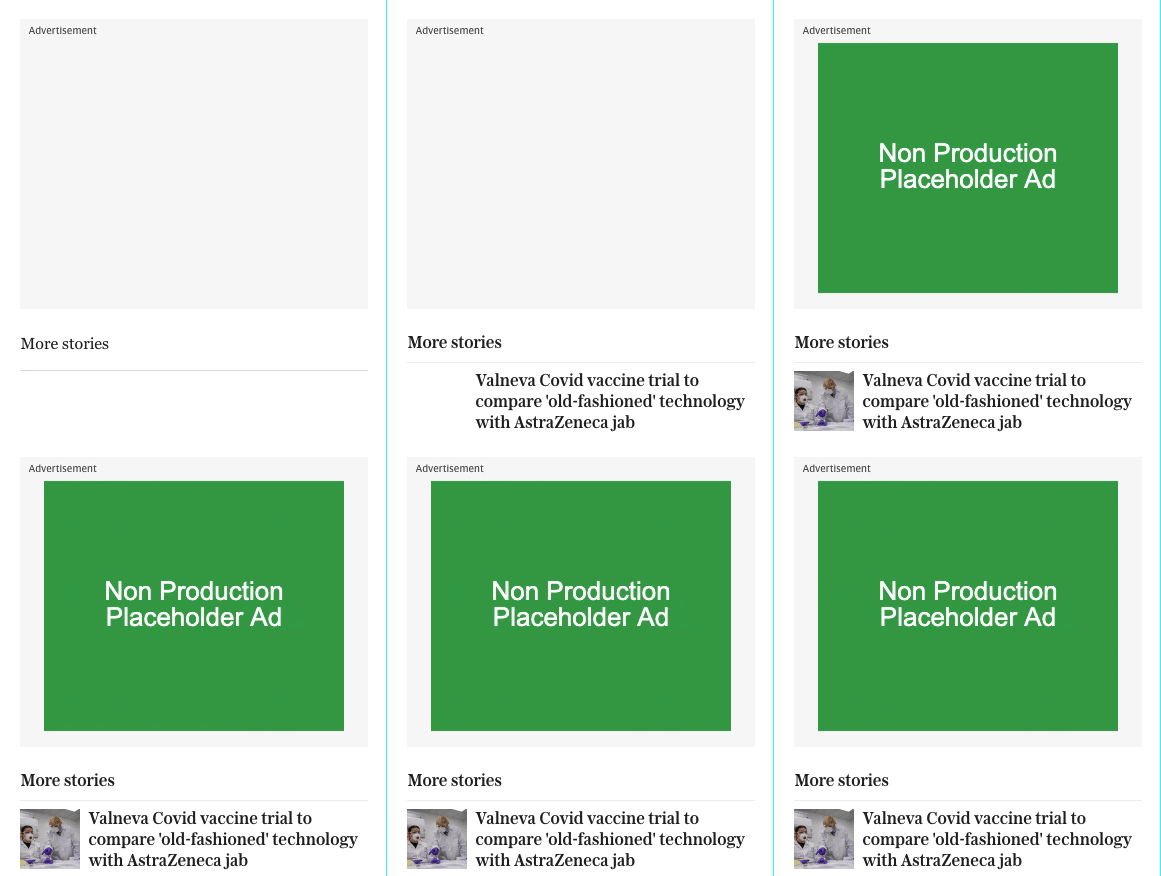 By reserving space for the advert, the "More stories" block below remains static before and after the advert loads.
We had misjudged the average height of the advert in some cases. For tablet
readers, the slot was collapsing.
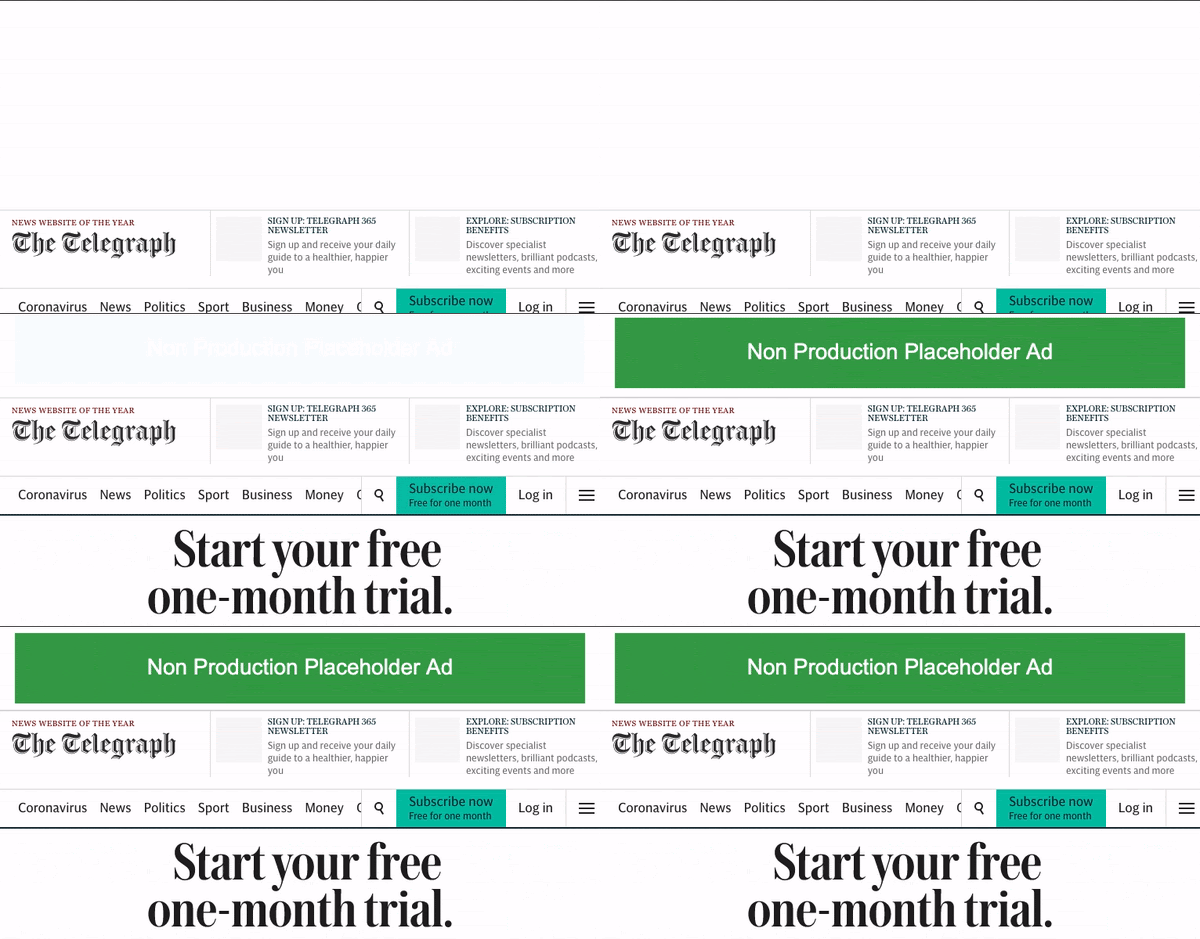 The advert slot collapsing after it loaded for readers on tablet sized devices.
We revisited the slot and adjusted the height to use the most common size.
 Ensuring the space we reserved for the advert slot matched the most commonly served height of the advert.
### Images
A lot of the images across the website are lazy loaded and have their space
reserved for them.
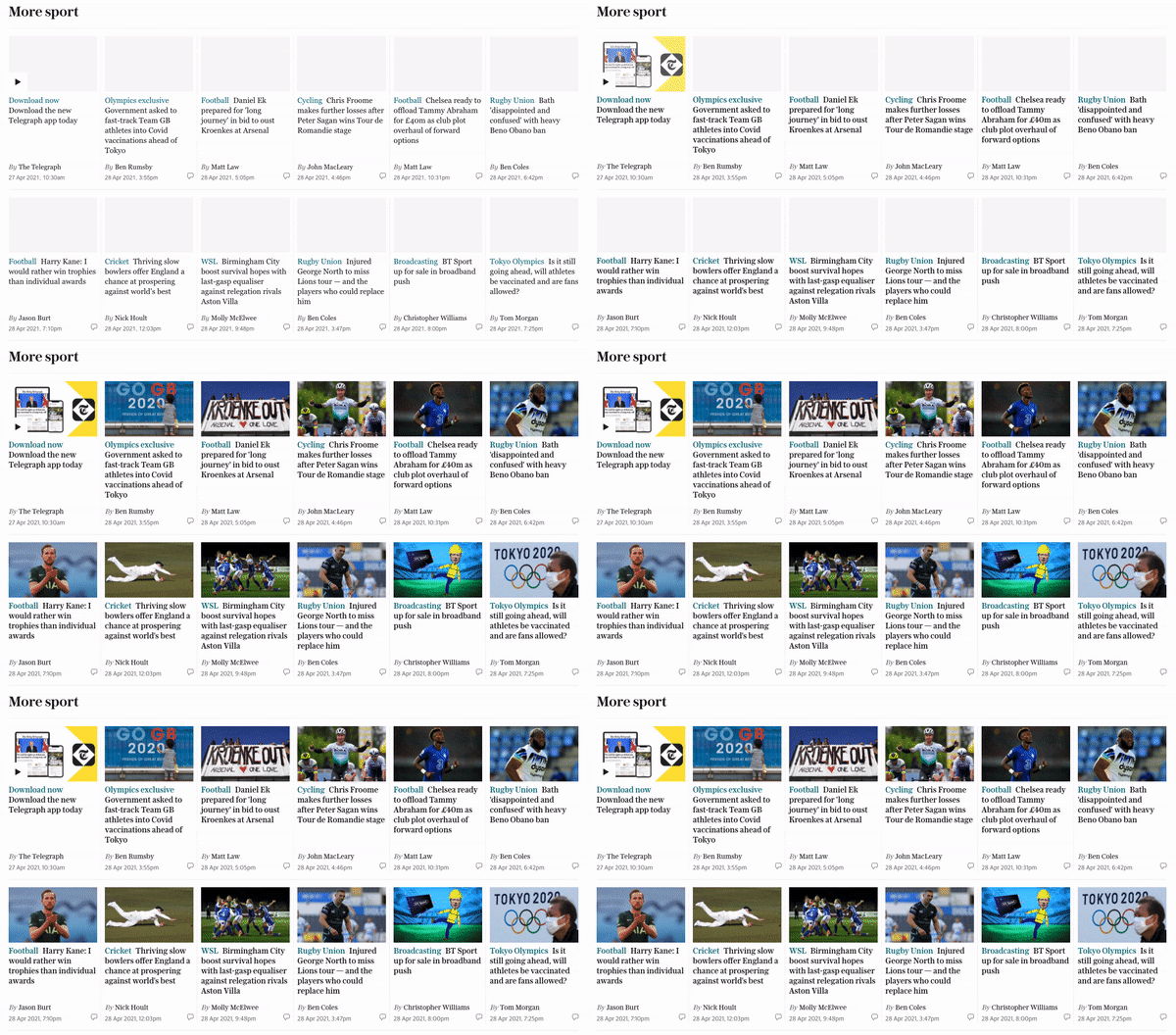 Lazy loading images without disrupting the layout.
However the inline images at the top of the articles did not have any space
reserved on the container, nor did they have width and height attributes
associated with the tags. This caused the layout to shift as they loaded in.
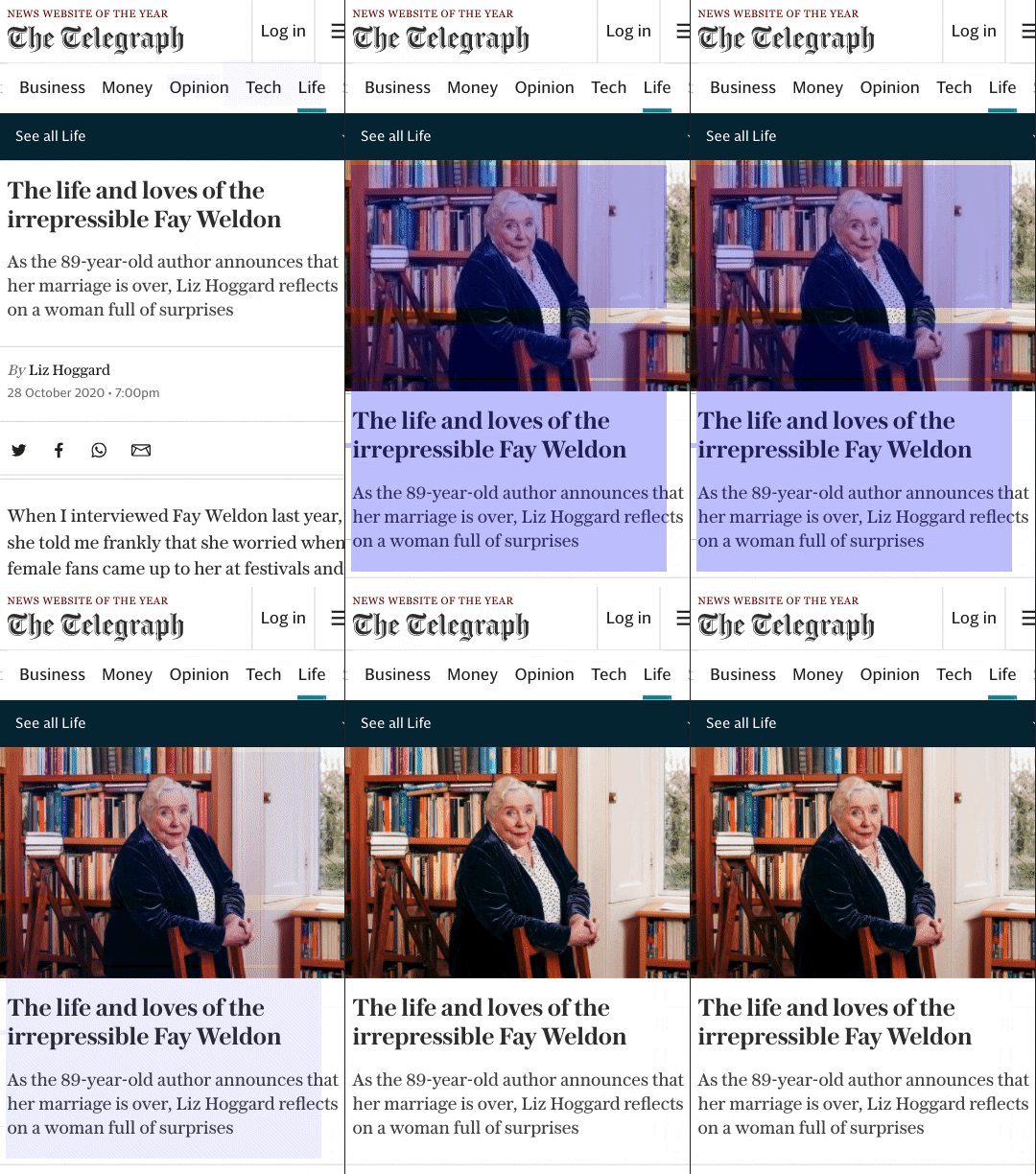 A layout shift caused by the article's main image.
Simply adding the width and height attributes to the images ensured the layout
did not shift.
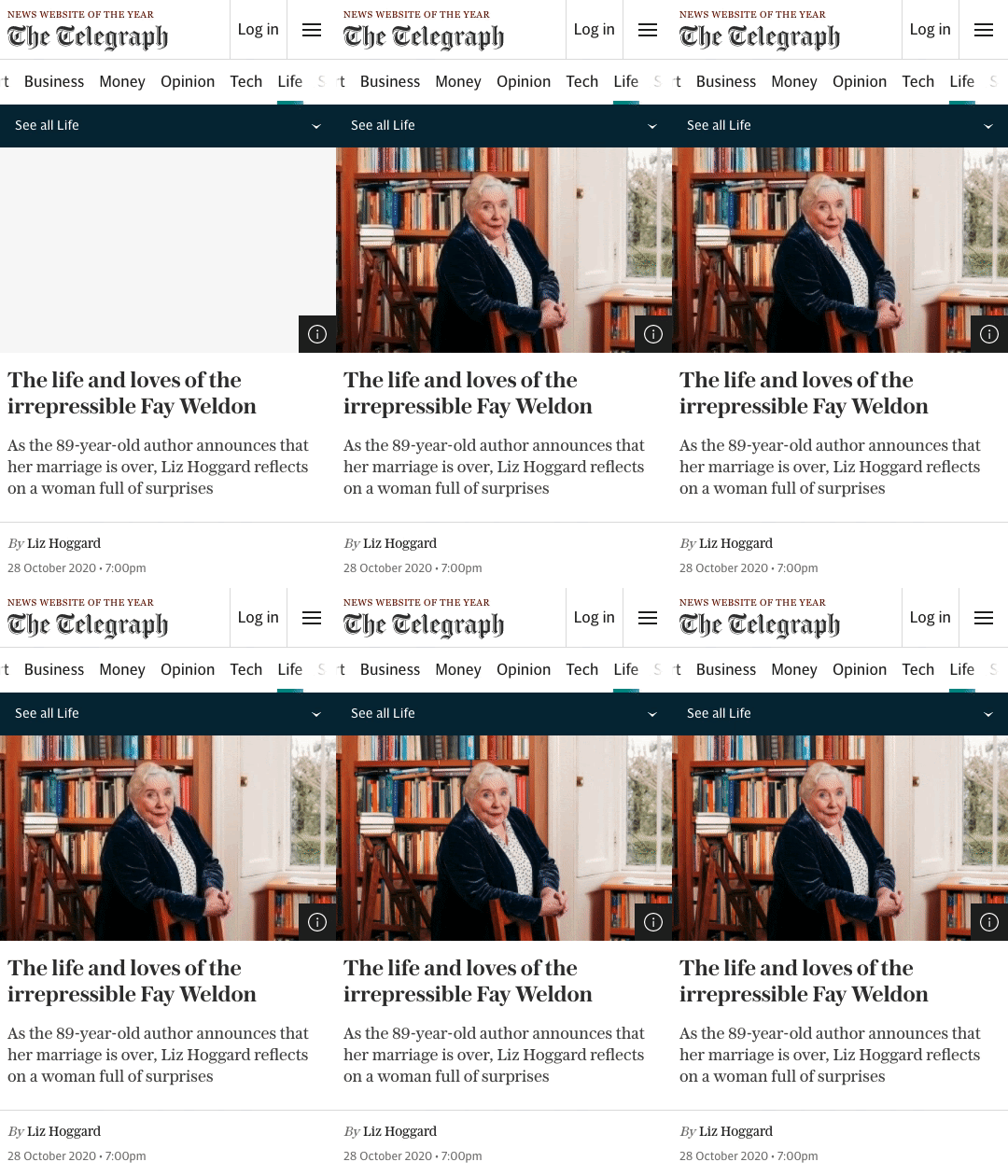 The main article image loading without causing the layout to shift.
### Header
The header was below the content in the markup and was positioned at the top
using CSS. The original idea was to prioritise the content loading before the
navigation however this caused the page to momentarily shift.
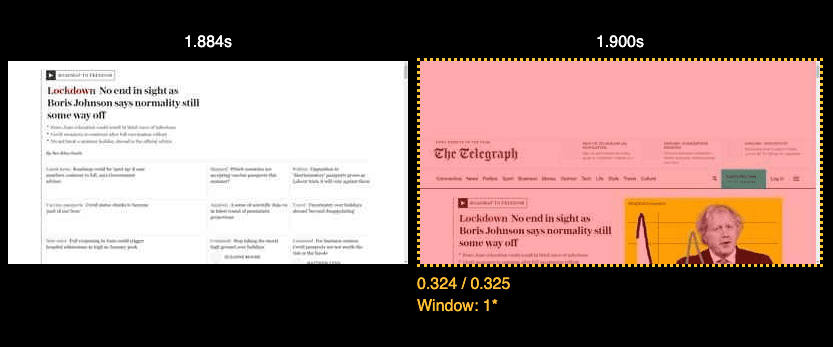 The header of the page loading inelegantly.
Moving the header to the top of the markup allowed the page to render without
this shift.
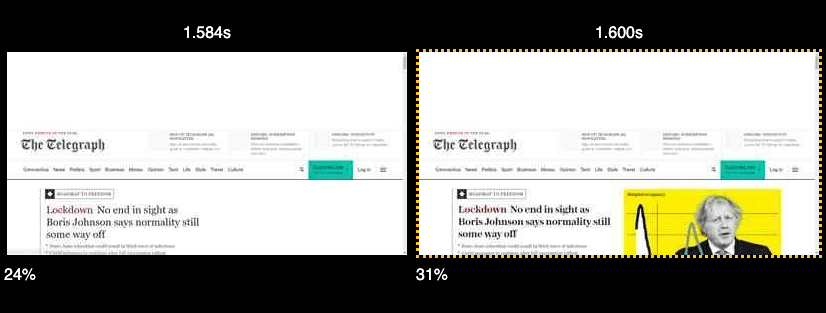 The layout is no longer disrupted by the header of the page loading.
### Embeds
Some of the frequently used embeds have a defined aspect ratio. For example,
YouTube videos. While the player is loading, we pull the thumbnail from YouTube
and use it as a placeholder while the video loads.
 The video player slot loading a low resolution thumbnail while the video player loads.
## Measuring the impact
We were able to measure the impact at a feature level quite easily using the
tooling mentioned towards the start of the article. However we wanted to measure
CLS both at a template level and at a site level. Synthetically, we used
[SpeedCurve](https://speedcurve.com/) to validate changes both in pre-production
and production.
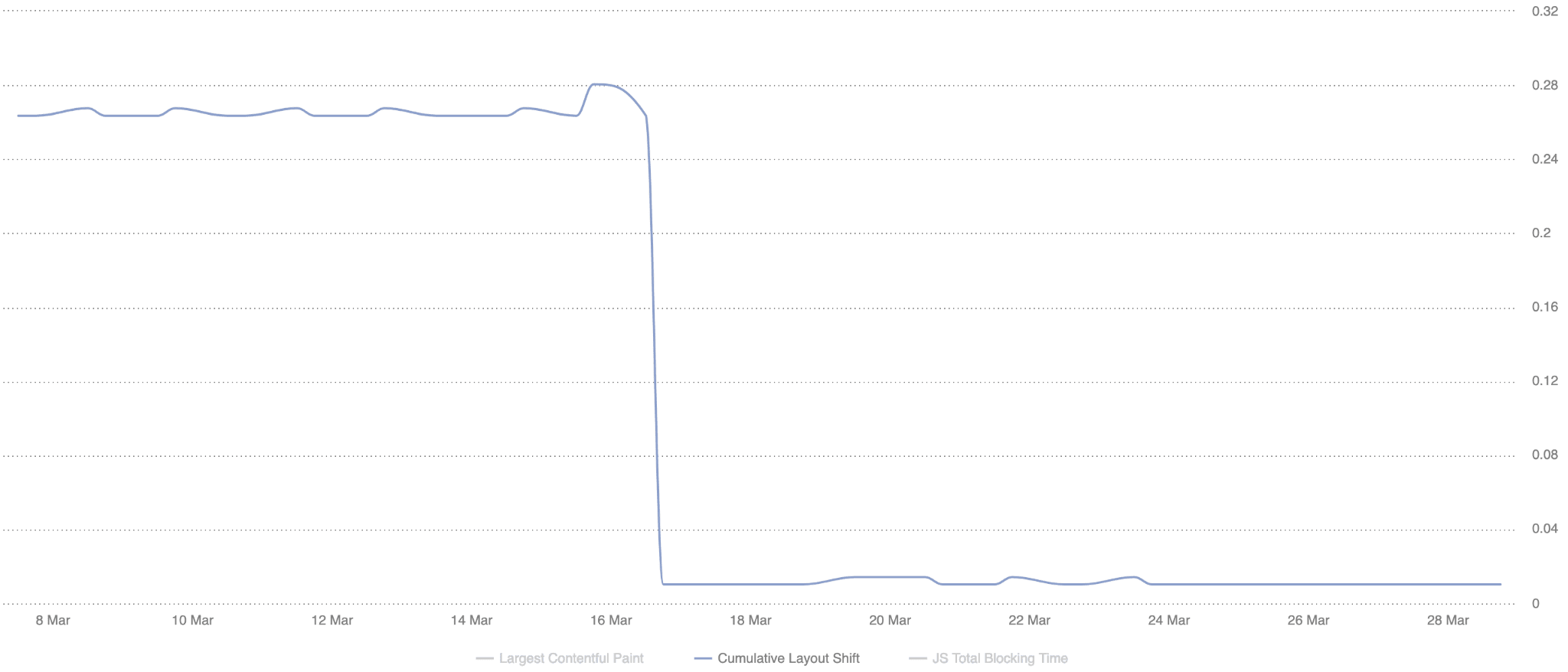 Tracking CLS progress synthetically using SpeedCurve.
We're able to then validate the results in our RUM data (provided by
[mPulse](https://www.akamai.com/uk/en/products/performance/mpulse-real-user-monitoring.jsp))
once the code reached production.
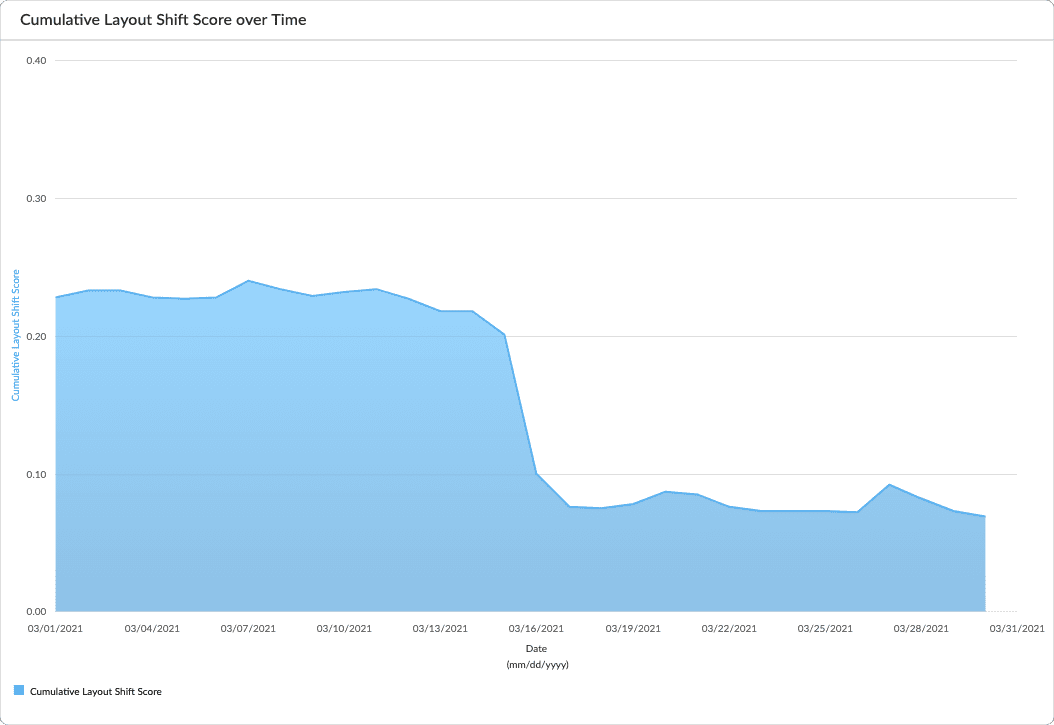 Validating site-wide CLS improvements with mPulse RUM data before and after making changes.
Checking the RUM data provides us with a good level of confidence that the
changes we're making are having a positive impact for our readers.
The final numbers we looked at are for the RUM data Google collects. This is
especially relevant now as they will soon [have an impact on page
ranking](https://developers.google.com/search/blog/2020/05/evaluating-page-experience#page-experience-ranking).
For starters we used the [Chrome UX Report](https://web.dev/articles/chrome-ux-report), both in the
monthly origin level data available through the [CrUX
dashboard](https://g.co/chromeuxdash), as well as by [querying
BigQuery](https://developer.chrome.com/blog/chrome-ux-report-bigquery) to retrieve historic p75 data. This way
we were easily able to see that for all of the traffic measured by CrUX, **our
75th percentile CLS improved by 250% from 0.25 to 0.1 and our passing bucket
grew from 57% to 72%**.
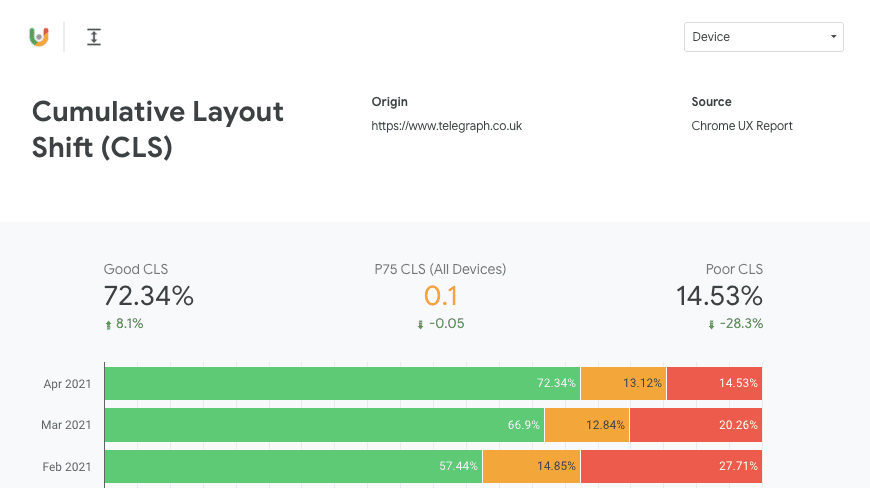 Results from the Crux Dashboard. 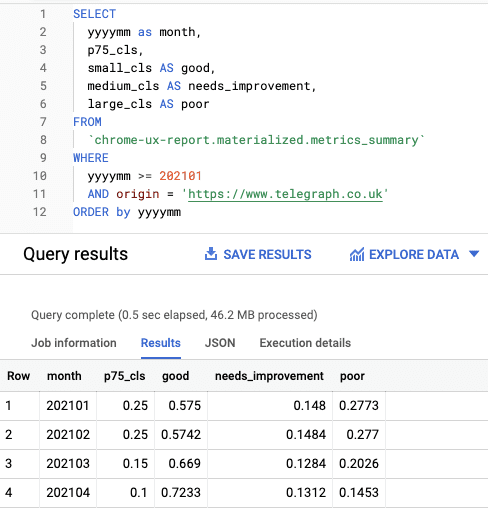 BigQuery run displaying the p75 values of 2021 to date.
In addition, we were able to make use of the [Chrome UX Report
API](https://developer.chrome.com/docs/crux/api)
and create some internal dashboards split into templates.
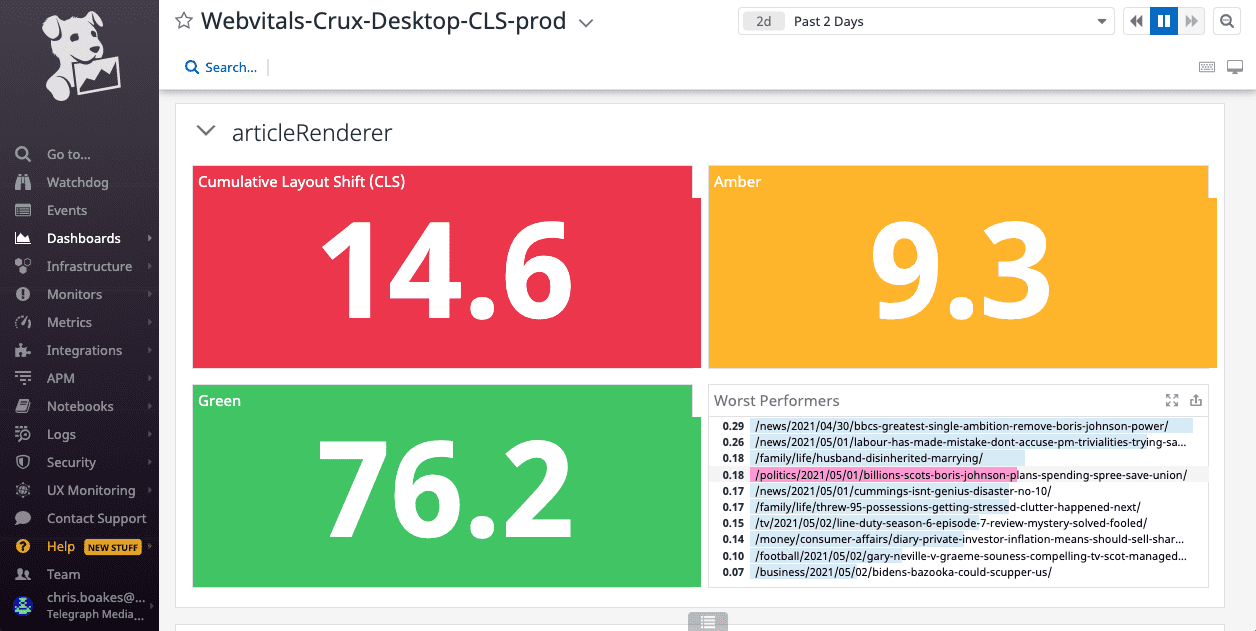 Internal dashboards making use of the Chrome UX Report API highlighting our average score and the worst performing pages using that template.
## Avoiding CLS regressions
An important aspect of making performance improvements is avoiding regressions.
We've set up some basic [performance budgets](https://web.dev/articles/performance-budgets-101.md.txt) for our
key metrics and included CLS in those.
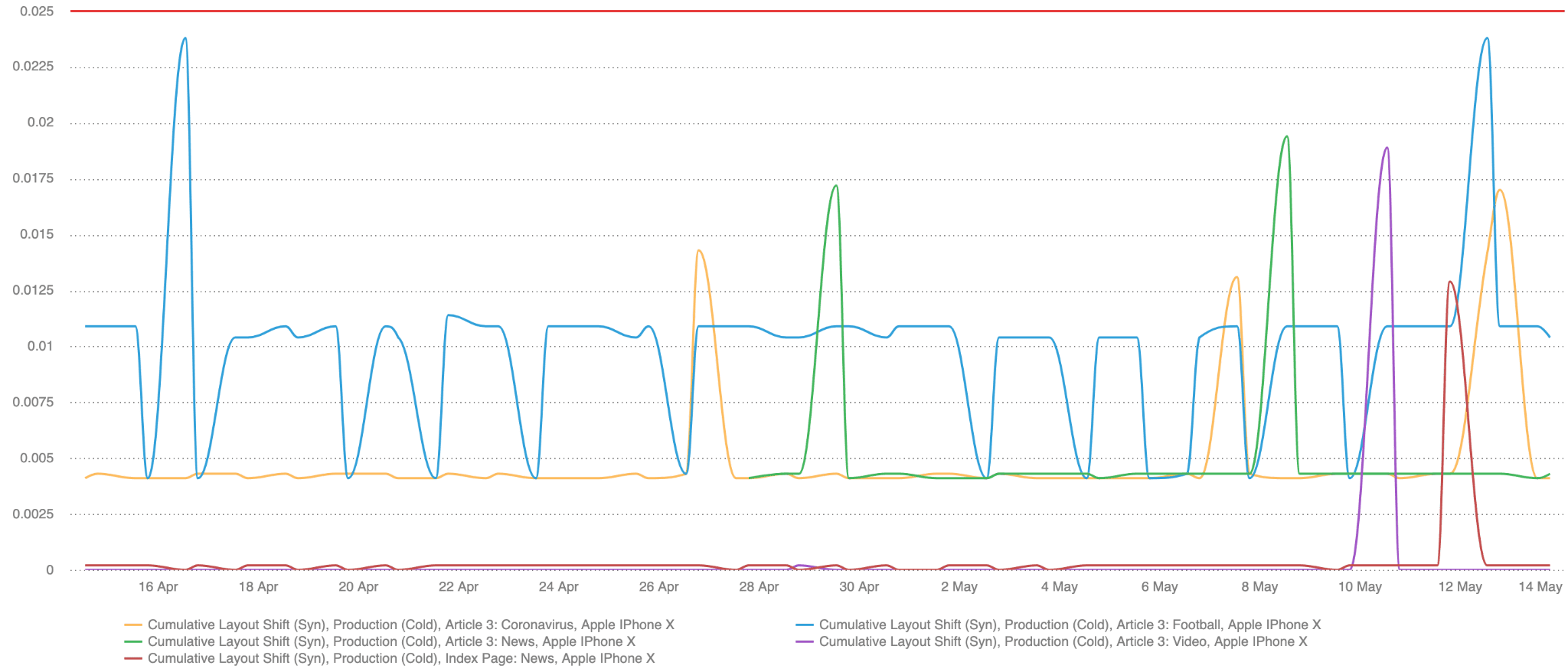 A performance budget dashboard which shows synthetic checks measuring CLS on some of our high traffic templates. The budget is currently set at 0.025.
If the test exceeds the budget it'll send a message to a Slack channel so we can
investigate the cause. We've also set up weekly reports, so that even if the
templates remain in budget we're aware of any changes that have had a negative
impact.
We're also planning to expand our budgets to use RUM data as well as synthetic
data, using mPulse to set both [static
alerts](https://learn.akamai.com/en-us/webhelp/mpulse/mpulse-help/GUID-CEE8FE75-2CD9-423A-BB3E-26EC9D8735A9.html)
and potentially [anomaly
detection](https://learn.akamai.com/en-us/webhelp/mpulse/mpulse-help/GUID-C6C446C4-E545-471F-A943-2CE6D885E60C.html)
which would make us aware of any changes that are out of the ordinary.
It's important for us to approach new features with CLS in mind. A lot of the
changes I've mentioned are those we've had to fix after they've been released to
our readers. Layout stability will be a consideration for the solution design of
any new feature going forward so that we can avoid any unexpected layout shifts
from the start.
## Conclusion
The improvements we've made so far were quite easy to implement and have had a
significant impact. A lot of changes I've outlined in this article didn't take
much time to deliver and they were applied to all of the most commonly used
templates which means they've had a widespread positive impact for our readers.
There are still areas of the site we need to improve. We're exploring ways we
might be able to do more of our client-side logic server-side which will improve
CLS even more. We will keep tracking and monitoring our metrics with an aim to
constantly improve them and provide our readers with the best user experience
possible.