


借助 Service Worker,我们为开发者提供了一种解决网络连接问题的方法。您可以控制缓存和请求的处理方式。 这意味着您可以创建自己的图案。我们先单独看看几种可能的模式,但在实践中,您可能会根据网址和上下文同时使用这些模式。
如需查看其中一些模式的实际演示,请参阅 Trained-to-thrill。
何时存储资源
' d='M96 183a64 64 0 0 1-23-23L17 64a128 128 0 0 0 111 192l55-96a64 64 0 0 1-87 23Z'/%3E%3Cpath fill='url(%23b)' d='M192 128a64 64 0 0 1-9 32l-55 96A128 128 0 0 0 239 64H128a64 64 0 0 1 64 64Z'/%3E%3Ccircle cx='128' cy='128' r='52' fill='%231a73e8'/%3E%3Cpath fill='url(%23c)' d='M96 73a64 64 0 0 1 32-9h111a128 128 0 0 0-222 0l56 96a64 64 0 0 1 23-87Z'/%3E%3C/svg%3E)
' xlink:href='%23A'%3E%3Cstop offset='.76' stop-opacity='0'/%3E%3Cstop offset='.95' stop-opacity='.5'/%3E%3Cstop offset='1'/%3E%3C/radialGradient%3E%3CradialGradient id='F' cx='2523' cy='4680' r='20243' gradientTransform='matrix(-.03715 .99931 -2.12836 -.07913 13579 3530)' xlink:href='%23A'%3E%3Cstop offset='0' stop-color='%2335c1f1'/%3E%3Cstop offset='.11' stop-color='%2334c1ed'/%3E%3Cstop offset='.23' stop-color='%232fc2df'/%3E%3Cstop offset='.31' stop-color='%232bc3d2'/%3E%3Cstop offset='.67' stop-color='%2336c752'/%3E%3C/radialGradient%3E%3CradialGradient id='G' cx='24247' cy='7758' r='9734' gradientTransform='matrix(.28109 .95968 -.78353 .22949 24510 -16292)' xlink:href='%23A'%3E%3Cstop offset='0' stop-color='%2366eb6e'/%3E%3Cstop offset='1' stop-color='%2366eb6e' stop-opacity='0'/%3E%3C/radialGradient%3E%3Cpath id='H' d='M24105 20053a9345 9345 0 01-1053 472 10202 10202 0 01-3590 646c-4732 0-8855-3255-8855-7432 0-1175 680-2193 1643-2729-4280 180-5380 4640-5380 7253 0 7387 6810 8137 8276 8137 791 0 1984-230 2704-456l130-44a12834 12834 0 006660-5282c220-350-168-757-535-565z'/%3E%3Cpath id='I' d='M11571 25141a7913 7913 0 01-2273-2137 8145 8145 0 01-1514-4740 8093 8093 0 013093-6395 8082 8082 0 011373-859c312-148 846-414 1554-404a3236 3236 0 012569 1297 3184 3184 0 01636 1866c0-21 2446-7960-8005-7960-4390 0-8004 4166-8004 7820 0 2319 538 4170 1212 5604a12833 12833 0 007684 6757 12795 12795 0 003908 610c1414 0 2774-233 4045-656a7575 7575 0 01-6278-803z'/%3E%3Cpath id='J' d='M16231 15886c-80 105-330 250-330 566 0 260 170 512 472 723 1438 1003 4149 868 4156 868a5954 5954 0 003027-839 6147 6147 0 001133-850 6180 6180 0 001910-4437c26-2242-796-3732-1133-4392-2120-4141-6694-6525-11668-6525-7011 0-12703 5635-12798 12620 47-3654 3679-6605 7996-6605 350 0 2346 34 4200 1007 1634 858 2490 1894 3086 2921 618 1067 728 2415 728 2952s-271 1333-780 1990z'/%3E%3Cuse fill='url(%23B)' xlink:href='%23H'/%3E%3Cuse fill='url(%23D)' opacity='.35' xlink:href='%23H'/%3E%3Cuse fill='url(%23C)' xlink:href='%23I'/%3E%3Cuse fill='url(%23E)' opacity='.4' xlink:href='%23I'/%3E%3Cuse fill='url(%23F)' xlink:href='%23J'/%3E%3Cuse fill='url(%23G)' xlink:href='%23J'/%3E%3C/svg%3E)
' gradientUnits='userSpaceOnUse'%3E%3Cstop offset='.2' stop-color='%239059ff' stop-opacity='0'/%3E%3Cstop offset='.3' stop-color='%238c4ff3' stop-opacity='.1'/%3E%3Cstop offset='.8' stop-color='%237716a8' stop-opacity='.5'/%3E%3Cstop offset='1' stop-color='%236e008b' stop-opacity='.6'/%3E%3C/radialGradient%3E%3CradialGradient id='ff-g' cx='239.1' cy='34.6' r='171.6' gradientUnits='userSpaceOnUse'%3E%3Cstop offset='0' stop-color='%23ffe226'/%3E%3Cstop offset='.1' stop-color='%23ffdb27'/%3E%3Cstop offset='.3' stop-color='%23ffc82a'/%3E%3Cstop offset='.5' stop-color='%23ffa930'/%3E%3Cstop offset='.7' stop-color='%23ff7e37'/%3E%3Cstop offset='.8' stop-color='%23ff7139'/%3E%3C/radialGradient%3E%3CradialGradient id='ff-h' cx='374' cy='-74.3' r='732.2' gradientUnits='userSpaceOnUse'%3E%3Cstop offset='.1' stop-color='%23fff44f'/%3E%3Cstop offset='.5' stop-color='%23ff980e'/%3E%3Cstop offset='.6' stop-color='%23ff5634'/%3E%3Cstop offset='.7' stop-color='%23ff3647'/%3E%3Cstop offset='.9' stop-color='%23e31587'/%3E%3C/radialGradient%3E%3CradialGradient id='ff-i' cx='304.6' cy='7.1' r='536.4' gradientTransform='rotate(84 303 4)' gradientUnits='userSpaceOnUse'%3E%3Cstop offset='0' stop-color='%23fff44f'/%3E%3Cstop offset='.1' stop-color='%23ffe847'/%3E%3Cstop offset='.2' stop-color='%23ffc830'/%3E%3Cstop offset='.3' stop-color='%23ff980e'/%3E%3Cstop offset='.4' stop-color='%23ff8b16'/%3E%3Cstop offset='.5' stop-color='%23ff672a'/%3E%3Cstop offset='.6' stop-color='%23ff3647'/%3E%3Cstop offset='.7' stop-color='%23e31587'/%3E%3C/radialGradient%3E%3CradialGradient id='ff-j' cx='235' cy='98.1' r='457.1' gradientUnits='userSpaceOnUse'%3E%3Cstop offset='.1' stop-color='%23fff44f'/%3E%3Cstop offset='.5' stop-color='%23ff980e'/%3E%3Cstop offset='.6' stop-color='%23ff5634'/%3E%3Cstop offset='.7' stop-color='%23ff3647'/%3E%3Cstop offset='.9' stop-color='%23e31587'/%3E%3C/radialGradient%3E%3CradialGradient id='ff-k' cx='355.7' cy='124.9' r='500.3' gradientUnits='userSpaceOnUse'%3E%3Cstop offset='.1' stop-color='%23fff44f'/%3E%3Cstop offset='.2' stop-color='%23ffe141'/%3E%3Cstop offset='.5' stop-color='%23ffaf1e'/%3E%3Cstop offset='.6' stop-color='%23ff980e'/%3E%3C/radialGradient%3E%3ClinearGradient id='ff-a' x1='446.9' y1='76.8' x2='47.9' y2='461.8' gradientUnits='userSpaceOnUse'%3E%3Cstop offset='.1' stop-color='%23fff44f'/%3E%3Cstop offset='.1' stop-color='%23ffe847'/%3E%3Cstop offset='.2' stop-color='%23ffc830'/%3E%3Cstop offset='.4' stop-color='%23ff980e'/%3E%3Cstop offset='.4' stop-color='%23ff8b16'/%3E%3Cstop offset='.5' stop-color='%23ff672a'/%3E%3Cstop offset='.5' stop-color='%23ff3647'/%3E%3Cstop offset='.7' stop-color='%23e31587'/%3E%3C/linearGradient%3E%3ClinearGradient id='ff-l' x1='442.1' y1='74.8' x2='102.6' y2='414.3' gradientUnits='userSpaceOnUse'%3E%3Cstop offset='.2' stop-color='%23fff44f' stop-opacity='.8'/%3E%3Cstop offset='.3' stop-color='%23fff44f' stop-opacity='.6'/%3E%3Cstop offset='.5' stop-color='%23fff44f' stop-opacity='.2'/%3E%3Cstop offset='.6' stop-color='%23fff44f' stop-opacity='0'/%3E%3C/linearGradient%3E%3C/defs%3E%3Cpath d='M479 166c-11-25-32-52-49-60a249 249 0 0 1 25 73c-27-68-73-95-111-155a255 255 0 0 1-8-14 44 44 0 0 1-4-9 1 1 0 0 0 0-1 1 1 0 0 0-1 0c-60 35-81 101-83 134a120 120 0 0 0-66 25 71 71 0 0 0-6-5 111 111 0 0 1-1-58c-25 11-44 29-58 44-9-12-9-52-8-60l-8 4a175 175 0 0 0-24 21 210 210 0 0 0-22 26 203 203 0 0 0-32 73l-1 2-2 15a229 229 0 0 0-4 34v1a240 240 0 0 0 477 40l1-9c5-41 0-84-15-121zM202 355l3 1-3-1zm55-145zm198-31z' fill='url(%23ff-a)'/%3E%3Cpath d='M479 166c-11-25-32-52-49-60 14 26 22 53 25 72v1a207 207 0 0 1-206 279c-113-3-212-87-231-197-3-17 0-26 2-40-2 11-3 14-4 34v1a240 240 0 0 0 477 40l1-9c5-41 0-84-15-121z' fill='url(%23ff-b)'/%3E%3Cpath d='M479 166c-11-25-32-52-49-60 14 26 22 53 25 72v1a207 207 0 0 1-206 279c-113-3-212-87-231-197-3-17 0-26 2-40-2 11-3 14-4 34v1a240 240 0 0 0 477 40l1-9c5-41 0-84-15-121z' fill='url(%23ff-c)'/%3E%3Cpath d='m362 195 1 1a130 130 0 0 0-22-29C266 92 322 5 331 0c-60 35-81 101-83 134l9-1c45 0 84 25 105 62z' fill='url(%23ff-d)'/%3E%3Cpath d='M257 210c-1 6-22 26-29 26-68 0-80 41-80 41 3 35 28 64 57 79l4 2 7 3a107 107 0 0 0 31 6c120 6 143-143 57-186 22-4 45 5 58 14-21-37-60-62-105-62l-9 1a120 120 0 0 0-66 25l17 16c16 16 58 33 58 35z' fill='url(%23ff-e)'/%3E%3Cpath d='M257 210c-1 6-22 26-29 26-68 0-80 41-80 41 3 35 28 64 57 79l4 2 7 3a107 107 0 0 0 31 6c120 6 143-143 57-186 22-4 45 5 58 14-21-37-60-62-105-62l-9 1a120 120 0 0 0-66 25l17 16c16 16 58 33 58 35z' fill='url(%23ff-f)'/%3E%3Cpath d='m171 151 5 3a111 111 0 0 1-1-58c-25 11-44 29-58 44 1 0 36 0 54 11z' fill='url(%23ff-g)'/%3E%3Cpath d='M18 261a242 242 0 0 0 231 197 207 207 0 0 0 206-279c8 56-20 110-64 146-86 71-169 43-186 31l-3-1c-50-24-71-70-67-110-42 0-57-35-57-35s38-28 89-4c46 22 90 4 90 4 0-2-42-19-58-35l-17-16a71 71 0 0 0-6-5l-5-3c-18-11-52-11-54-11-9-12-9-51-8-60l-8 4a175 175 0 0 0-24 21 210 210 0 0 0-22 26 203 203 0 0 0-32 73c0 1-9 38-5 57z' fill='url(%23ff-h)'/%3E%3Cpath d='M341 167a130 130 0 0 1 22 29 46 46 0 0 1 4 3c55 50 26 121 24 126 44-36 72-90 64-146-27-68-73-95-111-155a255 255 0 0 1-8-14 44 44 0 0 1-4-9 1 1 0 0 0 0-1 1 1 0 0 0-1 0c-9 5-65 92 10 167z' fill='url(%23ff-i)'/%3E%3Cpath d='M367 199a46 46 0 0 0-4-3l-1-1c-13-9-36-18-58-15 86 44 63 193-57 187a107 107 0 0 1-31-6 131 131 0 0 1-11-5c17 12 99 39 186-31 2-5 31-76-24-126z' fill='url(%23ff-j)'/%3E%3Cpath d='M148 277s12-41 80-41c7 0 28-20 29-26s-44 18-90-4c-51-24-89 4-89 4s15 35 57 35c-4 40 16 85 67 110l3 1c-29-15-54-44-57-79z' fill='url(%23ff-k)'/%3E%3Cpath d='M479 166c-11-25-32-52-49-60a249 249 0 0 1 25 73c-27-68-73-95-111-155a255 255 0 0 1-8-14 44 44 0 0 1-4-9 1 1 0 0 0 0-1 1 1 0 0 0-1 0c-60 35-81 101-83 134l9-1c45 0 84 25 105 62-13-9-36-18-58-14 86 43 63 192-57 186a107 107 0 0 1-31-6 131 131 0 0 1-11-5l-3-1 3 1c-29-15-54-44-57-79 0 0 12-41 80-41 7 0 28-20 29-26 0-2-42-19-58-35l-17-16a71 71 0 0 0-6-5 111 111 0 0 1-1-58c-25 11-44 29-58 44-9-12-9-52-8-60l-8 4a175 175 0 0 0-24 21 210 210 0 0 0-22 26 203 203 0 0 0-32 73l-1 2-2 15a279 279 0 0 0-4 34v1a240 240 0 0 0 477 40l1-9c5-41 0-84-15-121zm-24 13z' fill='url(%23ff-l)'/%3E%3C/svg%3E)
' xlink:href='%23s-b'%3E%3Cstop offset='0' stop-color='%2324a5f3' stop-opacity='0' /%3E%3Cstop offset='1' stop-color='%231e8ceb' /%3E%3C/radialGradient%3E%3CradialGradient id='s-j' cx='109.3' cy='13.8' r='93.1' gradientTransform='matrix(-.02 1.1 -1.04 -.02 137 -115)' xlink:href='%23s-b'%3E%3Cstop offset='0' stop-opacity='0' /%3E%3Cstop offset='1' stop-color='%235488d6' stop-opacity='0' /%3E%3Cstop offset='1' stop-color='%235d96eb' /%3E%3C/radialGradient%3E%3C/defs%3E%3Crect width='220' height='220' x='22' y='-107' fill='url(%23s-a)' ry='49' transform='matrix(.57 0 0 .57 187 256)' /%3E%3Cg transform='translate(194 190)'%3E%3Ccircle cx='67.8' cy='67.7' fill='url(%23s-c)' paint-order='stroke fill markers' r='54' /%3E%3Ccircle cx='-69.9' cy='69.3' fill='url(%23s-i)' transform='translate(138 -2)' r='54' /%3E%3C/g%3E%3Cellipse cx='120' cy='14.2' fill='url(%23s-j)' rx='93.1' ry='93.7' transform='matrix(.58 0 0 .58 192 250)' /%3E%3Cg transform='matrix(.58 0 0 .57 197 182)'%3E%3Cpath fill='%23cac7c8' d='M46 192h1l72-48-7-9-66 57Z' /%3E%3Cpath fill='%23fbfffc' d='M46 191v1l66-57-7-9-59 65Z' /%3E%3Cpath fill='url(%23s-d)' d='m119 144-7-9 66-57-59 66Z' /%3E%3Cpath fill='%23fb645c' d='m105 126 7 9 66-57-1-1-72 49Z' /%3E%3C/g%3E%3Cpath stroke='%23fff' stroke-linecap='round' stroke-miterlimit='1' stroke-width='1.3' d='m287 278 3-2m-12-17 8-2m-8-3h4m-4-13 8 2m-8 3h4m-1-13 7 3m-4-11 7 4m-2-11 6 6m0-12 6 7m1-11 4 6m4-10 3 7m5-9 2 7m15-7-1 7m10-5-3 7m11-4-4 7m11-2-5 6m16 7-7 4m10 4-7 3m10 6-8 1m8 16-8-2m5 10-7-3m4 11-7-4m2 11-6-5m0 11-5-6m-2 11-4-7m-4 11-3-8m-6 10-1-8m-16 8 2-8m-10 5 3-7m-11 4 4-7m-11 2 5-6m-8 3 3-3m4 8 2-3m5 8 2-4m6 7 1-4m8 5v-4m8 4v-4m9 3-1-4m9 1-2-4m9 0-2-4m9-2-3-3m8-4-3-2m8-5-4-2m7-6-4-1m5-8h-4m4-8h-4m3-9-4 1m1-9-4 2m-1-9-3 2m-2-9-3 3m-4-8-2 3m-5-8-2 4m-6-6-1 3m-8-5v4m-8-4v4m-9-2 1 3m-9 0 2 3m-9 1 2 3m-9 2 3 3m-8 4 3 2m-8 5 4 2m-7 6 4 1m-4 25 4-1m-2 5 7-3m-6 7 4-2m-2 6 7-4m-13-21h8m41-41v-8m0 99v-8m49-42h-8' transform='translate(-65 8)' /%3E%3C/svg%3E)
借助 Service Worker,您可以独立于缓存来处理请求,因此我将单独演示它们。首先,确定何时应使用缓存。
在安装时作为依赖项
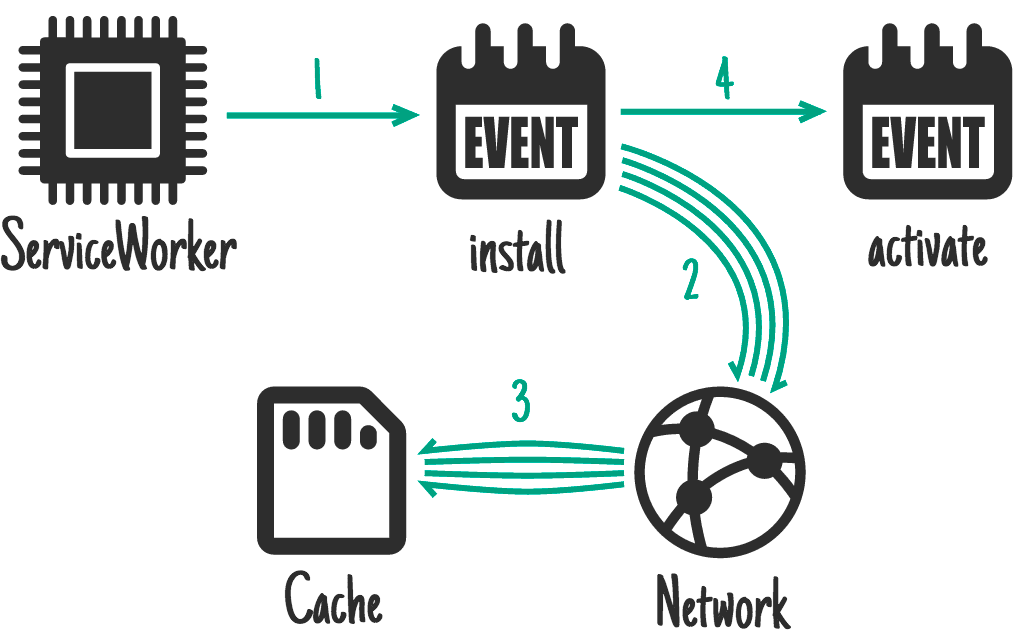
Service Worker API 会为您提供 install 事件。您可以使用此方法来准备必须在处理其他事件之前准备好的内容。在 install 期间,Service Worker 的先前版本会继续运行并提供网页。您此时执行的任何操作都不应中断现有的服务工作线程。
非常适合:CSS、图片、字体、JS、模板,或您认为该版本网站上的任何其他静态内容。
获取如果未能获取到就会导致网站完全无法正常运行的内容,等效的特定于平台的应用会将这些内容作为初始下载的一部分。
self.addEventListener('install', function (event) {
  event.waitUntil(
    caches.open('mysite-static-v3').then(function (cache) {
      return cache.addAll([
        '/css/whatever-v3.css',
        '/css/imgs/sprites-v6.png',
        '/css/fonts/whatever-v8.woff',
        '/js/all-min-v4.js',
        // etc.
      ]);
    }),
  );
});
event.waitUntil 接受一个 promise 来定义安装的长度和成功与否。如果 Promise 被拒绝,则安装会被视为失败,并且此 Service Worker 会被舍弃(如果较旧的版本正在运行,则会保持不变)。caches.open() 和 cache.addAll() 会返回 promise。
如果任何资源未能成功提取,cache.addAll() 调用会拒绝。
在 trained-to-thrill 上,我使用此功能来缓存静态资源。
在安装时,而不是作为依赖项

这类似于作为依赖项进行安装,但不会延迟安装完成,也不会在缓存失败时导致安装失败。
理想用途:不需要立即使用的较大资源,例如游戏后期关卡的素材资源。
self.addEventListener('install', function (event) {
  event.waitUntil(
    caches.open('mygame-core-v1').then(function (cache) {
      cache
        .addAll
        // levels 11-20
        ();
      return cache
        .addAll
        // core assets and levels 1-10
        ();
    }),
  );
});
此示例不会将 11-20 级的 cache.addAll promise 传递回 event.waitUntil,因此即使失败,游戏仍可离线使用。当然,您必须考虑这些级别可能不存在的情况,并在这些级别缺失时重新尝试缓存它们。
由于服务工作线程已完成事件处理,因此在下载 11-20 级时可能会被终止,这意味着这些级别不会被缓存。Web Periodic Background Synchronization API 可以处理此类情况,以及电影等较大的下载内容。
启用时

非常适合:清理和迁移。
新的 Service Worker 安装完毕且不再使用之前的版本后,新的 Service Worker 会激活,并触发 activate 事件。由于之前的版本已不再使用,因此现在是处理 IndexedDB 中的架构迁移以及删除未使用的缓存的好时机。
self.addEventListener('activate', function (event) {
  event.waitUntil(
    caches.keys().then(function (cacheNames) {
      return Promise.all(
        cacheNames
          .filter(function (cacheName) {
            // Return true if you want to remove this cache,
            // but remember that caches are shared across
            // the whole origin
          })
          .map(function (cacheName) {
            return caches.delete(cacheName);
          }),
      );
    }),
  );
});
在激活期间,fetch 等事件会被放入队列中,因此长时间的激活可能会阻塞网页加载。尽可能精简激活流程,仅在上一版本处于有效状态时无法完成的任务才需要激活。
在 trained-to-thrill 上,我使用此功能移除旧缓存。
用户互动

理想使用场景:整个网站无法离线使用,但您选择允许用户选择要离线使用的内容。例如,YouTube 上的某个视频、维基百科上的某篇文章、Flickr 上的某个特定图库。
为用户提供“稍后阅读”或“保存以供离线使用”按钮。当用户点击时,从网络中获取所需内容并将其放入缓存中。
document.querySelector('.cache-article').addEventListener('click', function (event) {
  event.preventDefault();

  var id = this.dataset.articleId;
  caches.open('mysite-article-' + id).then(function (cache) {
    fetch('/get-article-urls?id=' + id)
      .then(function (response) {
        // /get-article-urls returns a JSON-encoded array of
        // resource URLs that a given article depends on
        return response.json();
      })
      .then(function (urls) {
        cache.addAll(urls);
      });
  });
});
网页和 Service Worker 均可使用 Cache API,这意味着您可以直接从网页向缓存添加内容。
网络响应

非常适合:经常更新的资源,例如用户的收件箱或文章内容。对于头像等非必需内容也很有用,但需要谨慎使用。
如果请求与缓存中的任何内容都不匹配,则从网络获取相应内容,将其发送到网页,同时将其添加到缓存中。
如果您针对一系列网址(例如头像)执行此操作,则需要注意不要过度占用来源的存储空间。如果用户需要回收磁盘空间,您不希望成为首选对象。确保清除缓存中不再需要的项目。
self.addEventListener('fetch', function (event) {
  event.respondWith(
    caches.open('mysite-dynamic').then(function (cache) {
      return cache.match(event.request).then(function (response) {
        return (
          response ||
          fetch(event.request).then(function (response) {
            cache.put(event.request, response.clone());
            return response;
          })
        );
      });
    }),
  );
});
为了实现高效的内存使用,您只能读取一次响应/请求的正文。此代码示例使用 .clone() 创建可单独读取的额外副本。
在 trained-to-thrill 上,我使用此功能来缓存 Flickr 图片。
Stale-while-revalidate

理想使用场景:频繁更新资源,但不必使用最新版本。头像可以属于此类别。
如果有缓存版本,则使用该版本,但会提取更新以供下次使用。
self.addEventListener('fetch', function (event) {
  event.respondWith(
    caches.open('mysite-dynamic').then(function (cache) {
      return cache.match(event.request).then(function (response) {
        var fetchPromise = fetch(event.request).then(function (networkResponse) {
          cache.put(event.request, networkResponse.clone());
          return networkResponse;
        });
        return response || fetchPromise;
      });
    }),
  );
});
这与 HTTP 的 stale-while-revalidate 非常相似。
推送消息
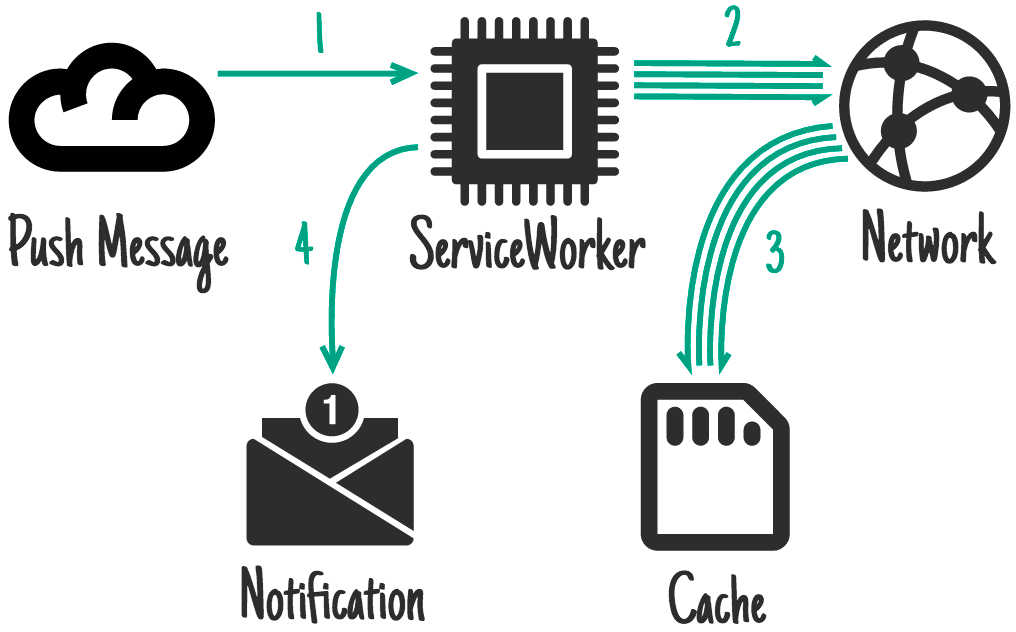
推送 API 是基于 Service Worker 构建的另一项功能。这样一来,服务工作线程就可以在收到来自操作系统消息传递服务的消息时被唤醒。即使用户没有打开您网站的标签页,也会发生这种情况。只有 service worker 会被唤醒。您可以在网页中请求执行此操作的权限,系统会提示用户。
理想用途:与通知相关的内容,例如聊天消息、突发新闻报道或电子邮件。此外,还包括可从即时同步中受益的不经常更改的内容,例如待办事项列表更新或日历更改。
常见的最终结果是通知,当用户点按该通知时,系统会打开并聚焦于相关页面,因此提前更新缓存非常重要。用户在收到推送消息时处于在线状态,但最终与通知互动时可能处于离线状态,因此离线提供此内容至关重要。
此代码会在显示通知之前更新缓存:
self.addEventListener('push', function (event) {
  if (event.data.text() == 'new-email') {
    event.waitUntil(
      caches
        .open('mysite-dynamic')
        .then(function (cache) {
          return fetch('/inbox.json').then(function (response) {
            cache.put('/inbox.json', response.clone());
            return response.json();
          });
        })
        .then(function (emails) {
          registration.showNotification('New email', {
            body: 'From ' + emails[0].from.name,
            tag: 'new-email',
          });
        }),
    );
  }
});

self.addEventListener('notificationclick', function (event) {
  if (event.notification.tag == 'new-email') {
    // Assume that all of the resources needed to render
    // /inbox/ have previously been cached, e.g. as part
    // of the install handler.
    new WindowClient('/inbox/');
  }
});
在后台同步时

后台同步是基于 Service Worker 构建的另一项功能。它允许您请求一次性或按(极具启发性的)时间间隔进行后台数据同步。即使在用户未打开您网站的标签页时,也会发生这种情况。只有 service worker 会被唤醒。您可以在网页上请求此权限,系统会提示用户。
理想用途:非紧急更新,尤其是那些发生频率非常高的更新,如果每次更新都发送推送消息,对用户来说会过于频繁,例如社交时间轴或新闻报道。
self.addEventListener('sync', function (event) {
  if (event.id == 'update-leaderboard') {
    event.waitUntil(
      caches.open('mygame-dynamic').then(function (cache) {
        return cache.add('/leaderboard.json');
      }),
    );
  }
});
缓存持久性
您的来源会获得一定量的可用空间,可随意使用。该可用空间在所有来源存储空间之间共享:(本地)存储空间、IndexedDB、文件系统访问,当然还有缓存。
您获得的金额未指定。具体取决于设备和存储条件。您可以使用以下方法查看自己有多少积分:
if (navigator.storage && navigator.storage.estimate) {
  const quota = await navigator.storage.estimate();
  // quota.usage -> Number of bytes used.
  // quota.quota -> Maximum number of bytes available.
  const percentageUsed = (quota.usage / quota.quota) * 100;
  console.log(`You've used ${percentageUsed}% of the available storage.`);
  const remaining = quota.quota - quota.usage;
  console.log(`You can write up to ${remaining} more bytes.`);
}
不过,与所有浏览器存储空间一样,如果设备存储空间不足,浏览器可以随时舍弃您的数据。遗憾的是,浏览器无法区分您无论如何都想保留的电影和您不太在意的游戏。
为了规避此问题,请使用 StorageManager 接口:
// From a page:
navigator.storage.persist()
.then(function(persisted) {
  if (persisted) {
    // Hurrah, your data is here to stay!
  } else {
   // So sad, your data may get chucked. Sorry.
});
当然,用户必须授予权限。为此,请使用 Permissions API。
让用户参与到此流程中非常重要,因为这样一来,我们就可以预期用户能够控制删除操作。如果设备存储空间不足,并且清除非必要数据无法解决此问题,用户可以自行判断要保留和移除哪些项目。
为此,操作系统需要在存储空间使用情况细分中将“持久”来源视为等同于平台专属应用,而不是将浏览器报告为单个项目。
提供建议
无论您进行多少缓存,服务工作线程只有在您告知它何时以及如何使用缓存时才会使用缓存。以下是处理请求的几种模式:
仅缓存

理想用途:您认为网站的特定“版本”中任何静态内容。您应该已在安装事件中缓存了这些内容,因此可以依赖于它们的存在。
self.addEventListener('fetch', function (event) {
  // If a match isn't found in the cache, the response
  // will look like a connection error
  event.respondWith(caches.match(event.request));
});
…虽然您通常不需要专门处理这种情况,但缓存,回退到网络涵盖了这种情况。
仅限网络

非常适合:没有离线等效项的内容,例如分析 ping、非 GET 请求。
self.addEventListener('fetch', function (event) {
  event.respondWith(fetch(event.request));
  // or don't call event.respondWith, which
  // will result in default browser behavior
});
…虽然您通常不需要专门处理这种情况,但缓存,回退到网络涵盖了这种情况。
缓存,回退到网络

适用场景:构建离线优先应用。在这种情况下,您将按以下方式处理大多数请求。其他模式是基于传入请求的例外情况。
self.addEventListener('fetch', function (event) {
  event.respondWith(
    caches.match(event.request).then(function (response) {
      return response || fetch(event.request);
    }),
  );
});
这样,缓存中的内容会采用“仅缓存”行为,而未缓存的内容会采用“仅网络”行为(包括所有非 GET 请求,因为它们无法缓存)。
缓存和网络竞争

理想应用场景:小型资源,您希望在磁盘访问速度较慢的设备上获得高性能。
在某些旧版硬盘、病毒扫描程序和更快的互联网连接的组合中,从网络获取资源可能比从磁盘获取资源更快。不过,如果用户设备上已有相应内容,但仍访问网络,可能会浪费流量,请注意这一点。
// Promise.race rejects when a promise rejects before fulfilling.
// To make a race function:
function promiseAny(promises) {
  return new Promise((resolve, reject) => {
    // make sure promises are all promises
    promises = promises.map((p) => Promise.resolve(p));
    // resolve this promise as soon as one resolves
    promises.forEach((p) => p.then(resolve));
    // reject if all promises reject
    promises.reduce((a, b) => a.catch(() => b)).catch(() => reject(Error('All failed')));
  });
}

self.addEventListener('fetch', function (event) {
  event.respondWith(promiseAny([caches.match(event.request), fetch(event.request)]));
});
网络回退到缓存

理想用途:快速修复网站“版本”之外经常更新的资源。例如文章、虚拟形象、社交媒体时间轴和游戏排行榜。
这意味着,您为在线用户提供的是最新内容,但离线用户获得的是较旧的缓存版本。如果网络请求成功,您很可能需要更新缓存条目。
不过,此方法存在缺陷。如果用户连接的网络不稳定或速度较慢,他们必须等待网络出现故障,才能获取设备上已有的完全可以接受的内容。这可能需要很长时间,并且会带来令人沮丧的用户体验。如需了解更好的解决方案,请参阅下一个模式:先缓存后网络。
self.addEventListener('fetch', function (event) {
  event.respondWith(
    fetch(event.request).catch(function () {
      return caches.match(event.request);
    }),
  );
});
先缓存后网络

适用场景:内容更新频繁。例如文章、社交媒体时间轴和游戏排行榜。
这需要网页发出两个请求,一个发送到缓存,另一个发送到网络。这种方法的思路是先显示缓存的数据,然后在网络数据到达时更新网页。
有时,您可以在新数据到达时直接替换当前数据(例如游戏排行榜),但对于较大的内容,这可能会造成中断。基本上,不要“消失”用户可能正在阅读或互动的内容。
Twitter 会将新内容添加到旧内容上方,并调整滚动位置,以便用户不受干扰。之所以能实现这一点,是因为 Twitter 会保留内容的大致线性顺序。我复制了这种模式,以便训练到惊险尽可能快地在屏幕上显示内容,同时在最新内容到达时立即显示。
网页中的代码:
var networkDataReceived = false;

startSpinner();

// fetch fresh data
var networkUpdate = fetch('/data.json')
  .then(function (response) {
    return response.json();
  })
  .then(function (data) {
    networkDataReceived = true;
    updatePage(data);
  });

// fetch cached data
caches
  .match('/data.json')
  .then(function (response) {
    if (!response) throw Error('No data');
    return response.json();
  })
  .then(function (data) {
    // don't overwrite newer network data
    if (!networkDataReceived) {
      updatePage(data);
    }
  })
  .catch(function () {
    // we didn't get cached data, the network is our last hope:
    return networkUpdate;
  })
  .catch(showErrorMessage)
  .then(stopSpinner);
服务工作线程中的代码:
您应始终前往网络并随时更新缓存。
self.addEventListener('fetch', function (event) {
  event.respondWith(
    caches.open('mysite-dynamic').then(function (cache) {
      return fetch(event.request).then(function (response) {
        cache.put(event.request, response.clone());
        return response;
      });
    }),
  );
});
在 trained-to-thrill 中,我通过使用 XHR 而不是 fetch 来解决此问题,并滥用 Accept 标头来告知 Service Worker 从何处获取结果(网页代码、Service Worker 代码)。
通用后备

如果您无法从缓存或网络中提供内容,请提供通用回退。
理想用途:辅助图片,例如头像、失败的 POST 请求和“离线时不可用”页面。
self.addEventListener('fetch', function (event) {
  event.respondWith(
    // Try the cache
    caches
      .match(event.request)
      .then(function (response) {
        // Fall back to network
        return response || fetch(event.request);
      })
      .catch(function () {
        // If both fail, show a generic fallback:
        return caches.match('/offline.html');
        // However, in reality you'd have many different
        // fallbacks, depending on URL and headers.
        // Eg, a fallback silhouette image for avatars.
      }),
  );
});
您回退到的项很可能是安装依赖项。
如果您的网页正在发布电子邮件,您的服务工作线程可能会退回到将电子邮件存储在 IndexedDB 发件箱中,并通过告知网页发送失败但数据已成功保留来做出响应。
Service Worker 端模板

理想应用场景:无法缓存服务器响应的网页。
在服务器上呈现网页的速度更快,但这意味着要包含在缓存中可能没有意义的状态数据,例如登录状态。如果您的网页由 Service Worker 控制,您可以选择请求 JSON 数据以及模板,然后渲染该数据。
importScripts('templating-engine.js');

self.addEventListener('fetch', function (event) {
  var requestURL = new URL(event.request.url);

  event.respondWith(
    Promise.all([
      caches.match('/article-template.html').then(function (response) {
        return response.text();
      }),
      caches.match(requestURL.path + '.json').then(function (response) {
        return response.json();
      }),
    ]).then(function (responses) {
      var template = responses[0];
      var data = responses[1];

      return new Response(renderTemplate(template, data), {
        headers: {
          'Content-Type': 'text/html',
        },
      });
    }),
  );
});
总结
您并非只能使用其中一种方法。事实上,您可能会根据请求网址使用其中许多方法。例如,训练有素的刺激使用:
- 安装时缓存,用于静态界面和行为
- 缓存网络响应,用于 Flickr 图片和数据
- 从缓存中提取,回退到网络,适用于大多数请求
- 针对 Flickr 搜索结果,先从缓存中提取,然后从网络中提取
只需查看请求并决定如何处理:
self.addEventListener('fetch', function (event) {
  // Parse the URL:
  var requestURL = new URL(event.request.url);

  // Handle requests to a particular host specifically
  if (requestURL.hostname == 'api.example.com') {
    event.respondWith(/* some combination of patterns */);
    return;
  }
  // Routing for local URLs
  if (requestURL.origin == location.origin) {
    // Handle article URLs
    if (/^\/article\//.test(requestURL.pathname)) {
      event.respondWith(/* some other combination of patterns */);
      return;
    }
    if (/\.webp$/.test(requestURL.pathname)) {
      event.respondWith(/* some other combination of patterns */);
      return;
    }
    if (request.method == 'POST') {
      event.respondWith(/* some other combination of patterns */);
      return;
    }
    if (/cheese/.test(requestURL.pathname)) {
      event.respondWith(
        new Response('Flagrant cheese error', {
          status: 512,
        }),
      );
      return;
    }
  }

  // A sensible default pattern
  event.respondWith(
    caches.match(event.request).then(function (response) {
      return response || fetch(event.request);
    }),
  );
});
深入阅读
赠金
对于可爱的图标:
- buzzyrobot 的代码
- Scott Lewis 的日历
- Ben Rizzo 的网络
- Thomas Le Bas 的 SD
- iconsmind.com 提供的 CPU 图标
- trasnik 的回收站
- @daosme 的通知
- Mister Pixel 的 Layout
- P.J. Onori 的 Cloud
感谢 Jeff Posnick 在我点击“发布”之前发现了许多严重错误。