


我們透過 Service Worker,為開發人員提供解決網路連線問題的方法。您可以控管快取和要求處理方式。 也就是說,你可以自行建立模式。請先個別查看幾種可能的模式,但實際上,您可能會根據網址和內容一併使用這些模式。
如要查看部分模式的運作示範,請參閱「訓練到令人興奮」。
何時儲存資源
' d='M96 183a64 64 0 0 1-23-23L17 64a128 128 0 0 0 111 192l55-96a64 64 0 0 1-87 23Z'/%3E%3Cpath fill='url(%23b)' d='M192 128a64 64 0 0 1-9 32l-55 96A128 128 0 0 0 239 64H128a64 64 0 0 1 64 64Z'/%3E%3Ccircle cx='128' cy='128' r='52' fill='%231a73e8'/%3E%3Cpath fill='url(%23c)' d='M96 73a64 64 0 0 1 32-9h111a128 128 0 0 0-222 0l56 96a64 64 0 0 1 23-87Z'/%3E%3C/svg%3E)
' xlink:href='%23A'%3E%3Cstop offset='.76' stop-opacity='0'/%3E%3Cstop offset='.95' stop-opacity='.5'/%3E%3Cstop offset='1'/%3E%3C/radialGradient%3E%3CradialGradient id='F' cx='2523' cy='4680' r='20243' gradientTransform='matrix(-.03715 .99931 -2.12836 -.07913 13579 3530)' xlink:href='%23A'%3E%3Cstop offset='0' stop-color='%2335c1f1'/%3E%3Cstop offset='.11' stop-color='%2334c1ed'/%3E%3Cstop offset='.23' stop-color='%232fc2df'/%3E%3Cstop offset='.31' stop-color='%232bc3d2'/%3E%3Cstop offset='.67' stop-color='%2336c752'/%3E%3C/radialGradient%3E%3CradialGradient id='G' cx='24247' cy='7758' r='9734' gradientTransform='matrix(.28109 .95968 -.78353 .22949 24510 -16292)' xlink:href='%23A'%3E%3Cstop offset='0' stop-color='%2366eb6e'/%3E%3Cstop offset='1' stop-color='%2366eb6e' stop-opacity='0'/%3E%3C/radialGradient%3E%3Cpath id='H' d='M24105 20053a9345 9345 0 01-1053 472 10202 10202 0 01-3590 646c-4732 0-8855-3255-8855-7432 0-1175 680-2193 1643-2729-4280 180-5380 4640-5380 7253 0 7387 6810 8137 8276 8137 791 0 1984-230 2704-456l130-44a12834 12834 0 006660-5282c220-350-168-757-535-565z'/%3E%3Cpath id='I' d='M11571 25141a7913 7913 0 01-2273-2137 8145 8145 0 01-1514-4740 8093 8093 0 013093-6395 8082 8082 0 011373-859c312-148 846-414 1554-404a3236 3236 0 012569 1297 3184 3184 0 01636 1866c0-21 2446-7960-8005-7960-4390 0-8004 4166-8004 7820 0 2319 538 4170 1212 5604a12833 12833 0 007684 6757 12795 12795 0 003908 610c1414 0 2774-233 4045-656a7575 7575 0 01-6278-803z'/%3E%3Cpath id='J' d='M16231 15886c-80 105-330 250-330 566 0 260 170 512 472 723 1438 1003 4149 868 4156 868a5954 5954 0 003027-839 6147 6147 0 001133-850 6180 6180 0 001910-4437c26-2242-796-3732-1133-4392-2120-4141-6694-6525-11668-6525-7011 0-12703 5635-12798 12620 47-3654 3679-6605 7996-6605 350 0 2346 34 4200 1007 1634 858 2490 1894 3086 2921 618 1067 728 2415 728 2952s-271 1333-780 1990z'/%3E%3Cuse fill='url(%23B)' xlink:href='%23H'/%3E%3Cuse fill='url(%23D)' opacity='.35' xlink:href='%23H'/%3E%3Cuse fill='url(%23C)' xlink:href='%23I'/%3E%3Cuse fill='url(%23E)' opacity='.4' xlink:href='%23I'/%3E%3Cuse fill='url(%23F)' xlink:href='%23J'/%3E%3Cuse fill='url(%23G)' xlink:href='%23J'/%3E%3C/svg%3E)
' gradientUnits='userSpaceOnUse'%3E%3Cstop offset='.2' stop-color='%239059ff' stop-opacity='0'/%3E%3Cstop offset='.3' stop-color='%238c4ff3' stop-opacity='.1'/%3E%3Cstop offset='.8' stop-color='%237716a8' stop-opacity='.5'/%3E%3Cstop offset='1' stop-color='%236e008b' stop-opacity='.6'/%3E%3C/radialGradient%3E%3CradialGradient id='ff-g' cx='239.1' cy='34.6' r='171.6' gradientUnits='userSpaceOnUse'%3E%3Cstop offset='0' stop-color='%23ffe226'/%3E%3Cstop offset='.1' stop-color='%23ffdb27'/%3E%3Cstop offset='.3' stop-color='%23ffc82a'/%3E%3Cstop offset='.5' stop-color='%23ffa930'/%3E%3Cstop offset='.7' stop-color='%23ff7e37'/%3E%3Cstop offset='.8' stop-color='%23ff7139'/%3E%3C/radialGradient%3E%3CradialGradient id='ff-h' cx='374' cy='-74.3' r='732.2' gradientUnits='userSpaceOnUse'%3E%3Cstop offset='.1' stop-color='%23fff44f'/%3E%3Cstop offset='.5' stop-color='%23ff980e'/%3E%3Cstop offset='.6' stop-color='%23ff5634'/%3E%3Cstop offset='.7' stop-color='%23ff3647'/%3E%3Cstop offset='.9' stop-color='%23e31587'/%3E%3C/radialGradient%3E%3CradialGradient id='ff-i' cx='304.6' cy='7.1' r='536.4' gradientTransform='rotate(84 303 4)' gradientUnits='userSpaceOnUse'%3E%3Cstop offset='0' stop-color='%23fff44f'/%3E%3Cstop offset='.1' stop-color='%23ffe847'/%3E%3Cstop offset='.2' stop-color='%23ffc830'/%3E%3Cstop offset='.3' stop-color='%23ff980e'/%3E%3Cstop offset='.4' stop-color='%23ff8b16'/%3E%3Cstop offset='.5' stop-color='%23ff672a'/%3E%3Cstop offset='.6' stop-color='%23ff3647'/%3E%3Cstop offset='.7' stop-color='%23e31587'/%3E%3C/radialGradient%3E%3CradialGradient id='ff-j' cx='235' cy='98.1' r='457.1' gradientUnits='userSpaceOnUse'%3E%3Cstop offset='.1' stop-color='%23fff44f'/%3E%3Cstop offset='.5' stop-color='%23ff980e'/%3E%3Cstop offset='.6' stop-color='%23ff5634'/%3E%3Cstop offset='.7' stop-color='%23ff3647'/%3E%3Cstop offset='.9' stop-color='%23e31587'/%3E%3C/radialGradient%3E%3CradialGradient id='ff-k' cx='355.7' cy='124.9' r='500.3' gradientUnits='userSpaceOnUse'%3E%3Cstop offset='.1' stop-color='%23fff44f'/%3E%3Cstop offset='.2' stop-color='%23ffe141'/%3E%3Cstop offset='.5' stop-color='%23ffaf1e'/%3E%3Cstop offset='.6' stop-color='%23ff980e'/%3E%3C/radialGradient%3E%3ClinearGradient id='ff-a' x1='446.9' y1='76.8' x2='47.9' y2='461.8' gradientUnits='userSpaceOnUse'%3E%3Cstop offset='.1' stop-color='%23fff44f'/%3E%3Cstop offset='.1' stop-color='%23ffe847'/%3E%3Cstop offset='.2' stop-color='%23ffc830'/%3E%3Cstop offset='.4' stop-color='%23ff980e'/%3E%3Cstop offset='.4' stop-color='%23ff8b16'/%3E%3Cstop offset='.5' stop-color='%23ff672a'/%3E%3Cstop offset='.5' stop-color='%23ff3647'/%3E%3Cstop offset='.7' stop-color='%23e31587'/%3E%3C/linearGradient%3E%3ClinearGradient id='ff-l' x1='442.1' y1='74.8' x2='102.6' y2='414.3' gradientUnits='userSpaceOnUse'%3E%3Cstop offset='.2' stop-color='%23fff44f' stop-opacity='.8'/%3E%3Cstop offset='.3' stop-color='%23fff44f' stop-opacity='.6'/%3E%3Cstop offset='.5' stop-color='%23fff44f' stop-opacity='.2'/%3E%3Cstop offset='.6' stop-color='%23fff44f' stop-opacity='0'/%3E%3C/linearGradient%3E%3C/defs%3E%3Cpath d='M479 166c-11-25-32-52-49-60a249 249 0 0 1 25 73c-27-68-73-95-111-155a255 255 0 0 1-8-14 44 44 0 0 1-4-9 1 1 0 0 0 0-1 1 1 0 0 0-1 0c-60 35-81 101-83 134a120 120 0 0 0-66 25 71 71 0 0 0-6-5 111 111 0 0 1-1-58c-25 11-44 29-58 44-9-12-9-52-8-60l-8 4a175 175 0 0 0-24 21 210 210 0 0 0-22 26 203 203 0 0 0-32 73l-1 2-2 15a229 229 0 0 0-4 34v1a240 240 0 0 0 477 40l1-9c5-41 0-84-15-121zM202 355l3 1-3-1zm55-145zm198-31z' fill='url(%23ff-a)'/%3E%3Cpath d='M479 166c-11-25-32-52-49-60 14 26 22 53 25 72v1a207 207 0 0 1-206 279c-113-3-212-87-231-197-3-17 0-26 2-40-2 11-3 14-4 34v1a240 240 0 0 0 477 40l1-9c5-41 0-84-15-121z' fill='url(%23ff-b)'/%3E%3Cpath d='M479 166c-11-25-32-52-49-60 14 26 22 53 25 72v1a207 207 0 0 1-206 279c-113-3-212-87-231-197-3-17 0-26 2-40-2 11-3 14-4 34v1a240 240 0 0 0 477 40l1-9c5-41 0-84-15-121z' fill='url(%23ff-c)'/%3E%3Cpath d='m362 195 1 1a130 130 0 0 0-22-29C266 92 322 5 331 0c-60 35-81 101-83 134l9-1c45 0 84 25 105 62z' fill='url(%23ff-d)'/%3E%3Cpath d='M257 210c-1 6-22 26-29 26-68 0-80 41-80 41 3 35 28 64 57 79l4 2 7 3a107 107 0 0 0 31 6c120 6 143-143 57-186 22-4 45 5 58 14-21-37-60-62-105-62l-9 1a120 120 0 0 0-66 25l17 16c16 16 58 33 58 35z' fill='url(%23ff-e)'/%3E%3Cpath d='M257 210c-1 6-22 26-29 26-68 0-80 41-80 41 3 35 28 64 57 79l4 2 7 3a107 107 0 0 0 31 6c120 6 143-143 57-186 22-4 45 5 58 14-21-37-60-62-105-62l-9 1a120 120 0 0 0-66 25l17 16c16 16 58 33 58 35z' fill='url(%23ff-f)'/%3E%3Cpath d='m171 151 5 3a111 111 0 0 1-1-58c-25 11-44 29-58 44 1 0 36 0 54 11z' fill='url(%23ff-g)'/%3E%3Cpath d='M18 261a242 242 0 0 0 231 197 207 207 0 0 0 206-279c8 56-20 110-64 146-86 71-169 43-186 31l-3-1c-50-24-71-70-67-110-42 0-57-35-57-35s38-28 89-4c46 22 90 4 90 4 0-2-42-19-58-35l-17-16a71 71 0 0 0-6-5l-5-3c-18-11-52-11-54-11-9-12-9-51-8-60l-8 4a175 175 0 0 0-24 21 210 210 0 0 0-22 26 203 203 0 0 0-32 73c0 1-9 38-5 57z' fill='url(%23ff-h)'/%3E%3Cpath d='M341 167a130 130 0 0 1 22 29 46 46 0 0 1 4 3c55 50 26 121 24 126 44-36 72-90 64-146-27-68-73-95-111-155a255 255 0 0 1-8-14 44 44 0 0 1-4-9 1 1 0 0 0 0-1 1 1 0 0 0-1 0c-9 5-65 92 10 167z' fill='url(%23ff-i)'/%3E%3Cpath d='M367 199a46 46 0 0 0-4-3l-1-1c-13-9-36-18-58-15 86 44 63 193-57 187a107 107 0 0 1-31-6 131 131 0 0 1-11-5c17 12 99 39 186-31 2-5 31-76-24-126z' fill='url(%23ff-j)'/%3E%3Cpath d='M148 277s12-41 80-41c7 0 28-20 29-26s-44 18-90-4c-51-24-89 4-89 4s15 35 57 35c-4 40 16 85 67 110l3 1c-29-15-54-44-57-79z' fill='url(%23ff-k)'/%3E%3Cpath d='M479 166c-11-25-32-52-49-60a249 249 0 0 1 25 73c-27-68-73-95-111-155a255 255 0 0 1-8-14 44 44 0 0 1-4-9 1 1 0 0 0 0-1 1 1 0 0 0-1 0c-60 35-81 101-83 134l9-1c45 0 84 25 105 62-13-9-36-18-58-14 86 43 63 192-57 186a107 107 0 0 1-31-6 131 131 0 0 1-11-5l-3-1 3 1c-29-15-54-44-57-79 0 0 12-41 80-41 7 0 28-20 29-26 0-2-42-19-58-35l-17-16a71 71 0 0 0-6-5 111 111 0 0 1-1-58c-25 11-44 29-58 44-9-12-9-52-8-60l-8 4a175 175 0 0 0-24 21 210 210 0 0 0-22 26 203 203 0 0 0-32 73l-1 2-2 15a279 279 0 0 0-4 34v1a240 240 0 0 0 477 40l1-9c5-41 0-84-15-121zm-24 13z' fill='url(%23ff-l)'/%3E%3C/svg%3E)
' xlink:href='%23s-b'%3E%3Cstop offset='0' stop-color='%2324a5f3' stop-opacity='0' /%3E%3Cstop offset='1' stop-color='%231e8ceb' /%3E%3C/radialGradient%3E%3CradialGradient id='s-j' cx='109.3' cy='13.8' r='93.1' gradientTransform='matrix(-.02 1.1 -1.04 -.02 137 -115)' xlink:href='%23s-b'%3E%3Cstop offset='0' stop-opacity='0' /%3E%3Cstop offset='1' stop-color='%235488d6' stop-opacity='0' /%3E%3Cstop offset='1' stop-color='%235d96eb' /%3E%3C/radialGradient%3E%3C/defs%3E%3Crect width='220' height='220' x='22' y='-107' fill='url(%23s-a)' ry='49' transform='matrix(.57 0 0 .57 187 256)' /%3E%3Cg transform='translate(194 190)'%3E%3Ccircle cx='67.8' cy='67.7' fill='url(%23s-c)' paint-order='stroke fill markers' r='54' /%3E%3Ccircle cx='-69.9' cy='69.3' fill='url(%23s-i)' transform='translate(138 -2)' r='54' /%3E%3C/g%3E%3Cellipse cx='120' cy='14.2' fill='url(%23s-j)' rx='93.1' ry='93.7' transform='matrix(.58 0 0 .58 192 250)' /%3E%3Cg transform='matrix(.58 0 0 .57 197 182)'%3E%3Cpath fill='%23cac7c8' d='M46 192h1l72-48-7-9-66 57Z' /%3E%3Cpath fill='%23fbfffc' d='M46 191v1l66-57-7-9-59 65Z' /%3E%3Cpath fill='url(%23s-d)' d='m119 144-7-9 66-57-59 66Z' /%3E%3Cpath fill='%23fb645c' d='m105 126 7 9 66-57-1-1-72 49Z' /%3E%3C/g%3E%3Cpath stroke='%23fff' stroke-linecap='round' stroke-miterlimit='1' stroke-width='1.3' d='m287 278 3-2m-12-17 8-2m-8-3h4m-4-13 8 2m-8 3h4m-1-13 7 3m-4-11 7 4m-2-11 6 6m0-12 6 7m1-11 4 6m4-10 3 7m5-9 2 7m15-7-1 7m10-5-3 7m11-4-4 7m11-2-5 6m16 7-7 4m10 4-7 3m10 6-8 1m8 16-8-2m5 10-7-3m4 11-7-4m2 11-6-5m0 11-5-6m-2 11-4-7m-4 11-3-8m-6 10-1-8m-16 8 2-8m-10 5 3-7m-11 4 4-7m-11 2 5-6m-8 3 3-3m4 8 2-3m5 8 2-4m6 7 1-4m8 5v-4m8 4v-4m9 3-1-4m9 1-2-4m9 0-2-4m9-2-3-3m8-4-3-2m8-5-4-2m7-6-4-1m5-8h-4m4-8h-4m3-9-4 1m1-9-4 2m-1-9-3 2m-2-9-3 3m-4-8-2 3m-5-8-2 4m-6-6-1 3m-8-5v4m-8-4v4m-9-2 1 3m-9 0 2 3m-9 1 2 3m-9 2 3 3m-8 4 3 2m-8 5 4 2m-7 6 4 1m-4 25 4-1m-2 5 7-3m-6 7 4-2m-2 6 7-4m-13-21h8m41-41v-8m0 99v-8m49-42h-8' transform='translate(-65 8)' /%3E%3C/svg%3E)
Service Worker 可讓您獨立處理要求和快取,因此我會分開示範這兩項功能。首先,請判斷何時應使用快取。
安裝時做為依附元件
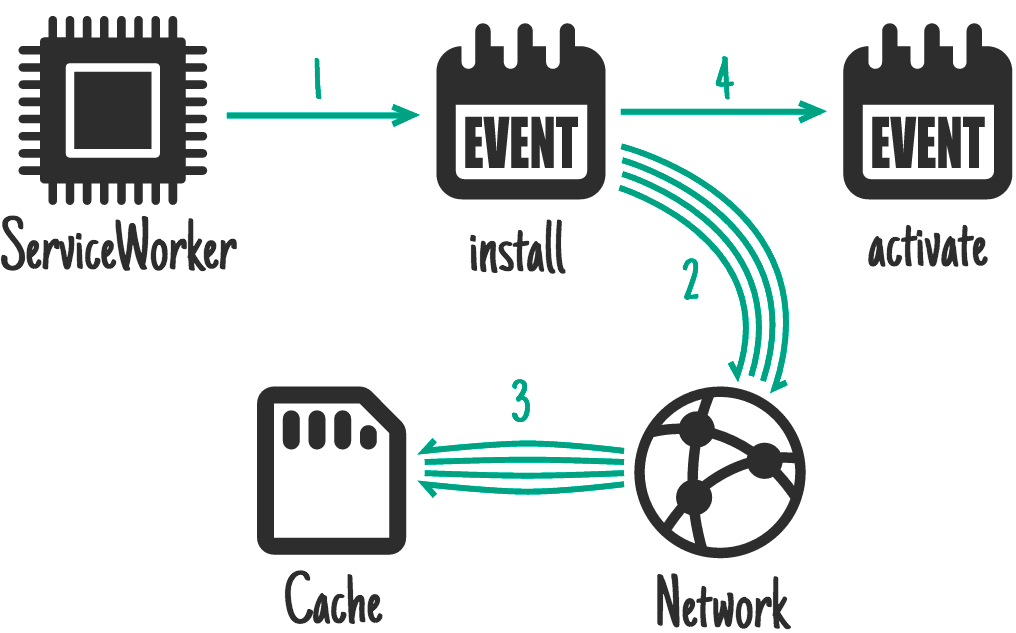
Service Worker API 會提供 install 事件。您可以使用這個方法準備好必要項目,這些項目必須準備就緒,您才能處理其他事件。在 install 期間,服務工作人員的舊版會繼續執行並提供網頁。此時進行的任何操作都不應中斷現有的服務工作人員。
適用於:CSS、圖片、字型、JS、範本,或您認為屬於該網站版本的任何靜態內容。
擷取如果擷取失敗,會導致網站完全無法運作的項目,這些項目是等同於平台專屬應用程式會納入初始下載的項目。
self.addEventListener('install', function (event) {
  event.waitUntil(
    caches.open('mysite-static-v3').then(function (cache) {
      return cache.addAll([
        '/css/whatever-v3.css',
        '/css/imgs/sprites-v6.png',
        '/css/fonts/whatever-v8.woff',
        '/js/all-min-v4.js',
        // etc.
      ]);
    }),
  );
});
event.waitUntil 會採用 Promise 來定義安裝長度和成功與否。如果 Promise 遭到拒絕,系統會將安裝視為失敗,並捨棄這個 Service Worker (如果較舊的版本正在執行,則會保持不變)。caches.open() 和 cache.addAll() 會傳回 Promise。
如果無法擷取任何資源,cache.addAll() 呼叫就會遭到拒絕。
在 trained-to-thrill 中,我使用這項功能快取靜態資產。
安裝時,而非依附元件

這與以依附元件形式安裝類似,但不會延遲安裝完成,也不會在快取失敗時導致安裝失敗。
適用於:不需要立即使用的大型資源,例如遊戲後續關卡的資產。
self.addEventListener('install', function (event) {
  event.waitUntil(
    caches.open('mygame-core-v1').then(function (cache) {
      cache
        .addAll
        // levels 11-20
        ();
      return cache
        .addAll
        // core assets and levels 1-10
        ();
    }),
  );
});
這個範例不會將第 11 至 20 級的 cache.addAll 承諾傳回 event.waitUntil,因此即使失敗,遊戲仍可離線使用。當然,您必須因應這些層級可能缺席的情況,並在這些層級遺失時重新嘗試快取。
由於服務工作人員已完成處理事件,因此在下載第 11 至 20 層時可能會遭到終止,這表示這些層級不會快取。網頁週期性背景同步處理 API 可處理這類情況,以及電影等較大的下載內容。
啟用時

適用於:清理和遷移。
新的 Service Worker 安裝完成且未在使用舊版時,新版本就會啟動,您會收到 activate 事件。由於舊版已移除,現在是處理 IndexedDB 中的結構定義遷移作業,以及刪除未使用的快取的好時機。
self.addEventListener('activate', function (event) {
  event.waitUntil(
    caches.keys().then(function (cacheNames) {
      return Promise.all(
        cacheNames
          .filter(function (cacheName) {
            // Return true if you want to remove this cache,
            // but remember that caches are shared across
            // the whole origin
          })
          .map(function (cacheName) {
            return caches.delete(cacheName);
          }),
      );
    }),
  );
});
啟用期間,fetch 等事件會放入佇列,因此啟用時間過長可能會阻礙網頁載入。盡可能簡化啟用程序,只在啟用舊版時無法執行的情況下使用。
在 trained-to-thrill 上,我使用這個方法移除舊快取。
使用者互動

適用於:無法離線存取整個網站,且您選擇允許使用者選取要離線存取的內容。例如 YouTube 上的影片、維基百科上的文章、Flickr 上的特定相簿。
為使用者提供「稍後閱讀」或「儲存供離線使用」按鈕。點選時,從網路擷取所需內容,並放入快取。
document.querySelector('.cache-article').addEventListener('click', function (event) {
  event.preventDefault();

  var id = this.dataset.articleId;
  caches.open('mysite-article-' + id).then(function (cache) {
    fetch('/get-article-urls?id=' + id)
      .then(function (response) {
        // /get-article-urls returns a JSON-encoded array of
        // resource URLs that a given article depends on
        return response.json();
      })
      .then(function (urls) {
        cache.addAll(urls);
      });
  });
});
網頁和 Service Worker 都能使用 Cache API,因此您可以直接從網頁新增至快取。
網路回應

適用於:經常更新資源,例如使用者的收件匣或文章內容。也適用於非必要內容 (例如虛擬人偶),但需要謹慎使用。
如果要求與快取中的任何內容都不相符,請從網路取得要求,然後傳送至網頁,同時新增至快取。
如果為一系列網址 (例如虛擬人偶) 執行這項操作,請務必小心,以免來源儲存空間膨脹。如果使用者需要回收磁碟空間,您不希望成為主要候選人。請務必清除快取中不再需要的項目。
self.addEventListener('fetch', function (event) {
  event.respondWith(
    caches.open('mysite-dynamic').then(function (cache) {
      return cache.match(event.request).then(function (response) {
        return (
          response ||
          fetch(event.request).then(function (response) {
            cache.put(event.request, response.clone());
            return response;
          })
        );
      });
    }),
  );
});
為有效運用記憶體,您只能讀取回應/要求的本文一次。程式碼範例會使用 .clone() 建立額外副本,以便分別讀取。
在 trained-to-thrill 中,我使用這個方法快取 Flickr 圖片。
Stale-while-revalidate

適用於:經常更新資源,但不需要最新版本。虛擬人偶也屬於這類內容。
如有快取版本,請使用該版本,但要擷取更新內容,以供下次使用。
self.addEventListener('fetch', function (event) {
  event.respondWith(
    caches.open('mysite-dynamic').then(function (cache) {
      return cache.match(event.request).then(function (response) {
        var fetchPromise = fetch(event.request).then(function (networkResponse) {
          cache.put(event.request, networkResponse.clone());
          return networkResponse;
        });
        return response || fetchPromise;
      });
    }),
  );
});
這與 HTTP 的 stale-while-revalidate 非常相似。
推播訊息
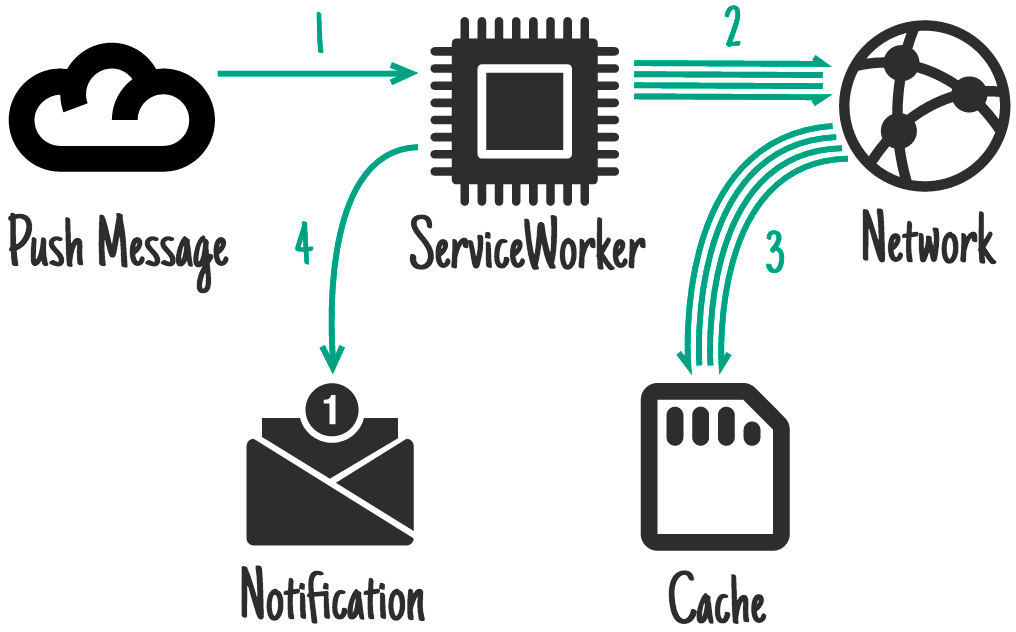
Push API 是以 Service Worker 為基礎建構的另一項功能。這樣一來,服務工作人員就能在收到 OS 訊息服務的訊息時喚醒。即使使用者未開啟網站的分頁,也會發生這種情況。只有 Service Worker 會喚醒。您可從網頁要求這項權限,系統會提示使用者。
適用於:與通知相關的內容,例如即時通訊訊息、重大新聞或電子郵件。此外,如果內容不常變更,但需要立即同步處理,例如待辦事項更新或日曆變更。
常見的最終結果是通知,輕觸通知後會開啟並聚焦相關頁面,因此預先更新快取非常重要。使用者收到推播訊息時可能處於連線狀態,但與通知互動時可能離線,因此務必提供離線內容。
這段程式碼會在顯示通知前更新快取:
self.addEventListener('push', function (event) {
  if (event.data.text() == 'new-email') {
    event.waitUntil(
      caches
        .open('mysite-dynamic')
        .then(function (cache) {
          return fetch('/inbox.json').then(function (response) {
            cache.put('/inbox.json', response.clone());
            return response.json();
          });
        })
        .then(function (emails) {
          registration.showNotification('New email', {
            body: 'From ' + emails[0].from.name,
            tag: 'new-email',
          });
        }),
    );
  }
});

self.addEventListener('notificationclick', function (event) {
  if (event.notification.tag == 'new-email') {
    // Assume that all of the resources needed to render
    // /inbox/ have previously been cached, e.g. as part
    // of the install handler.
    new WindowClient('/inbox/');
  }
});
背景同步處理

背景同步是另一項以 Service Worker 為基礎建構的功能。您可以要求一次性或以 (極度啟發式) 間隔同步處理背景資料。即使使用者未開啟網站的分頁,也會發生這種情況。系統只會喚醒 Service Worker,您可從網頁要求這項權限,系統會提示使用者。
適用於:非緊急更新,特別是更新頻率過高,不適合每次都傳送推播訊息給使用者,例如社群時間軸或新聞報導。
self.addEventListener('sync', function (event) {
  if (event.id == 'update-leaderboard') {
    event.waitUntil(
      caches.open('mygame-dynamic').then(function (cache) {
        return cache.add('/leaderboard.json');
      }),
    );
  }
});
快取持續性
來源會獲得一定量的可用空間,可隨意使用。所有來源儲存空間共用這項免費空間: (本機) 儲存空間、 IndexedDB、 檔案系統存取權,以及當然還有 快取。
你獲得的金額並未指定。實際情況會因裝置和儲存空間狀況而異。你可以透過下列方式查看餘額:
if (navigator.storage && navigator.storage.estimate) {
  const quota = await navigator.storage.estimate();
  // quota.usage -> Number of bytes used.
  // quota.quota -> Maximum number of bytes available.
  const percentageUsed = (quota.usage / quota.quota) * 100;
  console.log(`You've used ${percentageUsed}% of the available storage.`);
  const remaining = quota.quota - quota.usage;
  console.log(`You can write up to ${remaining} more bytes.`);
}
不過,與所有瀏覽器儲存空間一樣,如果裝置儲存空間不足,瀏覽器可以捨棄您的資料。很抱歉,瀏覽器無法分辨你想要保留的電影,以及你不太在意的遊戲。
如要解決這個問題,請使用 StorageManager 介面:
// From a page:
navigator.storage.persist()
.then(function(persisted) {
  if (persisted) {
    // Hurrah, your data is here to stay!
  } else {
   // So sad, your data may get chucked. Sorry.
});
當然,使用者必須授予權限。如要執行這項操作,請使用 Permissions API。
讓使用者參與這項流程非常重要,因為現在可以預期他們會控管刪除作業。如果裝置儲存空間不足,且清除非必要資料後仍無法解決問題,使用者可以自行判斷要保留及移除哪些項目。
如要達成這個目標,作業系統必須將「持久」來源視為與平台專屬應用程式等效,並在儲存空間用量明細中列出,而非將瀏覽器視為單一項目。
提供建議
無論您快取多少內容,服務工作人員只會在您告知何時及如何使用快取時,才會使用快取。以下列舉幾個處理要求的模式:
僅限快取

適用於:您認為網站特定「版本」的任何靜態內容。您應該已在安裝事件中快取這些項目,因此可以依附於這些項目。
self.addEventListener('fetch', function (event) {
  // If a match isn't found in the cache, the response
  // will look like a connection error
  event.respondWith(caches.match(event.request));
});
…雖然您通常不需要特別處理這個情況,但「快取,回溯至網路」涵蓋了這個情況。
僅限網路

適用於:沒有離線對應項目的項目,例如 Analytics 連線偵測、非 GET 要求。
self.addEventListener('fetch', function (event) {
  event.respondWith(fetch(event.request));
  // or don't call event.respondWith, which
  // will result in default browser behavior
});
…雖然您通常不需要特別處理這個情況,但「快取,回溯至網路」涵蓋了這個情況。
快取,改用網路

適用情況:建構離線優先應用程式。在這種情況下,您會以這種方式處理大部分要求。其他模式則是根據連入要求而定的例外狀況。
self.addEventListener('fetch', function (event) {
  event.respondWith(
    caches.match(event.request).then(function (response) {
      return response || fetch(event.request);
    }),
  );
});
這樣一來,快取中的項目就會「僅限快取」,而未快取的項目則「僅限網路」(包括所有非 GET 要求,因為這些要求無法快取)。
快取和網路競爭

適用於:小型資產,且您要追求磁碟存取速度緩慢的裝置效能。
如果使用較舊的硬碟、病毒掃描器和速度較快的網際網路連線,從網路取得資源的速度可能會比從磁碟取得資源更快。不過,如果使用者裝置上已有內容,連上網路可能會浪費資料,請留意這一點。
// Promise.race rejects when a promise rejects before fulfilling.
// To make a race function:
function promiseAny(promises) {
  return new Promise((resolve, reject) => {
    // make sure promises are all promises
    promises = promises.map((p) => Promise.resolve(p));
    // resolve this promise as soon as one resolves
    promises.forEach((p) => p.then(resolve));
    // reject if all promises reject
    promises.reduce((a, b) => a.catch(() => b)).catch(() => reject(Error('All failed')));
  });
}

self.addEventListener('fetch', function (event) {
  event.respondWith(promiseAny([caches.match(event.request), fetch(event.request)]));
});
網路回溯至快取

適用於:快速修正網站「版本」以外經常更新的資源。例如文章、虛擬人偶、社群媒體時間軸和遊戲排行榜。
也就是說,線上使用者會看到最新內容,但離線使用者會看到較舊的快取版本。如果網路要求成功,您很可能需要更新快取項目。
不過,這種方法有缺點。如果使用者連線不穩定或速度緩慢,就必須等待網路連線失敗,才能取得裝置上已有的內容,這完全可以接受。這可能需要很長的時間,而且使用者體驗不佳。如要瞭解更完善的解決方案,請參閱下一個模式「快取,然後透過網路」。
self.addEventListener('fetch', function (event) {
  event.respondWith(
    fetch(event.request).catch(function () {
      return caches.match(event.request);
    }),
  );
});
先快取再透過網路傳輸

適用情況:內容經常更新。例如文章、社群媒體時間軸和遊戲排行榜。
這需要網頁發出兩項要求,一項是向快取發出,另一項是向網路發出。這個概念是先顯示快取資料,然後在網路資料送達時更新網頁。
有時,您可以在新資料送達時直接取代目前的資料 (例如遊戲排行榜),但如果內容較大,可能會造成中斷。基本上,請勿「隱藏」使用者可能正在閱讀或互動的內容。
Twitter 會將新內容加到舊內容上方,並調整捲動位置,讓使用者不中斷。這是因為 Twitter 大致上會依時間順序顯示內容。我複製了「訓練到令人興奮」的模式,盡快在畫面上顯示內容,同時在內容送達時立即顯示最新內容。
網頁中的程式碼:
var networkDataReceived = false;

startSpinner();

// fetch fresh data
var networkUpdate = fetch('/data.json')
  .then(function (response) {
    return response.json();
  })
  .then(function (data) {
    networkDataReceived = true;
    updatePage(data);
  });

// fetch cached data
caches
  .match('/data.json')
  .then(function (response) {
    if (!response) throw Error('No data');
    return response.json();
  })
  .then(function (data) {
    // don't overwrite newer network data
    if (!networkDataReceived) {
      updatePage(data);
    }
  })
  .catch(function () {
    // we didn't get cached data, the network is our last hope:
    return networkUpdate;
  })
  .catch(showErrorMessage)
  .then(stopSpinner);
服務工作站中的程式碼:
您應一律前往網路並更新快取。
self.addEventListener('fetch', function (event) {
  event.respondWith(
    caches.open('mysite-dynamic').then(function (cache) {
      return fetch(event.request).then(function (response) {
        cache.put(event.request, response.clone());
        return response;
      });
    }),
  );
});
在 trained-to-thrill 中,我使用 XHR 而非 fetch 解決這個問題,並濫用 Accept 標頭,告知 Service Worker 從何處取得結果 (網頁程式碼、Service Worker 程式碼)。
一般備用答覆

如果無法從快取或網路提供內容,請提供一般備援。
適用於:次要圖像,例如虛擬人偶、失敗的 POST 要求,以及「離線時無法使用」頁面。
self.addEventListener('fetch', function (event) {
  event.respondWith(
    // Try the cache
    caches
      .match(event.request)
      .then(function (response) {
        // Fall back to network
        return response || fetch(event.request);
      })
      .catch(function () {
        // If both fail, show a generic fallback:
        return caches.match('/offline.html');
        // However, in reality you'd have many different
        // fallbacks, depending on URL and headers.
        // Eg, a fallback silhouette image for avatars.
      }),
  );
});
您要回溯的項目可能是安裝依附元件。
如果網頁要發布電子郵件,服務工作人員可能會改為將電子郵件儲存在 IndexedDB 寄件匣,並回應網頁,告知傳送失敗但資料已成功保留。
Service Worker 端範本

適用於:無法快取伺服器回應的網頁。
在伺服器上算繪網頁的速度較快,但這可能表示要納入快取中可能沒有意義的狀態資料,例如登入狀態。如果網頁由 Service Worker 控制,您可以選擇連同範本一併要求 JSON 資料,然後改為算繪該資料。
importScripts('templating-engine.js');

self.addEventListener('fetch', function (event) {
  var requestURL = new URL(event.request.url);

  event.respondWith(
    Promise.all([
      caches.match('/article-template.html').then(function (response) {
        return response.text();
      }),
      caches.match(requestURL.path + '.json').then(function (response) {
        return response.json();
      }),
    ]).then(function (responses) {
      var template = responses[0];
      var data = responses[1];

      return new Response(renderTemplate(template, data), {
        headers: {
          'Content-Type': 'text/html',
        },
      });
    }),
  );
});
整合在一起
你不一定要使用其中一種方法,事實上,您可能會根據要求網址使用許多這類方法。舉例來說,trained-to-thrill 使用:
- 安裝時快取,適用於靜態 UI 和行為
- 快取網路回應,適用於 Flickr 圖片和資料
- 從快取擷取資料,並在大多數要求中回溯至網路
- 從快取擷取,然後從網路擷取 Flickr 搜尋結果
只要查看要求並決定要採取的行動:
self.addEventListener('fetch', function (event) {
  // Parse the URL:
  var requestURL = new URL(event.request.url);

  // Handle requests to a particular host specifically
  if (requestURL.hostname == 'api.example.com') {
    event.respondWith(/* some combination of patterns */);
    return;
  }
  // Routing for local URLs
  if (requestURL.origin == location.origin) {
    // Handle article URLs
    if (/^\/article\//.test(requestURL.pathname)) {
      event.respondWith(/* some other combination of patterns */);
      return;
    }
    if (/\.webp$/.test(requestURL.pathname)) {
      event.respondWith(/* some other combination of patterns */);
      return;
    }
    if (request.method == 'POST') {
      event.respondWith(/* some other combination of patterns */);
      return;
    }
    if (/cheese/.test(requestURL.pathname)) {
      event.respondWith(
        new Response('Flagrant cheese error', {
          status: 512,
        }),
      );
      return;
    }
  }

  // A sensible default pattern
  event.respondWith(
    caches.match(event.request).then(function (response) {
      return response || fetch(event.request);
    }),
  );
});
延伸閱讀
抵免額
如要使用可愛的圖示:
- Code by buzzyrobot
- 日曆 (作者:Scott Lewis)
- Ben Rizzo 製作的網路
- SD,作者:Thomas Le Bas
- iconsmind.com 的 CPU
- trasnik 的「Trash」
- @daosme 的通知
- Layout (Mister Pixel 製作)
- P.J. Onori 的「Cloud」
感謝 Jeff Posnick 在我按下「發布」前,發現許多錯誤。