

瞭解如何使用 Gamepad API,讓網頁遊戲更上一層樓。

Chrome 離線頁面的彩蛋是史上最廣為人知的秘密之一 ([citation needed],但這只是為了戲劇效果)。只要按下空格鍵,或在行動裝置上輕觸恐龍,離線頁面就會變成可玩的街機遊戲。您可能知道,想玩遊戲時其實不必離線:在 Chrome 中,只要前往 about://dino,或以極客的方式瀏覽 about://network-error/-106 即可。但你知道每個月有 2.7 億次 Chrome 恐龍遊戲遊玩記錄嗎?
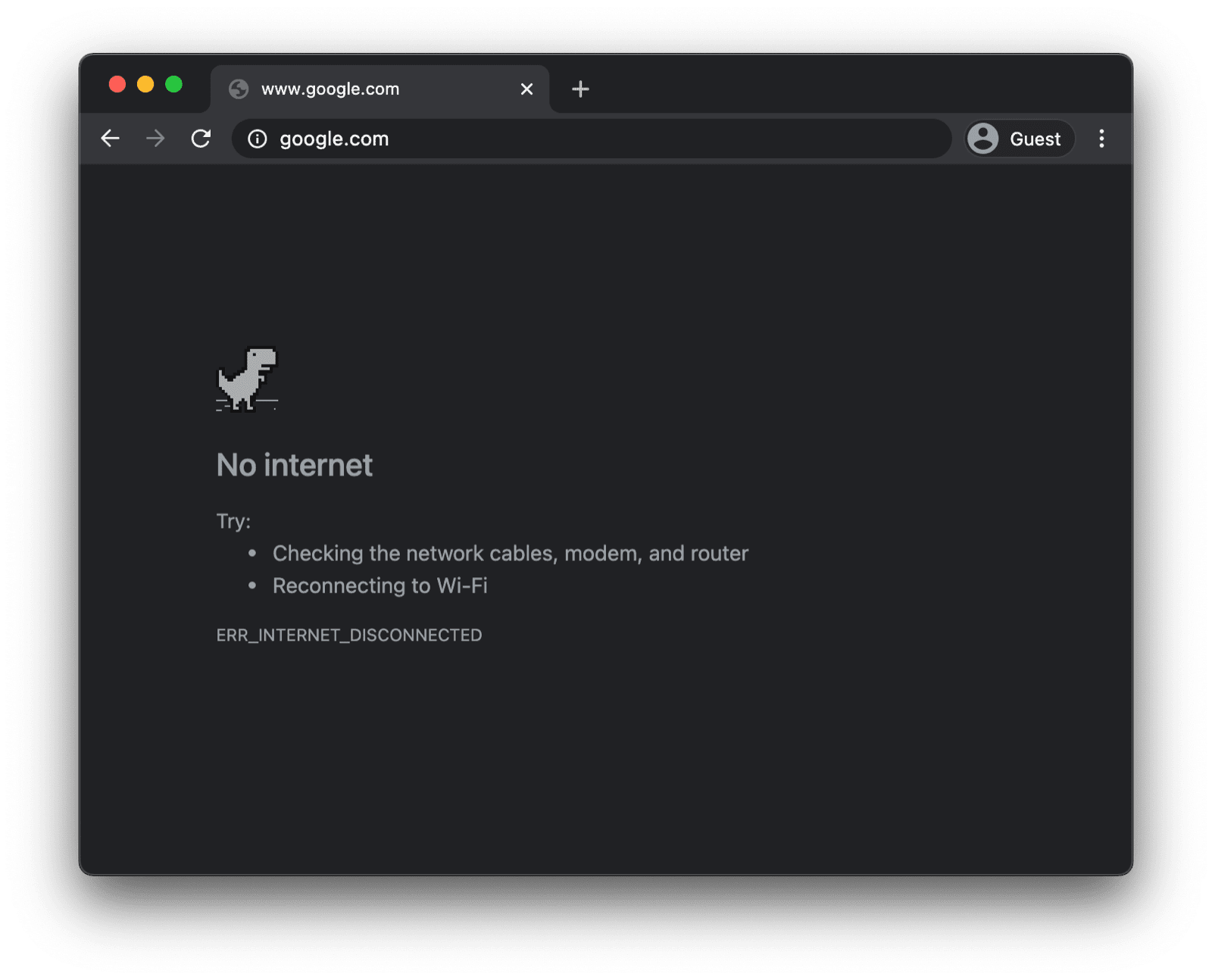
另一個可能更實用,但你可能不知道的事實是,在街機模式中,你可以使用遊戲手把玩遊戲。截至本文撰寫時,Reilly Grant 在修訂版本中新增遊戲手把支援功能,大約是一年前。如你所見,這款遊戲和 Chromium 專案的其他部分一樣,完全開放原始碼。本文將說明如何使用 Gamepad API。
使用 Gamepad API
功能偵測和瀏覽器支援
Gamepad API 在電腦和行動裝置上都獲得廣泛的瀏覽器支援。您可以使用下列程式碼片段,偵測是否支援 Gamepad API:
if ('getGamepads' in navigator) {
  // The API is supported!
}
瀏覽器如何呈現遊戲手把
瀏覽器會將遊戲手把表示為 Gamepad 物件。Gamepad 具有下列屬性:
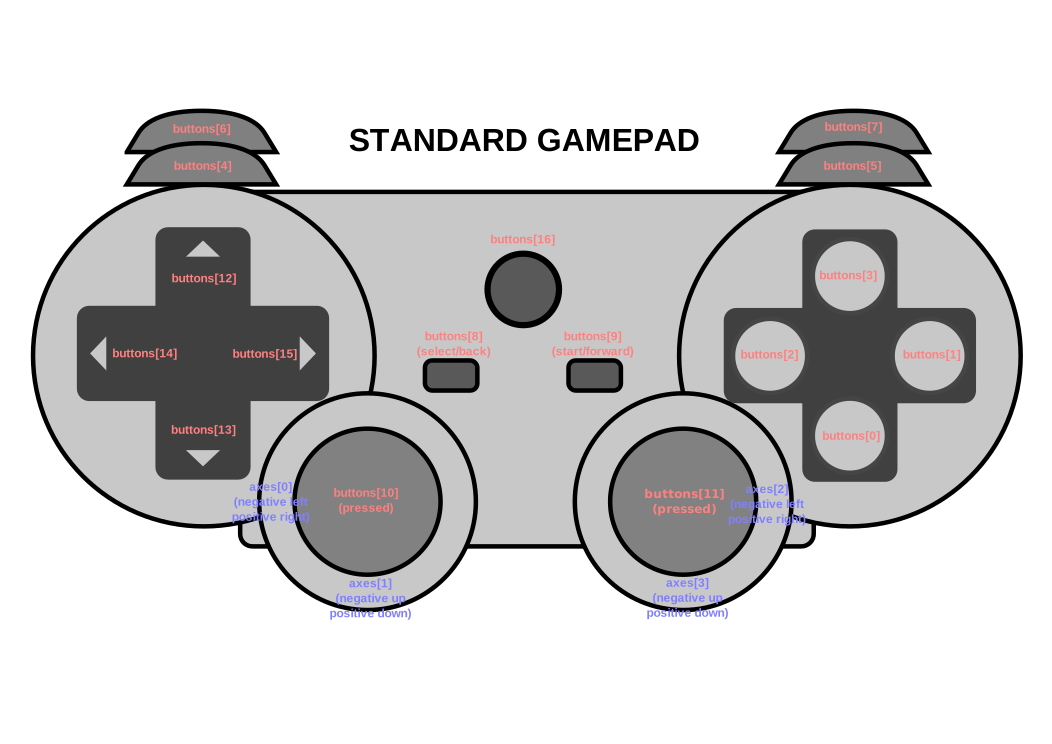
id:遊戲手把的識別字串。這個字串可識別已連結遊戲手把裝置的品牌或樣式。displayId:相關聯VRDisplay的VRDisplay.displayId(如適用)。index:導覽器中遊戲手把的索引。connected:指出遊戲手把是否仍連線至系統。hand:列舉,定義控制器握在或最可能握在哪隻手上。timestamp:上次更新這個遊戲手把資料的時間。mapping:這個裝置使用的按鈕和軸對應,可以是"standard"或"xr-standard"。pose:GamepadPose物件,代表與 WebVR 控制器相關聯的姿勢資訊。axes:遊戲手把所有軸的值陣列,線性正規化至-1.0到1.0的範圍。buttons:遊戲手把所有按鈕的狀態陣列。
請注意,按鈕可以是數位 (按下或未按下) 或類比 (例如按下 78%)。因此,按鈕會回報為 GamepadButton 物件,並具有下列屬性:
pressed:按鈕的按下狀態 (如果按下按鈕,則為true;如果未按下,則為false)。touched:按鈕的輕觸狀態。如果按鈕可以偵測觸控,則當按鈕被觸控時,這個屬性為true,否則為false。value:對於具有類比感應器的按鈕,這個屬性代表按鈕按下的程度,線性正規化至0.0–1.0的範圍。hapticActuators:包含GamepadHapticActuator物件的陣列,每個物件都代表控制器上可用的觸覺回饋硬體。
視瀏覽器和遊戲手把而定,您可能還會遇到 vibrationActuator 屬性。可提供兩種震動效果:
- 雙震動:由兩個偏心旋轉質量致動器產生的觸覺回饋效果,每個遊戲手把握把各有一個。
- Trigger-Rumble:由兩個獨立馬達產生的觸覺回饋效果,每個馬達位於遊戲手把的其中一個扳機。
以下示意圖直接取自規格,顯示一般遊戲手把上的按鈕和軸的對應和排列方式。
遊戲手把連線時的通知
如要瞭解遊戲手把何時連線,請監聽 window 物件上觸發的 gamepadconnected 事件。當使用者透過 USB 或藍牙連接遊戲手把時,系統會觸發 GamepadEvent,並在適當命名的 gamepad 屬性中提供遊戲手把的詳細資料。以下是 Xbox 360 控制器的範例 (沒錯,我喜歡復古遊戲)。
window.addEventListener('gamepadconnected', (event) => {
  console.log('✅ 🎮 A gamepad was connected:', event.gamepad);
  /*
    gamepad: Gamepad
    axes: (4) [0, 0, 0, 0]
    buttons: (17) [GamepadButton, GamepadButton, GamepadButton, GamepadButton, GamepadButton, GamepadButton, GamepadButton, GamepadButton, GamepadButton, GamepadButton, GamepadButton, GamepadButton, GamepadButton, GamepadButton, GamepadButton, GamepadButton, GamepadButton]
    connected: true
    id: "Xbox 360 Controller (STANDARD GAMEPAD Vendor: 045e Product: 028e)"
    index: 0
    mapping: "standard"
    timestamp: 6563054.284999998
    vibrationActuator: GamepadHapticActuator {type: "dual-rumble"}
  */
});
遊戲手把中斷連線時的通知
系統偵測到遊戲手把中斷連線時,會以類似偵測到連線的方式通知。這次應用程式會監聽 gamepaddisconnected 事件。請注意,在以下範例中,當我拔除 Xbox 360 控制器時,connected 現在是 false。
window.addEventListener('gamepaddisconnected', (event) => {
  console.log('❌ 🎮 A gamepad was disconnected:', event.gamepad);
  /*
    gamepad: Gamepad
    axes: (4) [0, 0, 0, 0]
    buttons: (17) [GamepadButton, GamepadButton, GamepadButton, GamepadButton, GamepadButton, GamepadButton, GamepadButton, GamepadButton, GamepadButton, GamepadButton, GamepadButton, GamepadButton, GamepadButton, GamepadButton, GamepadButton, GamepadButton, GamepadButton]
    connected: false
    id: "Xbox 360 Controller (STANDARD GAMEPAD Vendor: 045e Product: 028e)"
    index: 0
    mapping: "standard"
    timestamp: 6563054.284999998
    vibrationActuator: null
  */
});
遊戲迴圈中的遊戲手把
如要取得遊戲手把,請先呼叫 navigator.getGamepads(),系統會傳回含有 Gamepad 項目的陣列。Chrome 中的陣列「一律」有四個項目,長度固定。如果未連接遊戲手把或連接的遊戲手把少於四個,則項目可能只是 null。請務必檢查陣列的所有項目,並注意遊戲手把會「記住」其位置,不一定會出現在第一個可用位置。
// When no gamepads are connected:
navigator.getGamepads();
// (4) [null, null, null, null]
如果已連接一或多個遊戲手把,但 navigator.getGamepads() 仍回報 null 個項目,您可能需要按下任何按鈕來「喚醒」每個遊戲手把。接著,您可以在遊戲迴圈中輪詢遊戲手把狀態,如以下程式碼所示。
const pollGamepads = () => {
  // Always call `navigator.getGamepads()` inside of
  // the game loop, not outside.
  const gamepads = navigator.getGamepads();
  for (const gamepad of gamepads) {
    // Disregard empty slots.
    if (!gamepad) {
      continue;
    }
    // Process the gamepad state.
    console.log(gamepad);
  }
  // Call yourself upon the next animation frame.
  // (Typically this happens every 60 times per second.)
  window.requestAnimationFrame(pollGamepads);
};
// Kick off the initial game loop iteration.
pollGamepads();
震動致動器
vibrationActuator 屬性會傳回 GamepadHapticActuator 物件,對應至馬達或其他致動器的設定,可施力提供觸覺回饋。呼叫 Gamepad.vibrationActuator.playEffect() 即可播放觸覺效果。有效的效果類型只有 'dual-rumble' 和 'trigger-rumble'。
支援的震動效果
if (gamepad.vibrationActuator.effects.includes('trigger-rumble')) {
  // Trigger rumble supported.
} else if (gamepad.vibrationActuator.effects.includes('dual-rumble')) {
  // Dual rumble supported.
} else {
  // Rumble effects aren't supported.
}
雙震動
雙震動是指觸覺設定,在標準遊戲手把的每個握把中,都有一個偏心旋轉質量震動馬達。在這種設定下,任一馬達都能讓整個遊戲手把震動。兩個質量不相等,因此可以結合各自的效果,創造更複雜的觸覺效果。雙震動效果由四個參數定義:
duration:設定震動效果的時間長度 (以毫秒為單位)。startDelay:設定震動開始前的延遲時間長度。strongMagnitude和weakMagnitude:設定較重和較輕的偏心旋轉質量馬達的震動強度等級,正規化至0.0–1.0範圍。
// This assumes a `Gamepad` as the value of the `gamepad` variable.
const dualRumble = (gamepad, delay = 0, duration = 100, weak = 1.0, strong = 1.0) => {
  if (!('vibrationActuator' in gamepad)) {
    return;
  }
  gamepad.vibrationActuator.playEffect('dual-rumble', {
    // Start delay in ms.
    startDelay: delay,
    // Duration in ms.
    duration: duration,
    // The magnitude of the weak actuator (between 0 and 1).
    weakMagnitude: weak,
    // The magnitude of the strong actuator (between 0 and 1).
    strongMagnitude: strong,
  });
};
扳機震動
扳機鍵震動是由兩個獨立馬達產生的觸覺回饋效果,每個馬達位於遊戲手把的扳機鍵中。
// This assumes a `Gamepad` as the value of the `gamepad` variable.
const triggerRumble = (gamepad, delay = 0, duration = 100, weak = 1.0, strong = 1.0) => {
  if (!('vibrationActuator' in gamepad)) {
    return;
  }
  // Feature detection.
  if (!('effects' in gamepad.vibrationActuator) || !gamepad.vibrationActuator.effects.includes('trigger-rumble')) {
    return;
  }
  gamepad.vibrationActuator.playEffect('trigger-rumble', {
    // Duration in ms.
    duration: duration,
    // The left trigger (between 0 and 1).
    leftTrigger: leftTrigger,
    // The right trigger (between 0 and 1).
    rightTrigger: rightTrigger,
  });
};
與權限政策整合
Gamepad API 規格定義了由字串 "gamepad" 識別的政策控制功能。預設 allowlist 為 "self"。文件的權限政策會決定是否允許該文件中的任何內容存取 navigator.getGamepads()。如果在任何文件中停用,則文件中的任何內容都不得使用 navigator.getGamepads(),也不會觸發 gamepadconnected 和 gamepaddisconnected 事件。
<iframe src="index.html" allow="gamepad"></iframe>
示範
以下範例嵌入了遊戲手把測試工具示範。原始碼位於 GitHub。如要試用示範,請使用 USB 或藍牙連接遊戲手把,然後按下任何按鈕或移動任何軸。
額外好處:在 web.dev 上玩 Chrome 恐龍遊戲
你可以在這個網站上,用遊戲手把玩 Chrome 恐龍遊戲。原始碼位於 GitHub。請查看 trex-runner.js 中的遊戲手把輪詢實作,並留意其模擬按鍵的方式。
為了讓 Chrome 恐龍遊戲手把示範正常運作,我從核心 Chromium 專案中擷取 Chrome 恐龍遊戲 (更新 Arnelle Ballane 先前的成果),將其放在獨立網站上,透過新增蹲伏和震動效果擴充現有的 Gamepad API 實作,建立全螢幕模式,並由 Mehul Satardekar 貢獻深色模式實作。祝您玩得愉快!
實用連結
特別銘謝
本文件由 François Beaufort 和 Joe Medley 審查。Gamepad API 規格由 Steve Agoston、James Hollyer 和 Matt Reynolds 編輯。前任規格編輯者為 Brandon Jones、Scott Graham 和 Ted Mielczarek。Gamepad Extensions 規格由 Brandon Jones 編輯。