



Organizations and developers face a significant hurdle when moving users from passwords to passkeys. While passkeys provide a vital security upgrade, the manual creation process can often introduce friction. In a high-volume ecommerce environment, every second of hesitation matters, because any delay can potentially disrupt the path to purchase and lead to cart abandonment. Furthermore, keeping credential states synchronized between the server and the user's device is essential to prevent sign-in errors and user frustration.
adidas faced these exact challenges. Their primary goal was to remove friction from the sign-in process and simplify the experience across web and app platforms and devices. While security remains a high priority, the product team focused on making the sign-up and sign-in flows as seamless as possible with passkeys.
To address these challenges, adidas implemented Conditional Create to automatically upgrade password users to passkeys and the Signal API to keep credentials consistent. Additionally, they deployed Related Origin Requests to support cross-domain use where needed.
The results
adidas's strategy of automating passkey creation and maintaining credential health yielded immediate, measurable results in both adoption and sign-in reliability:
- High adoption rate: Since launching the passkey sign-in process, adidas has achieved a 47% overall passkey creation rate. This includes both automated Conditional Create and user-initiated opt-ins when prompted during sign-up or sign-in flows. This adoption was particularly high on mobile devices, which had a 52% conversion rate (compared to 34% on desktop).
- Accelerated upgrades using Conditional Create: Beyond explicit prompts, adidas achieved an 8% increase in passkey creations by seamlessly upgrading existing password users in the background, without requiring manual user action.
- Near-perfect sign-in reliability: Passkeys delivered a greater than 99% success rate once a sign-in was initiated. This is a major security upgrade compared to adidas's historical password success rate of 70%, which was often reduced by human errors like typos or forgotten credentials.
- Minimized friction and errors: By deploying the Signal API to
automatically sync device and server credentials, adidas successfully kept
PASSKEY_NOT_FOUNDerrors to less than 0.3% of sign-in attempts. This effectively eliminated user frustration from orphaned passkeys.
47 %
Passkey creation rate
8 %
Uplift in passkey creations using Conditional Create
>99 %
Passkey sign-in success rate once initiated
<0.3 %
Orphaned passkey error rate
How adidas solved the problem
Here's how adidas addressed these challenges:
1. Accelerate adoption with Conditional Create
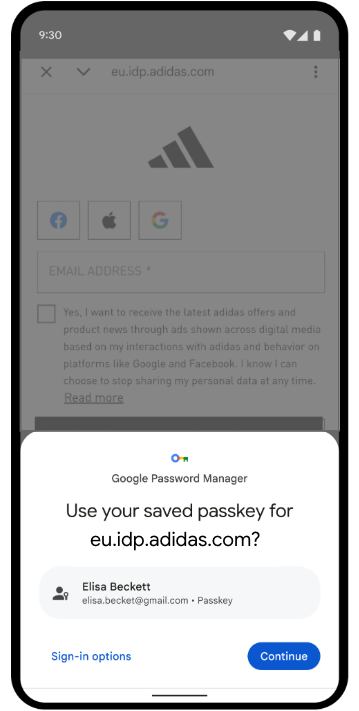
To help users seamlessly adopt passkeys, adidas implemented Conditional Create. This feature lets a website automatically create a passkey when a user signs in with a password stored in their password manager. To ensure the highest success rate, the system calls the API immediately after a successful sign-in so that the system recognizes the password use as recent.
const cred = await navigator.credentials.create({
  publicKey: options,
  mediation: 'conditional' // Enables automatic passkey creation
});
adidas integrated this feature with custom logic that first validates the user's environment. Specifically, the system checks if the Conditional Create feature is supported by the browser. The system also respects user preferences by suppressing the prompt if the user has already skipped passkey creation three times in the last six months.
If the environment is compatible, the system attempts to create the passkey in
the background, immediately after successful user authentication. This specific
timing increases the likelihood that the prerequisites are met. Importantly, the
implementation handles WebAuthn exceptions with a "fail-open" philosophy to
always prioritize user access. If the browser reports an InvalidStateError,
indicating a passkey likely already exists, the system stops the background
creation and immediately signs the user in. Conversely, if a NotAllowedError
occurs, which means the specific conditions for automatic creation were not met,
the system detects this state and guides the user to a "Passkey Collector"
screen to guide them through a manual setup process. By distinguishing between
these technical constraints and user behaviors, adidas ensures that the push for
passkey upgrades enhances the sign-in experience rather than interrupting it.

2. Ensure reliability with the Signal API
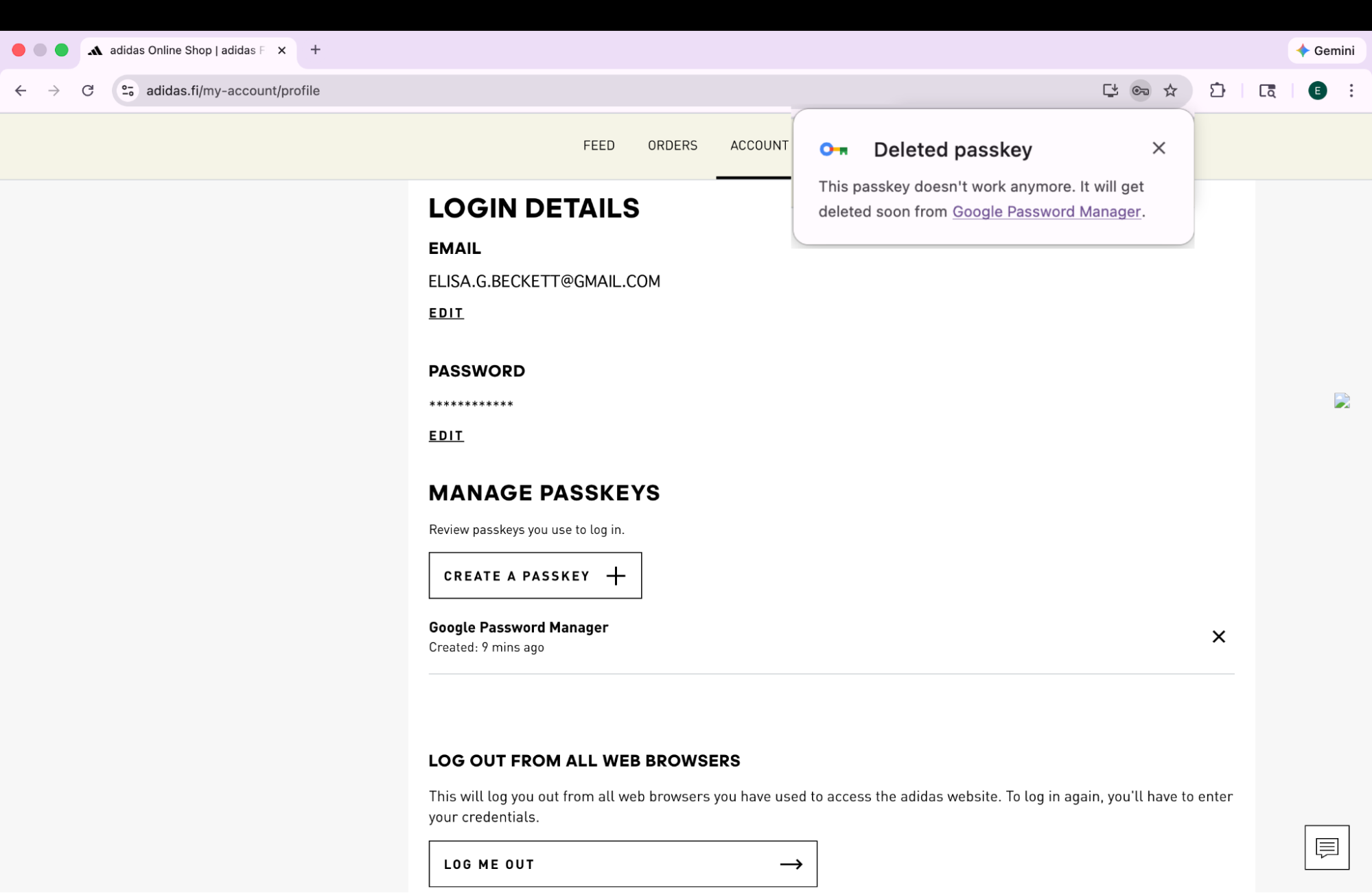
As users manage their credentials across devices, inconsistencies can arise. For example, a passkey might be deleted from the server but remain on the user's device. To prevent sign-in failures caused by these "phantom" credentials, adidas implemented the Signal API. This API lets the server signal the status of credentials to the passkey provider.
adidas uses all three available Signal API methods to maintain this consistency. Rather than guessing which credentials to remove, adidas maps specific user lifecycle events to the appropriate API call:
- Registration failures: When a passkey is created on the client but fails
to register on the backend, adidas uses
signalUnknownCredentialto immediately remove the orphaned credential. - Invalid sign-ins: If a user attempts to sign in with a revoked or
outdated passkey,
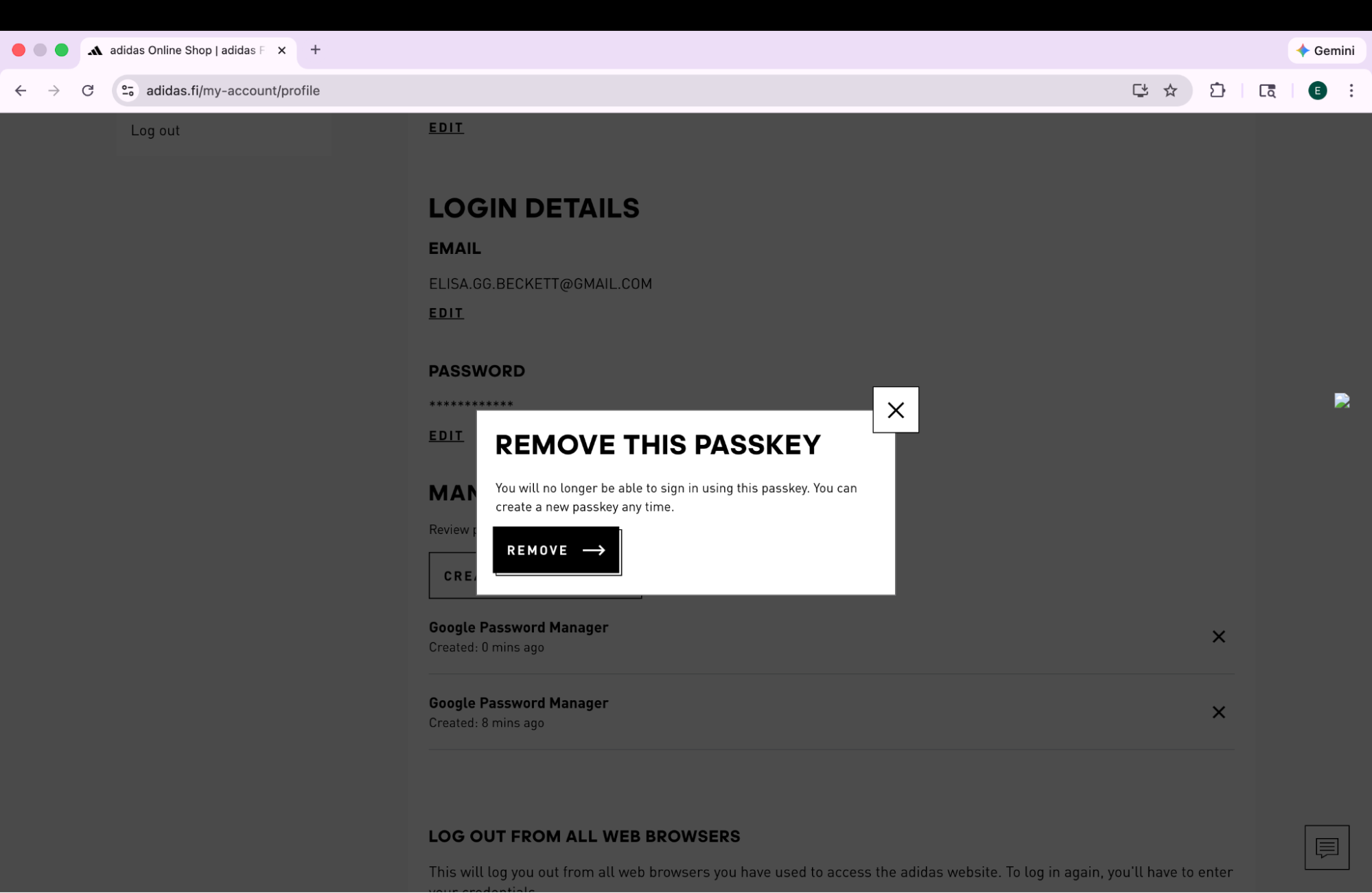
signalUnknownCredentialsignals the provider to hide it. - User management: When a user explicitly removes a passkey in their
account settings,
signalAllAcceptedCredentialssynchronizes the allowlist. This ensures the deleted passkey is no longer offered. - Account updates: When a user changes their email or username,
signalCurrentUserDetailsupdates the metadata on the device to match the server.
// Detect authentication failure due to lack of the credential

if (result.status === 404) {
  if (PublicKeyCredential.signalUnknownCredential) {
    await PublicKeyCredential.signalUnknownCredential({
      rpId: "adidas.com",
      credentialId: "..." // base64url encoded credential ID
    });
  }
}
3. Unify access with Related Origin Requests and Digital Asset Links
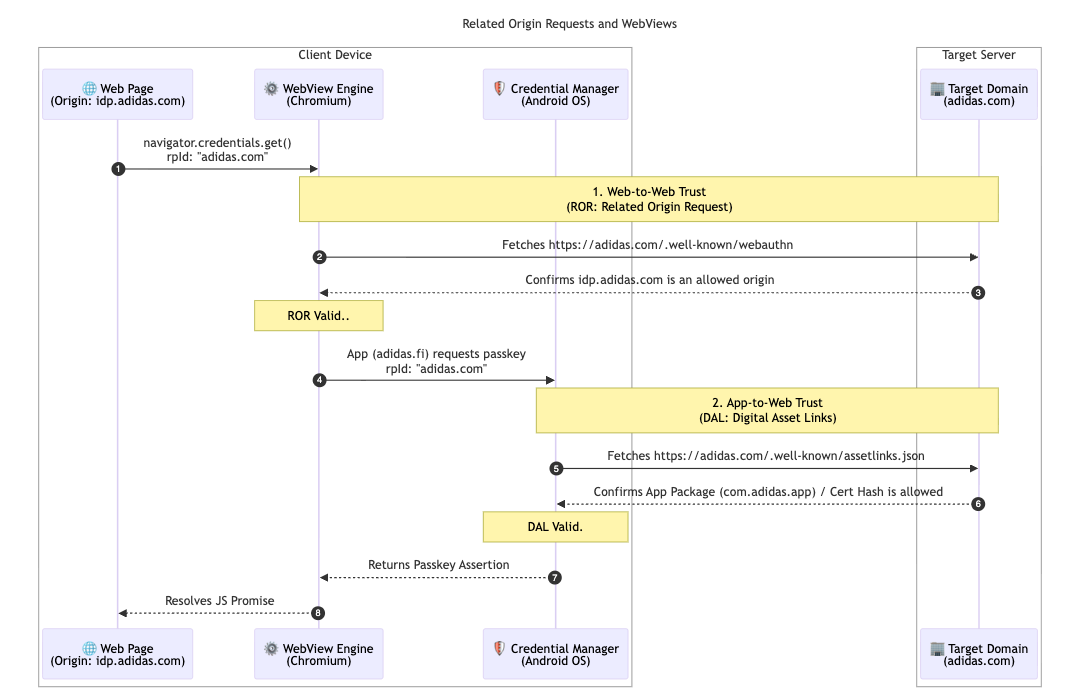
To further support their multi-market architecture, adidas implemented Related
Origin Requests. While most users
stick to their local market (for example, adidas.nl), this
configuration lets users who navigate between regions reuse passkeys across
allowed domains by targeting a single Relying Party
ID (adidas.com).
To enable this, adidas hosts a webauthn configuration file at their primary
Relying Party ID (RP ID) domain. This file contains an explicit allowlist of
origins that are permitted to use adidas.com for passkey registration and
authentication. By defining these relationships, the browser can verify that a
passkey created on one regional site is valid for use on another, providing a
frictionless experience for global users.
// https://www.adidas.com/.well-known/webauthn

{
  "origins": [
    "https://www.adidas.fi",
    "https://www.adidas.nl",
    // ... abridged (the full file lists 50+ regional domains)
  ]
}
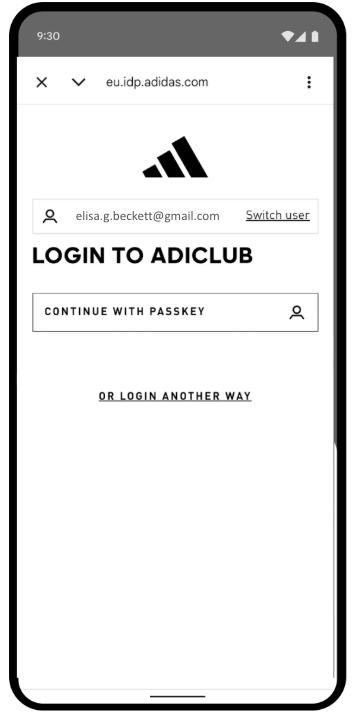
Importantly, adidas also provided seamless passkey support within their Android mobile apps using Digital Asset Links. Since the apps use a WebView hosted on idp.adidas.com for authentication, Digital Asset Links were required to establish a trusted relationship between the Android app and the Relying Party ID (adidas.com). This verification lets the app access the same passkeys used on the web, creating a smooth, unified sign-in experience across platforms.
To achieve this, adidas hosts a Digital Asset Links (assetlinks.json) file on
their respective web domains. This file publicly declares the cryptographic
association with their Android applications. Similarly, to support their iOS
ecosystem, adidas uses Associated
Domains.
By hosting an apple-app-site-association file, they establish a secure
connection that lets their iOS app securely use passkeys in a web
view.
// https://www.adidas.fi/.well-known/assetlinks.json

[
  {
    "relation": [
      "delegate_permission/common.handle_all_urls",
      "delegate_permission/common.get_login_creds"
    ],
    "target": {
      "namespace": "android_app",
      "package_name": "com.adidas.app",
      "sha256_cert_fingerprints": [
        "B2:55:43:78:89:F6:F6:FD:BB:16:5C:43:EE:66:14:18:D4:E8:33:6D:3A:1F:68:86:C3:A8:7C:89:2B:51:45:96",
        "..."
      ]
    }
  },
  // ... abridged
]
What's next for adidas?
With a robust foundation of automatic upgrades and synchronized credentials live on adidas.fi and adidas.nl, adidas will deploy this seamless setup to all other global markets by the end of April 2026. Additionally, adidas is exploring even more frictionless sign-in experiences by testing the immediate mediation origin trial. Future plans include letting users create accounts directly with passkeys. This removes the current requirement to sign up with an alternative method first. The team is also investigating "smart triggering" to directly invoke the system passkey dialog on the second step of sign-in. This eliminates the need for an extra click when there is high confidence that the user has a passkey available on their current device.
Why this matters for you
The shift to passwordless authentication succeeds when the user experience remains seamless. By implementing Conditional Create, you can effortlessly migrate users away from passwords without disrupting their habits. By using Related Origin Requests, you can share those passkeys across your domains, letting users seamlessly access your entire ecosystem with a single passkey. Finally, pairing this with the Signal API ensures that your unified, passwordless experience remains reliable and error-free.