

Published: March 5, 2026
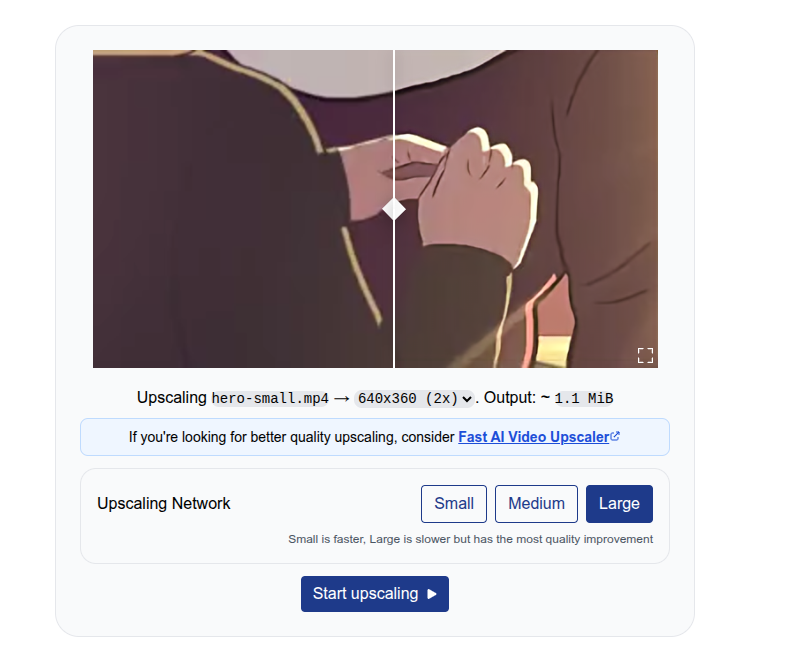
I, Sam Bhattacharyya, initially built Free AI Video Upscaler as an open source hobby project in 2023. It unexpectedly and organically grew to 250,000 monthly active users (MAU) (as of February 2026). This was possible because the project was built with client-side AI processing, which has zero server processing costs. You can enhance video in the browser, without requiring software installation or sign-in.
This document explains how I used WebGPU and WebCodecs to add free, client-side processing to my application.
Challenges with server cost
In a previous role, I managed AI infrastructure for a browser-based live streaming tool with millions of users and significant budget costs to process videos on the server side.
Server-side video processing accounted for 20% of the budget. This was a major variable cost for the company, second only to salaries. For every AI feature, such as transcription, audio, or video enhancement, the team faced strict budget requirements ($0.1 per hour of video) for new implementations.
Client-side AI was the only exception, with features like virtual backgrounds and background noise removal implemented using an in-house client-side SDK. These AI features incurred no server processing costs because model inference and video processing occurred on the user's device.
APIs like WebCodecs enable building full video processing pipelines, including full-fledged video editing suites, in the browser. WebGPU makes client-side AI much more efficient.
Client-side processing with WebCodecs and WebGPU
Free AI Video Upscaler uses the open source WebSR SDK. This SDK accepts an image, upscales it, and paints the result to a canvas.
A super-resolution neural network accomplishes upscaling by applying repeated image convolutions (matrix multiplications) to extract image features from a source image. More convolutions are then applied to these image features to reconstruct the final higher-quality image.
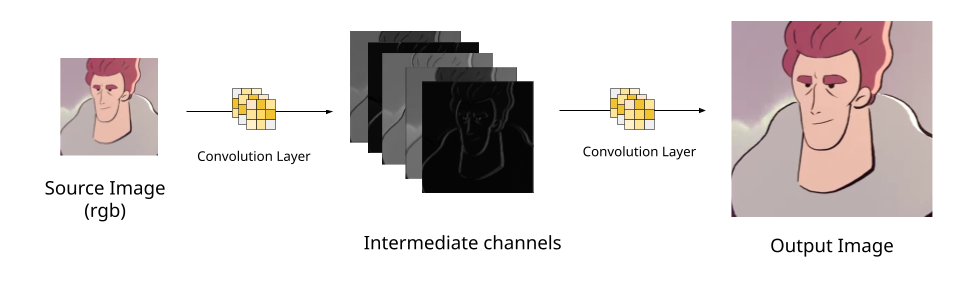
WebSR implements these neural network convolution layers as WebGPU compute shaders. For example, see an example layer and the full network. When you call the render method, the SDK runs each layer of the upscaling network and outputs the final image to a canvas. You can learn more about the neural network implementation.
import WebSR from "https://esm.sh/@websr/websr@0.0.15";

const gpu = await WebSR.initWebGPU();
const canvas = document.getElementById("canvas");

const websr = new WebSR({
  network_name: "anime4k/cnn-2x-l",
  weights: await (
    await fetch("https://katana.video/files/cnn-2x-lg-2d-animation.json")
  ).json(),
  gpu,
  canvas,
});

const img = document.getElementById("source");
const bitmap = await createImageBitmap(img);

await websr.render(bitmap);
See the WebSR SDK example on Codepen.
You can replace the WebSR SDK with any model, using frameworks like MediaPipe or TensorflowJS. The video processing pipeline uses WebCodecs and is structured as a transcoding pipeline.
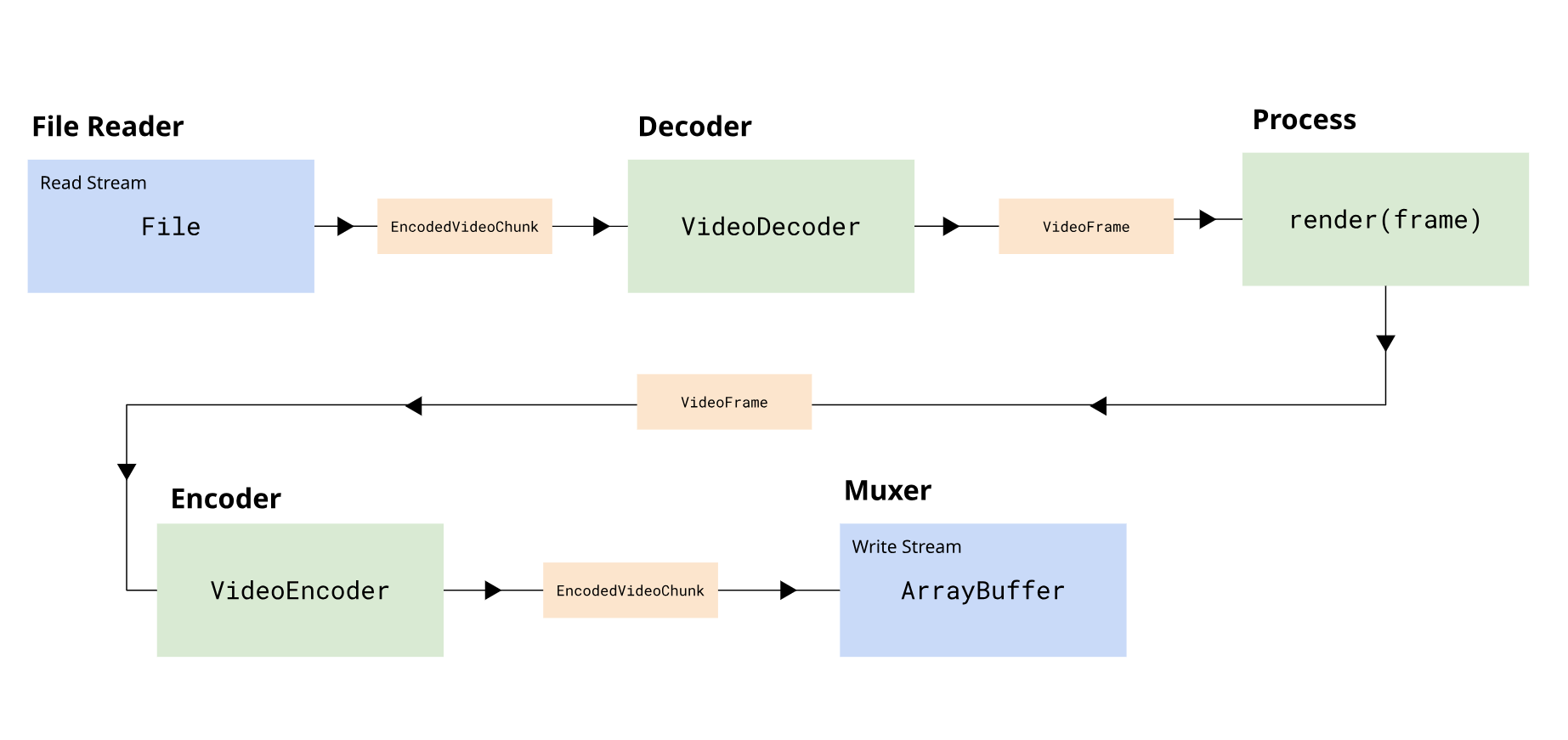
The pipeline is broken into several stages:
- Demuxing: Reads encoded video chunks from a File object.
- Decoding: Decodes encoded chunks into VideoFrame objects.
- Processing: Converts the input VideoFrame to an upscaled VideoFrame.
- Encoding: Encodes the upscaled VideoFrame objects to new encoded chunks.
- Muxing: Writes the output encoded chunks to the output file.
The pipeline uses the Streams
API. The
encoding, decoding, and demuxing or muxing are implemented as streams. For a demo,
the project uses muxing and stream utilities from the webcodecs-utils
library. This library provides
streaming
wrappers for
VideoEncoder
and
VideoDecoder.
import {
  SimpleDemuxer,
  VideoDecodeStream,
  VideoProcessStream,
  VideoEncodeStream,
  SimpleMuxer,
} from "https://esm.sh/webcodecs-utils";

import WebSR from "https://esm.sh/@websr/websr@0.0.15";

// Fetch demo video
const arrayBuffer = await (
  await fetch("https://katana.video/files/hero-small.mp4")
).arrayBuffer();
const videoFile = new File([arrayBuffer], "hero-small.mp4", {
  type: "video/mp4",
});

// Initialize WebGPU and WebSR
const gpu = await WebSR.initWebGPU();
const weights = await (
  await fetch("https://katana.video/files/cnn-2x-lg-2d-animation.json")
).json();
const websr = new WebSR({
  network_name: "anime4k/cnn-2x-l",
  weights,
  gpu,
  canvas,
});

// Set up demuxer
const demuxer = new SimpleDemuxer(videoFile);
await demuxer.load();
const decoderConfig = await demuxer.getVideoDecoderConfig();

const encoderConfig = {
  codec: "avc1.4d0034", // https://webcodecsfundamentals.org/codecs/avc1.4d0034.html
  width: 640,
  height: 360,
  bitrate: 1000000,
  framerate: 30,
};

// Set up muxer
const muxer = new SimpleMuxer({ video: "avc" });

// Build the upscaling pipeline
await demuxer
  .videoStream()
  .pipeThrough(new VideoDecodeStream(decoderConfig))
  .pipeThrough(
    new VideoProcessStream(async (frame) => {
      // AI upscale with WebSR
      await websr.render(frame);
      const upscaledFrame = new VideoFrame(canvas, {
        timestamp: frame.timestamp,
        duration: frame.duration,
      });

      return upscaledFrame;
    }),
  )
  .pipeThrough(new VideoEncodeStream(encoderConfig))
  .pipeTo(muxer.videoSink());

// Get output
const blob = await muxer.finalize();
See the full pipeline on Codepen.
The Streams API is especially helpful with WebCodecs because it uses backpressure to automatically slow down upstream stages, such as decoding, if one stage, such as encoding, gets overloaded. This avoids memory issues and improves efficiency.
This creates a straightforward user experience:
- You upload a video with a file input.
- The system processes the video locally.
- You can download the result as a Blob.
You can learn more about building a transcoding pipeline in WebCodecs. You can also see the full processing pipeline for Free AI Video Upscaler, which is less than 400 lines of code, on GitHub.
Results
Free AI Video Upscaler's only promotion was a single Reddit post. Despite this, it has grown organically to 250,000 monthly active users, with a 32% month-over-month growth rate, thanks to word-of-mouth from users sharing the tool on forums.
250,000
Monthly active users
10,000
Videos processed per day
30,000
Hours of video processed per month
0 $
Server processing costs
It processes 10,000 videos a day (30,000 hours of video per month) with zero server costs.
Free AI Video Upscaler serves as a lead generation tool for a paid AI Upscaling service. I built this service, too, using more powerful AI models running server-side. This approach generates profitability without marketing, while the initial application remains free and open source.
Recommendations and resources
Before WebCodecs and WebGPU, video-processing intensive applications required either desktop software, which could be cumbersome, or costly server-side processing. Server costs often accounted for a significant portion of a video application's operating costs.
These browser APIs let you build efficient client-side video-processing applications. These applications are more intuitive and offer less friction than desktop software, and they are also more affordable and scalable than server-side processing.
If you're interested in learning more about WebCodecs and how to build video applications like Free AI Video Upscaler or Katana, read WebCodecsFundamentals. You'll learn how to build production WebCodecs applications with a focus on production and implementation details.