
You have two options for client-side AI. You can use built-in AI capabilities that ship in a browser or run custom models with client-side libraries. Both approaches help you deliver AI features without a server, but they differ significantly in scope, flexibility, and operational complexity.
This module helps you choose between these approaches by explaining how they work, what trade-offs to expect, and how to handle application-specific constraints.
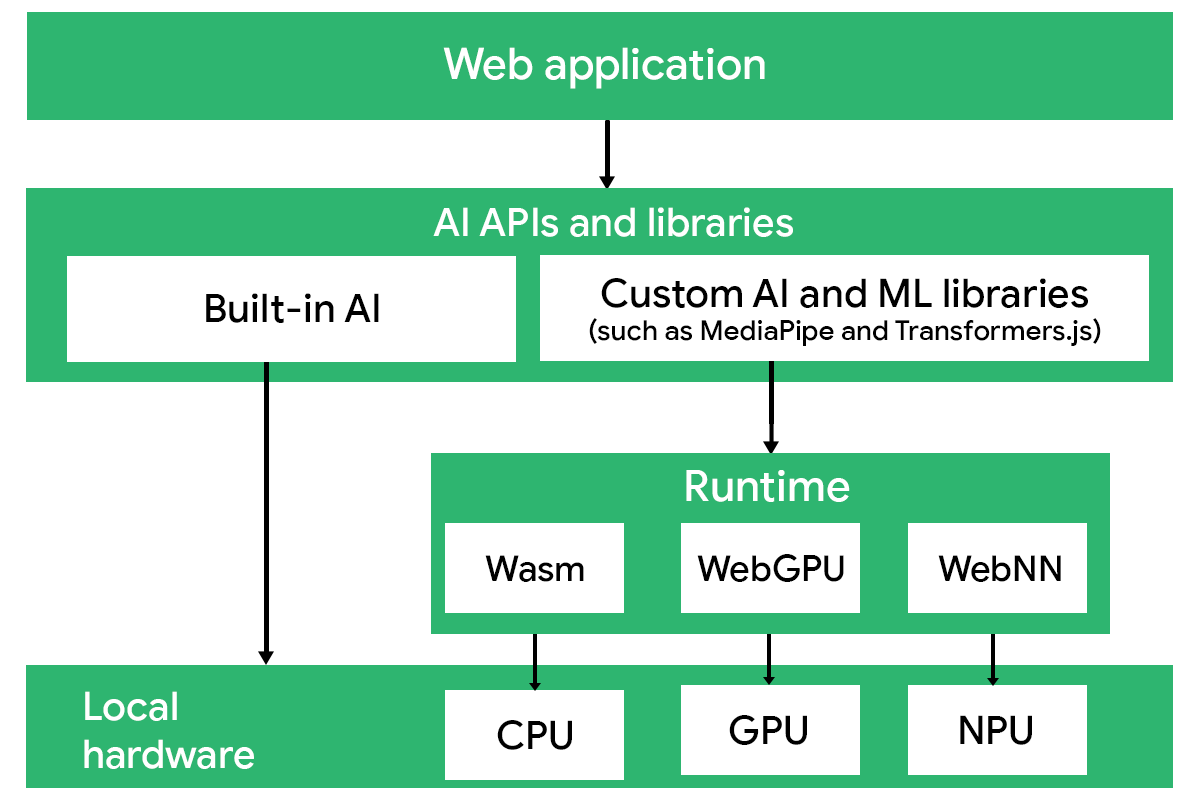
Built-in AI
A growing number of browsers now ship with compact, preloaded AI models that you can call directly from JavaScript. For example, Google Chrome bundles a Google foundation model, while Microsoft Edge exposes a Microsoft foundation model. The browsers expose high-level APIs so developers can access these models. Chrome offers several task-based APIs, at varying stages of development, including APIs that support summarization, proofreading, and translation.
From a developer's perspective, built-in models behave like any other browser capability: you call an API, receive a result, and continue building your interface. You don't need to load models, configure runtimes, or maintain an inference pipeline. Built-in AI can dramatically reduce the cost of a feature, because you don't need to pay for each API call. You can prototype, iterate, and discard ideas quickly, focusing on user experience and product behavior instead of infrastructure.
Built-in AI trades flexibility for simplicity. Here are some limitations you should plan for:
- Constrained output behavior: Models are intentionally small and bounded in capability; they are less suitable for complex reasoning, long contexts, or open-ended conversation.
- User-side download and storage cost: Before the AI features become available, the user's browser must download and cache the model. This requires bandwidth, time, and local disk space, which may impede the first run.
- Browser-specific availability: Capabilities might differ across browsers (such as Chrome and Edge). There is no guarantee of uniform support, so you must implement server-side fallbacks for environments without support.
- No persistence guarantees: Models hosted on devices can be removed by the operating system or browser at any time. Your application should be built to handle temporary gaps in model availability.
As you may remember from Choose a platform, built-in AI is best for smaller, task-specific features. If your application requires retrieval (RAG), agents, structured outputs, or custom workflows, you need a client-side runtime or server inference.
Custom deployments with libraries
When you hit the limits of built-in AI, you might want to try out custom AI libraries. They offer access to additional models and pipeline functionality, and some of them even provide options for custom training and fine-tuning.
| Library | What it runs | Training | Best for |
| Transformers.js | Models from Huggingface, incl. multiple modalities | No full training (some fine-tuning support) | NLP pipelines, embeddings, small multimodal tasks |
| TensorFlow.js | TF/Keras models | In-browser | Vision tasks, audio tasks, custom classifiers |
| WebLLM | Smaller language models (such as Gemma, Mistral, Phi-3, or Qwen) | Offline | Chatbots, reasoning, agents, offline AI |
| MediaPipe | Task-specific vision models | No | Face/hand/pose apps, AR, gesture UIs |
| ONNX Runtime Web | Arbitrary ONNX models | Offline | Embeddings, safety filters, SEO scoring, custom machine learning |
Transformers.js
Transformers.js provides a channel to Huggingface, the biggest repository of open models. You can load and run thousands of pre-trained models from the Huggingface Hub, with no backend setup required. It abstracts common NLP and multimodal tasks through familiar pipelines (such as sentiment analysis, named entity recognition, summarization, and embeddings).
It's an excellent choice for developers who want flexible experimentation, swap-in/swap-out models from the HF Hub, or build rich multi-model workflows in the browser without maintaining server infrastructure.
TensorFlow.js
TensorFlow.js lets you run TensorFlow and Keras models directly in the browser or Node.js. A major advantage is its large ecosystem of pre-trained models, covering tasks like image classification, object detection, and pose estimation, without custom work.
TensorFlow.js is ideal if you want reliable in-browser inference for well-established tasks, don't need large and powerful generative models, and prefer a stable API with strong documentation and long-term support.
WebLLM
WebLLM executes language models in the browser, enabling client-side LLM experiences. It offers an API that supports any open weight model, allowing you to create a hybrid setup with minimal changes. Developers can also load custom MLC-compiled models, making it suitable for domain-specific assistants and offline applications.
WebLLM is the right choice when you want to offer conversational or agentic features on the client.
MediaPipe
MediaPipe specializes in computer vision tasks, including face detection, hand tracking, and segmentation. The library handles the full pipeline from pre-processing through inference and post-processing, offering stable real-time performance even on mid-range hardware. You'd likely use it for interactive visual features, fitness applications, or any other scenario that requires consistent and offline perception.
MediaPipe also provides models for text and allows for advanced fine-tuning of language models.
ONNX Runtime Web
ONNX Runtime Web (ORT-Web) is a flexible, high-performance engine for running models defined using the ONNX standard in the browser. This standard is framework-agnostic, so you can export models from PyTorch, TensorFlow, Keras, scikit-learn, and many other frameworks, and directly deploy them in your web app.
ONNX models are widely represented on Huggingface, so ORT-Web is a great choice when you want to use a customized client-side model.
Runtimes
To run inference, client-side AI libraries rely on browser runtimes, lower-level execution backends that map operations to the underlying hardware. The runtime you use impacts the performance, memory usage, numerical stability, and device compatibility of your AI features.
Most libraries abstract these details, but understanding runtimes helps you make informed architecture decisions and diagnose bottlenecks. The following table shows which major runtimes are supported by client-side AI libraries:
| Library | Wasm | WebGPU | WebNN |
| Transformers.js | |||
| TensorFlow.js | |||
| WebLLM | |||
| MediaPipe | |||
| ONNX Runtime Web |
WebAssembly
WebAssembly (Wasm) runs optimized CPU-bound code in the browser at near-native speed. It's the most universally supported machine learning runtime and works across all browsers, platforms, and hardware.
Wasm supports SIMD (single instruction, multiple data) and multithreading (where allowed), so it's well-suited for smaller ML workloads, such as embeddings, classifiers, and ranking models. Wasm doesn't use the GPU, so it's slower for larger matrix multiplications, but it remains a great fallback.
If WebGPU is unavailable, Wasm keeps your features running.
WebGPU
WebGPU is a graphics API that's built for ML workloads. It delivers major speed improvements over Wasm, and can run larger generative models, multi-head attention, and high-dimensional embeddings fully on the client. Libraries rely on WebGPU to achieve LLM inference in the browser, such as WebLLM, Transformers.js, and ONNX Runtime Web,.
Browser support is growing quickly, but you should still consider providing Wasm fallbacks for unsupported devices.
WebNN
WebNN lets the browser run machine learning workloads on whatever hardware accelerator the device provides, whether it's GPUs, NPUs, or other specialized chips. ML operations such as matrix multiplications, convolutions, and activations are executed on the most efficient available path.
Your takeaways
Client-side AI lets web developers add intelligence without relying on servers, either through built-in browser models or custom libraries. Built-in AI is ideal for fast prototyping and lightweight, well-scoped features, while custom libraries offer greater flexibility, model choice, and control at the cost of higher complexity.
Once you understand the trade-offs between these options and the runtimes they rely on, you can better choose your stack, which may change as your application's needs evolve.
Resources
- Read Jason Mayes' article, Life on the Edge with Web AI.
Check your understanding
What is a key advantage of using browser-supplied models, in comparison to custom client-side libraries?
If you want to use a runtime for ML that works across browsers, which should you use?
When should you choose WebLLM as your client-side library?
What is a limitation of client-side AI that developers should plan for?