

در ماژول هوش مصنوعی مولد ، آموختید که فضای ورودی مدلهای هوش مصنوعی مولد عملاً نامحدود است. برای تولید خروجیهایی که با انتظارات کاربران شما همسو باشند، باید اعلانهایی (prompts) بسازید. اعلان، قراردادی ساختاریافته بین برنامه شما و مدل است.
یک درخواست خوب نوشته شده:
- بیان میکند که LLM چگونه باید پاسخ خود را ارائه دهد.
- شامل اجزای متعددی است که میتوانند در طول زمان نسخهبندی، آزمایش و بهبود یابند.
- میتواند به عنوان یک مصنوع مشترک برای همکاری بین تیمها عمل کند.
در این ماژول، شما یاد میگیرید که چگونه دستورالعملهای مؤثر بنویسید. ما توضیح میدهیم که چگونه یک دستورالعمل ساختار یافته و اجزای آن چگونه بین سیستم و کاربر نهایی توزیع میشوند. همچنین تکنیکهای اولیه دستورالعملنویسی و سناریوهایی را که میتوانید هر یک از آنها را در آن اعمال کنید، خواهید آموخت.
در طول این ماژول، از یک مثال مشترک استفاده خواهیم کرد: BlogBuddy، یک دستیار نوشتاری مبتنی بر هوش مصنوعی، که از استفاده CyberAgent از Prompt API الهام گرفته شده است.
برای طرح اولیه سیستم BlogBuddy به ماژول هوش مصنوعی مولد برگردید.
اجزای سریع
هر جزء اعلان، نقش خاصی در هدایت رفتار مدل دارد.
- زمینه : نقش و دامنه مدل را مشخص میکند، بنابراین مدل میفهمد که چگونه رفتار کند.
- دستورالعمل : یک وظیفه خاص را به مدل اختصاص میدهد.
- متغیرهای ورودی : زمینهی خاص هر موقعیت، که توسط برنامهی شما به صورت بلادرنگ ارائه میشود.
- قالب خروجی : ساختار خروجی مورد انتظار را تعریف میکند. برای مثال، ممکن است خروجیهای JSON بخواهید.
- مثالها : نشان دهید که چگونه وظیفه باید برای یک یا چند ورودی دیگر اجرا شود.
- محدودیتها : محدودیتهای مشخصی تعیین کنید تا خروجی، ثابت، ایمن و مطابق با برند شما باشد.
ممکن است دستور شما شامل برخی یا همه این اجزا باشد. مثال زیر این اجزا را برای ویژگی دستیار نوشتاری BlogBuddy نشان میدهد.
### Context

You are a writing assistant for blog authors.
Your job is to generate helpful, concise, and engaging content.

### Instruction

Generate 3 alternative titles for the user's blog post with a given style.

### Input variables

Here is the content of the blog post:
${blogPostContent}

Here is the desired style:
${titleStyle}

### Output format

Return valid JSON ONLY, in the following exact structure:
{
  "titles": ["Title option 1", "Title option 2", "Title option 3"]
}

### Examples

Example input:
{
  "blogPostContent": "I finally visited the small neighborhood café I've been eyeing for months...",
  "titleStyle": "friendly"
}

Example output:
{
  "titles": [
    "A First Visit to the Neighborhood Café",
    "Trying the Café I've Wanted to Visit for Months",
    "My Experience at a Long-Awaited Local Spot"
  ]
}
### Constraints

- Each title must be under 128 characters.
- Titles must be original, not copied verbatim from the draft.
- Keep the tone natural and human. Avoid emojis unless explicitly requested.
- Avoid sensationalism or clickbait.
- If the draft includes multiple topics, choose the most prominent topic.
برای اولین درخواستهایتان، با موارد ضروری شروع کنید: دستورالعمل و قالب خروجی. سپس، به طور مکرر اجزای بیشتری را اضافه کنید، زیرا نتایج را تجزیه و تحلیل میکنید و تعیین میکنید که برای موفقیت به چه کنترلهای دقیقتری نیاز است.
درخواستهای سیستم در مقابل درخواستهای کاربر
برخی از اجزای اعلان به صورت کدنویسی شده هستند، در حالی که برخی دیگر میتوانند توسط کاربر نهایی ارائه شوند:
اعلان سیستم توسط توسعهدهندگان برنامه ارائه میشود و رفتار کلی مدل را تعریف میکند. این اعلان میتواند نقش مدل، لحن مورد انتظار، فرمت خروجی (مانند یک طرحواره JSON دقیق) و هرگونه محدودیت جهانی را تعیین کند. اعلان سیستم همچنین جایی است که شما الزامات ایمنی و مسئولیت را کدگذاری میکنید. این اعلان در بین درخواستها ثابت میماند و پایه و اساس پایداری برای رفتار مدل فراهم میکند.
اعلان کاربر شامل درخواست فوری است که منجر به یک خروجی میشود. کاربر یک کار خاص را درخواست میکند که میتواند شامل متغیرهای خاصی باشد. به عنوان مثال، "سه عنوان برای این پست نمایش داده شود"، "این پاراگراف ادامه یابد" یا "این متن رسمیتر به نظر برسد".
اکثر APIهای مولد هوش مصنوعی به شما اجازه میدهند یک اعلان را به صورت آرایهای از پیامها ساختاردهی کنید که هر کدام دارای نقش (سیستم یا کاربر) و محتوا هستند. این امر جداسازی دستورالعملهای پایدار و سراسری را از ورودی پویا و بر اساس هر درخواست آسانتر میکند.
چگونه تصمیم میگیرید که چه اجزایی به اعلان سیستم تعلق دارند و چه چیزهایی باید به کاربر واگذار شود تا مشخص کند؟ پاسخ به این بستگی دارد که تجربه کاربری شما چقدر انعطافپذیر است و مدل شما چقدر توانمند است.
موارد استفاده محدود
برای موارد استفاده بسیار خاص، بیشتر موارد میتوانند از پیش در اعلان سیستم تعریف شوند. برای مثال در BlogBuddy، کاربران میتوانند روی نمایش عنوانها کلیک کنند تا پیشنهادهای عنوان تولید شده برای پیشنویس خود را فهرست کنند.
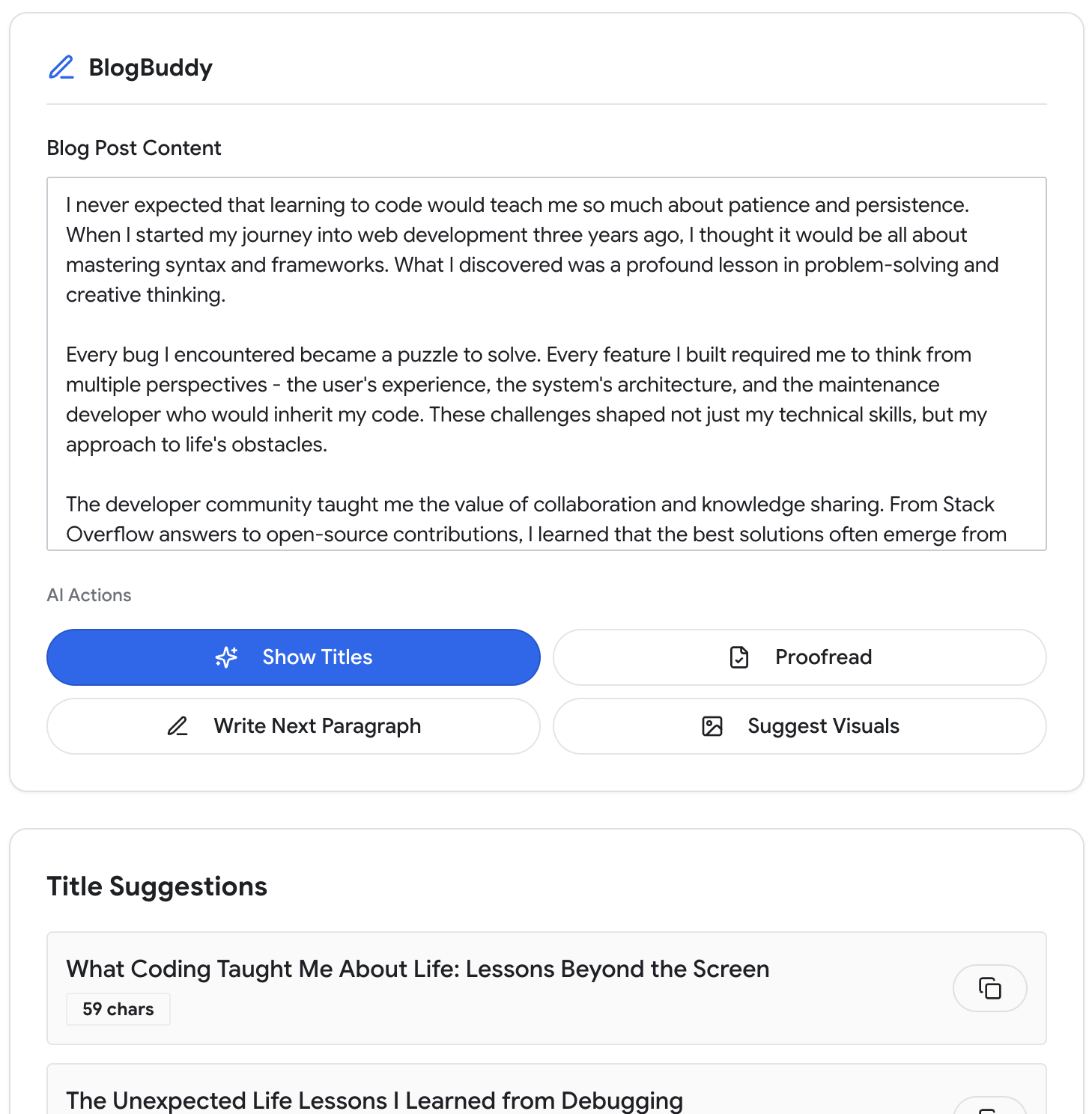
وظیفه ثابت است، فرمت خروجی مشخص است و کاربر برای دریافت نتیجه مورد انتظار نیازی به ارائه اطلاعات اضافی ندارد. در این حالت، شما تمام قوانین پایدار، دستورالعملهای لحن، طرحوارههای خروجی و مثالها را در اعلان سیستم قرار میدهید.
برای ساخت این با استفاده از API مربوط به Prompt ، initialPrompts برای تعریف رفتار در سطح سیستم برای کل جلسه استفاده میکنیم:
// Defines stable behavior for the entire session
const session = await LanguageModel.create({
  initialPrompts: [
    {
      role: "system",
      content: `You are a blog-writing assistant.
      Your task is to generate high-quality titles for blog posts.
      Always respond in concise, friendly language.
      Return exactly 3 alternative titles.
      Produce valid JSON with a "titles" array of strings.`
    }
  ]
});
وقتی کاربر روی نمایش عنوانها کلیک میکند، اعلان برای محتوای فعلی فراخوانی میشود:
// The only variable input is the blog content
const result = await session.prompt(blogContent);
با گذشت زمان، کاربران ممکن است درخواست انعطافپذیری و کنترل بیشتری داشته باشند. در این حالت، میتوانید اجزای خاصی را با کنترلهای رابط به اعلان کاربر منتقل کنید. به عنوان مثال، یک منوی کشویی از مشخصات سبک یا لحن.
با این حال، تعداد زیاد اقدامات ساختاریافته میتواند تجربه کاربری را مختل کند. وقتی این اتفاق میافتد، ممکن است بخواهید به یک طراحی بازتر بروید که به کاربران اجازه میدهد بیشتر درخواستهای خود را خودشان مشخص کنند. میتوانید در مورد بهینهسازی این طراحی در ماژول الگوهای UX اطلاعات بیشتری کسب کنید.
وظایف انعطافپذیر به دستورالعملهای دقیق کاربر متکی هستند
یک تجربه تعاملی و باز که به کاربران کمک میکند پستهای وبلاگ را از ابتدا بنویسند، انعطافپذیری بیشتری را به کاربران شما ارائه میدهد. آنها ممکن است ایده، طرح کلی، بازنویسی، تغییر لحن یا طوفان فکری بخواهند یا مشخص کنند که یک کار دقیقاً چگونه باید اجرا شود. با این نوع برنامه، احتمالاً به یک مدل سمت سرور قدرتمندتر نیاز دارید.
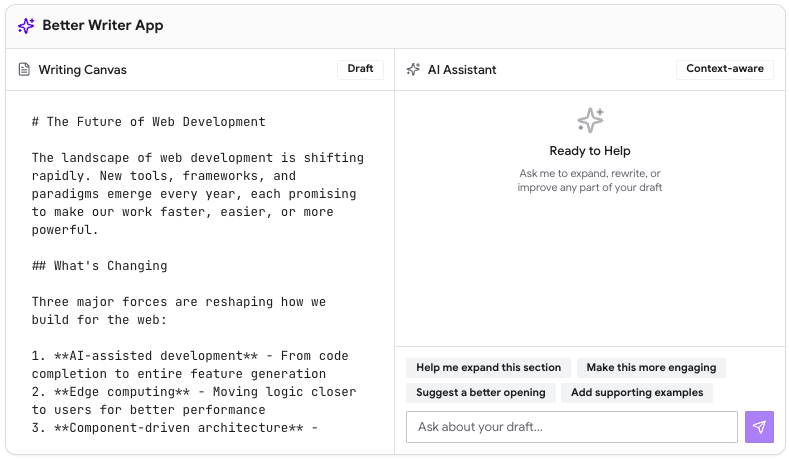
با وظایف انعطافپذیر، کاربر باید اطلاعات بیشتری را مشخص کند، زیرا طیف گزینههای ممکن بسیار گستردهتر است. اعلان سیستم همچنان رفتار کلی را کنترل میکند.
بهترین شیوهها عبارتند از:
- قوانین، ساختار و مثالهای پایدار را در اعلان سیستم قرار دهید. محتوای پویا و درخواستهای مربوط به وظیفه خاص را در اعلان کاربر قرار دهید.
- هرچه تجربه کاربری شما بازتر باشد، درخواست کاربر برای تطبیق با ورودیهای غیرقابل پیشبینی به انعطافپذیری بیشتری نیاز دارد.
- هرچه کاربر مجبور به انجام کار بیشتری باشد، مدل باید توانمندتر باشد، زیرا باید تغییرات بیشتری را با ساختار داخلی کمتری مدیریت کند.
شما میتوانید از این قوانین برای بهینهسازی تدریجی تعادل بین کنترل و انعطافپذیری کاربر در زمینه محصول خود استفاده کنید. ترجیحات و رفتارهای کاربر را از نزدیک مشاهده کنید. انعطافپذیری بیشتر همیشه به ارزش واقعی تبدیل نمیشود. کاربران شما همچنین باید زمان، مهارت و پهنای باند شناختی لازم را برای ایجاد پیامهای گستردهتر داشته باشند.
تکنیکهای رایج تشویق
توسعهدهندگان معمولاً چندین تکنیک فراخوانی را امتحان میکنند تا بهترین روش را برای مورد استفاده و مدل خود پیدا کنند.
راهنمایی بدون نتیجه
شما وظیفه را برای مدل شرح میدهید و امیدوارید که بهترین نتیجه را بگیرید. برای مثال:
"What is the capital of France?"
روش Zero-shot prompt یک روش پایه کارآمد برای بسیاری از وظایف هوش مصنوعی است. برای درخواستهایی که پیچیده نیستند، مانند جستجوی دانش جامع، احتمالاً بهتر است از این تکنیک استفاده کنید. با این حال، در اکثر برنامههای دنیای واقعی، باید prompt خود را با شرطبندی و منطق اضافی گسترش دهید.
چند شات باعث
با ارائه چند مرحلهای، شما مثالهایی برای نشان دادن رفتار، سبک، ساختار و سایر متغیرهای مهم درست ارائه میدهید. در اینجا یک مثال برای طبقهبندی احساسات آورده شده است:
You classify user messages into one of the following categories:
- "positive"
- "negative"
- "neutral"
Here are examples to guide your classifications:
Input: "I love this product! It works perfectly."
Output: { "label": "positive" }

Input: "This is terrible. I want a refund."
Output: { "label": "negative" }
روش «کمی-شات» برای این نوع وظایف شبهپیشبینی مفید است. همچنین میتواند برای وظایفی که از یک ساختار قابل تشخیص پیروی میکنند، مانند تولید عنوان در شکل ۱، اعمال شود.
وقتی فضای خروجی بسیار گسترده است، مانند محتوای باز یا طولانی، احتمالاً ارائه چند نمونه بهترین تکنیک نیست. ارائه مثالهایی که به طور معناداری فضا را پوشش دهند، دشوار یا حتی غیرممکن است.
راهنمایی زنجیرهای از افکار
شما مدل را تشویق میکنید تا قبل از ارائه پاسخ، گام به گام استدلال کند. مراحل را میتوان به صراحت شرح داد، یا میتوان تعریف آنها را به مدل واگذار کرد. برای مثال:
"Think step-by-step to identify the main idea of this paragraph. Then produce a
short heading under 60 characters."
زنجیره فکری برای کارهایی که نیاز به استدلال و اجرای چند مرحلهای دارند، مانند طرح کلی یک پست وبلاگ یا پشتیبانی از تصمیمات پیچیده، بسیار عالی عمل میکند. این تکنیک اصلی پشت مدلهای استدلال است.
این میتواند پرهزینه باشد. تولید ردیابیهای استدلال گام به گام، محاسبات، هزینه و تأخیر را افزایش میدهد. فقط زمانی از آن استفاده کنید که مورد استفاده شما نیاز به استدلال و برنامهریزی پیچیده داشته باشد.
ترغیب به خوداندیشی
پس از تولید اولیه، شما از مدل میخواهید که خروجی خود را نقد و اصلاح کند. برای مثال:
"Review your previous output.
Identify unclear phrasing and rewrite it more concisely."
خوداندیشی به ویژه برای کارهایی که از اصلاح مکرر سود میبرند، مانند ابزارهای ویرایش یا بازنویسی، مفید است. پیادهسازی آن سریع است و میتواند دستاوردهای کیفی قابل توجهی ایجاد کند. یک حلقه خوداندیشی زمانی مفید است که درخواست شما به خوبی عمل کند. ابتدا، خروجی را برای وضوح بیشتر یا افزایش لذت کاربر اصلاح کنید.
نکات مهم شما
در این ماژول، شما یاد گرفتید که چگونه اعلانها از اجزای ساختاریافته ساخته میشوند. در عمل، مهندسی اعلان بسیار تجربی است. وضوح و قابلیت اطمینان تنها پس از چندین دور اصلاح ظاهر میشود.
در ماژول بعدی، به توسعهی دستورالعملهای ارزیابیمحور میپردازیم. این روش به شما کمک میکند تا دستورالعملها را بهطور سیستماتیک بهبود بخشید و روی آنچه برای محصول و کاربران شما بهتر عمل میکند، همگرایی کنید.
منابع
هر یک از این تکنیکها انواع و بهترین شیوههای خاص خود را دارند. طیف گستردهای از منابع خارجی با جزئیات کامل وجود دارد، به عنوان مثال:
- راهنمای سریع مهندسان گوگل کلود
- راهنمای مهندسی سریع DAIR
- سادهسازی دستورالعملها توسط جانا لیپنکووا
- فصل ۶ کتاب «هنر توسعه محصول هوش مصنوعی» را بخوانید.
مستندات مدل انتخابی خود را بررسی کنید، زیرا ممکن است توصیههای خاصی برای شما وجود داشته باشد تا بهترین نتایج ممکن را کسب کنید.
درک خود را بررسی کنید
چه نوع قوانینی را میتوان در اعلان سیستم مشخص کرد؟
وقتی میخواهید مدل قبل از تولید پاسخ، گام به گام استدلال کند، از چه تکنیکی باید استفاده کنید؟
چه زمانی تلقین با چند ضربه بیشترین فایده را دارد؟
تکنیک ترغیب به خوداندیشی چیست؟