
Published: February 25, 2025



Web developers have been building and optimizing websites for human and non-human audiences, including crawlers and other bots. AI agents are the latest web user that benefits from your optimization.
At its core, an agent is a system that receives input, interprets it, then plans and executes actions on behalf of the user (be it a human or another agent). An agent has multiple components, which can include models, APIs, or other tools.
There are several characteristics that define agents. In a web development context, you should think about the following:
- Autonomous: Agents can operate without direct human intervention.
- Interactive: Agents can converse with other agents and humans.
- Reactive: An agent perceives its environment and responds to changes.
- Proactive: Agents can take initiative to meet specific goals.
For example, Example Bookshop is an online bookstore. A user could gather recommendations for a new book, based on books they like and other interests, by interacting with a large language model (LLM). An agent could take the user to the recommended book's page and start the checkout process. If the book was out of stock, the agent could take the user to purchase that recommendation at another online bookstore.
As agents are a fairly new user on the web, you have some time before you need to adopt best practices. However, many of the best practices to help agents actually help all users, particularly building an accessible website.
In this document, we review how agents operate as web users and why you should consider building your website with agents in mind.
How agents operate as users
Much of the discussion around AI and websites has been on crawlers used to scrape training data for LLMs. The scraped data for training is often kept in open datasets like Common Crawl, which helps prevent sites from being overwhelmed by crawlers. However, training is just one of the reasons you'll encounter AI systems.
AI systems can target specific pages to scrape, based on a specific user's request (be it a human or an agent). For example, a user could provide sources to NotebookLM and the system scrapes the content to better help the user with related tasks, such as summarizing or data aggregation.
Agents follow similar patterns and crawl pages on behalf of the user, to answer the user's request, but the flow may be less linear.
While agents have long been used for automation tasks and gathering information, now they can click links and buttons, fill in fields, and scroll on pages, completing workflows on behalf of the users. These can be small tasks, such as filling out contact forms, or more complex tasks, such as booking flights for your family.
Understanding consent is the most important skill for these new types of agents, as they act as companions to humans. Agents should ask for confirmation at critical points, such as a purchase step or submitting a form with sensitive information.
Agents as companions
Agents can be companions or even surrogates for human users, assisting with complex task completion on your website or web application. At a high level, an agent's process is always the same:
- Receive the query.
- Process and plan how to address the query.
- Execute the plan.
- Save any lessons learned to memory.
Agents are best suited to support tasks across multiple origins. In the case of shopping for books, the agent may be completing a task on your origin, while also navigating other similar origins. The better your site is in supporting an agent completing the task, the more likely it is that the agent will complete it with your origin.
Your job as a web developer is to support and build tools to help humans and agents efficiently complete critical tasks. But tools are just one piece of agent infrastructure.
Agent infrastructure
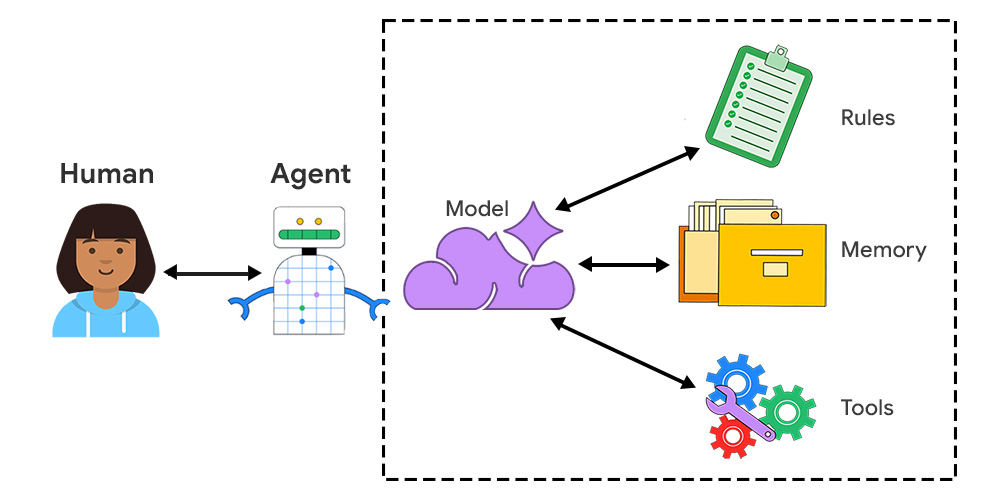
An agent is a contained unit with multiple connected pieces:
- Model: Large language models (LLMs) are the foundation for an AI agent. These provide reasoning, a base of knowledge, and the ability to process and generate language.
- Rules: Various constraints, including a persona, instructions, and goals, help the agent perform tasks consistently.
- Memory: Short-term memory and long-term memory support an agent managing context, gaining efficiency, and generally performing better for the user.
- Tools: There are many different tools an agent could use, including APIs, functions, databases, and even other agents. For example, WebMCP (in origin trial) is a proposal to support structured interactions on your website.
When agents treat websites as data sources or interact directly with pages, they can do so visually or semantically:
- Visual interaction: The agent takes a snapshot of the rendered web page. It uses a vision model to read the content and identify interactive elements.
- Semantic interaction: The agent analyzes the DOM and reads text directly. This is particularly common for agents performing automated tasks.
For both visual and semantic interactions, agents benefit from sites that are well-designed, intuitive to navigate, and have a clear content hierarchy.
Agents require access to data
One way to define agents is by its relationship to data. Is the owner of the agent and data the same or different? This choice determines what layers of authentication are needed and how challenging it is to complete the task.
Zero-party agent
A zero-party agent is a browser-based agent that acts in a local context, using local data. As browsers store custom user preferences which could be considered personally identifiable information (PII), a zero-party agent can prevent operations that share this data with other parties.
First-party agent
A first-party agent is when the tool and information are owned by the same party, so developers can own and support tools, manage access to information and configuration.
For example, say you're a user planning a vacation to Toronto, and you want to build a list of places to visit. An agent provided by Google Maps could take a set of criteria and data to generate a list of points of interest on your behalf, marking each item on the map. This could be considered a first-party agent as the agent is provided by Google, who also owns the map data and any other personal preferences stored by a logged-in user.
Third-party agent
A third-party agent is created by an external developer or organization, and offers functions and data from external services. For example, you may want a third-party calendar provider to support an event-based feature on your website. You could offer tools to these agents, such as WebMCP, or integrate the agents into your workflows (assuming they pass your privacy review).
A third-party agent could conceivably complete the same mapping task, when built as an extension.
Developers could build an agent that relies on specific sources to create lists, such as capturing the best restaurants from local newspapers. This agent would need read access to the local newspaper sites in addition to read and write access on a list creation tool, be it Google Maps or an alternative service. This requires several layers of consent and permissions, as well as specific tools to interact with sites (such as a Playwright tool).
It's likely that your website or web application may be a third-party information provider to an agent. In this case, you may want to offer a permissions structure that makes it possible for agents and humans to complete tasks with you.
Takeaways
Now that you have an understanding of how agents work, you can decide how your website can best support them.
- Read about WebMCP and sign up for the origin trial.
- Learn how to build an accessible website.
- Take the Learn AI course to understand how AI systems can be added to your sites.
We'll continue to update this series with actionable best practices to support your website and web application interactions with agents.