
From a user's perspective, AI systems are inherently uncertain. They can produce inconsistent results and make regular mistakes. The user interface offers many opportunities to absorb, filter, and reduce frustrations caused by AI limitations. As a developer, you play a central role in shaping AI user experiences because you have deeper insight into how and where an AI system is likely to fail.
One key design consideration is how much control the users have over AI. Some opportunities are invisible to users, while others have explicit interaction. Greater exposure means more flexibility, but also more risk and complexity that have to be managed.
In this module, we learn best practices for designing user experience (UX) patterns for three types of exposure: background, constrained, and open-ended. For each type, we highlight how technical and architectural choices affect the AI system's user experience.
Background AI
AI can be used to subtly augment an existing experience without introducing new features. This minimizes disruption and failure potential. In this case, responsibility for usefulness, reliability, and graceful degradation lies entirely with the product. Users don't need to learn how the AI works, or even know that AI is involved, to benefit from it.
Background AI is most appropriate when:
- The task is low-risk.
- User control wouldn't meaningfully improve outcomes.
- The product can still provide its core value, even if the AI feature fails or is unavailable.
There are many examples of background AI all over the web, from spam filters to entertainment recommendations, or even complex examples, like BILIBILI's bullet-stream comments. Some of these features, you may not even think of as "AI."
Example: AI-powered review summaries and highlights
Remember Example Shoppe? We've shared two system blueprints so far, for different AI features, including a customer support feature and enhanced product search. Now, we're introducing a third feature: review summaries. Take a look at the AI system blueprint.
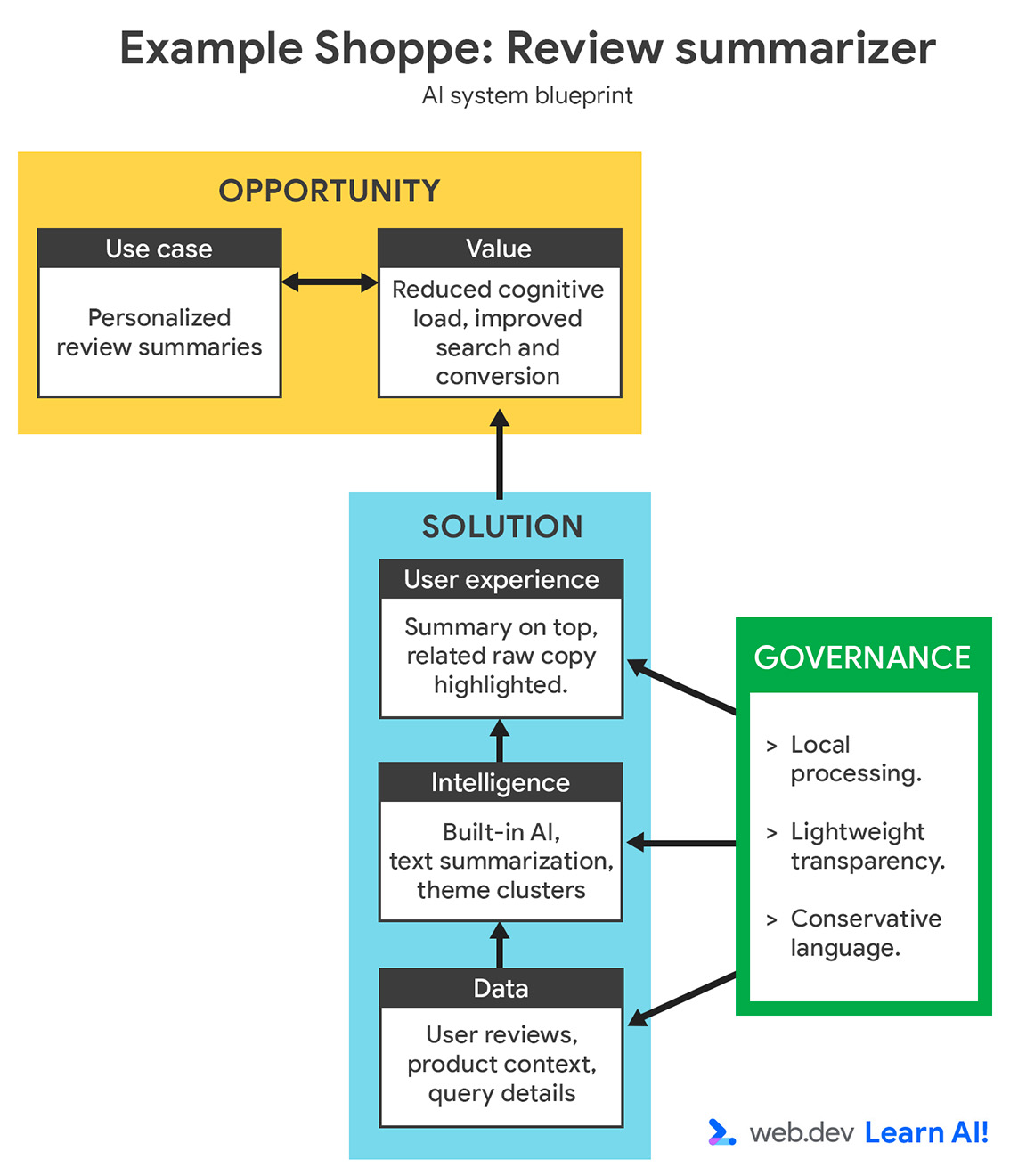
Product pages often contain hundreds of reviews. For users, it can be difficult to evaluate the characteristics that actually matter to them.
You can use AI to offer recurring themes within their searches to provide personalized review highlights and summaries. In our example interface, the user is looking for headphones, so themes of sound quality and battery life are highlighted. This reduces cognitive load and can lead to faster purchase decisions.
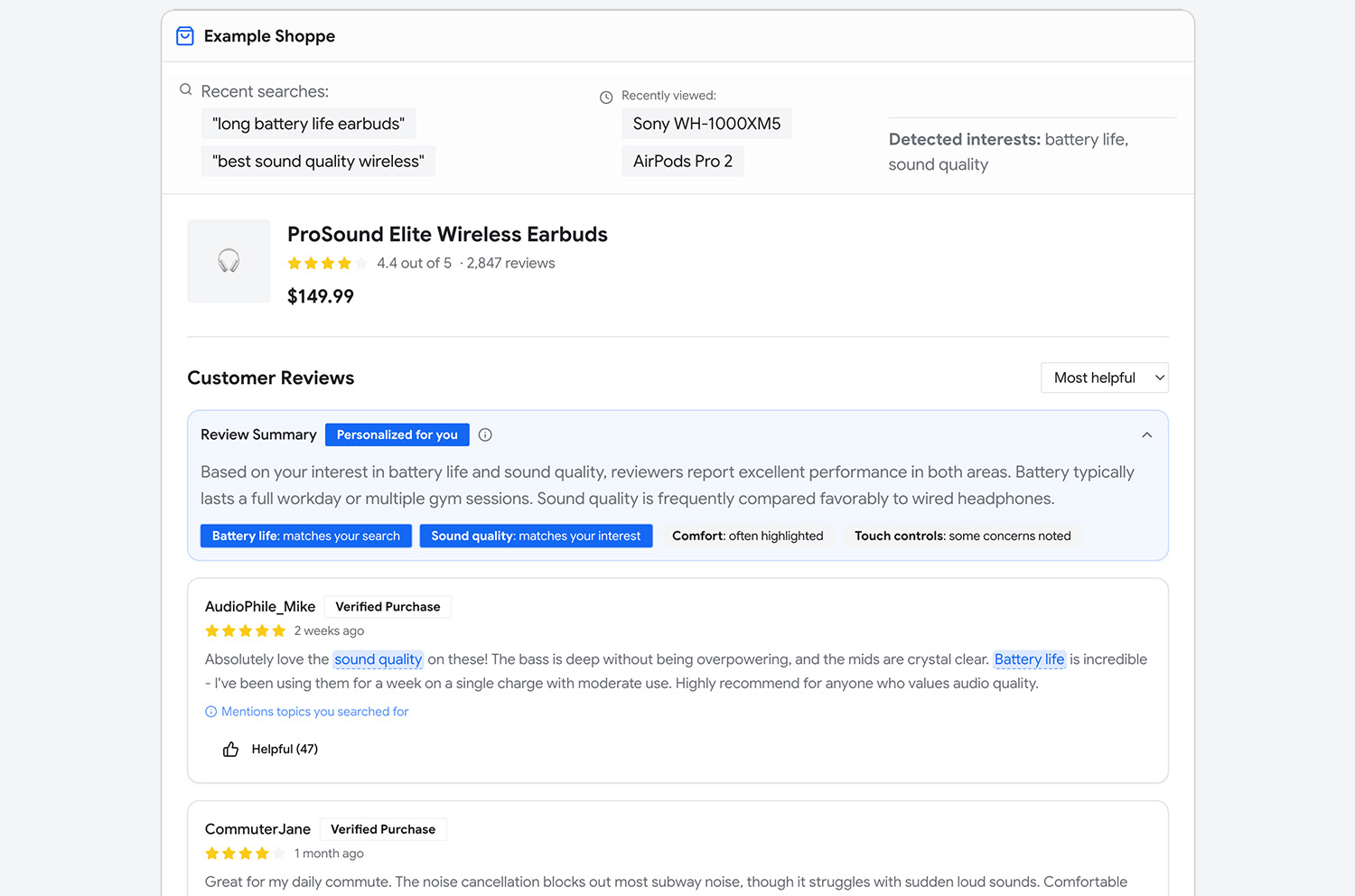
As summaries are unique for each person, you should prioritize privacy and speed when choosing your platform. You may want to choose built-in AI and the Summarizer API, so computation happens directly on the user device.
Best practices
Observe the following guidelines so your AI feature seamlessly blends into the existing user experience:
- Provide lightweight transparency: When AI transforms or aggregates user-generated content, subtle cues set your users' expectations. You can use neutral labels like "Summary" or "Key insights," and add progressive disclosure, through tooltips or other UI elements.
- Allow opt-out: People have different attitudes towards AI. Some may react to AI as intrusive, overwhelming, or annoying. Provide a clear path to disable these features.
- Be mindful of wording: Language is an important part of any user experience, including AI-generated text. In our example, summaries should reflect trends, not claims. Add rules to your system prompt to reduce or remove overly confident language in the summary.
- Design a graceful fallback: When possible, provide value without AI. If the summary is unavailable for technical reasons, such as an unavailable model, the system should still offer unsummarized reviews. Once the model is downloaded, your application can automatically expose the new summary.
- Minimize disruption during the setup: The initial download of a client-side model can create friction. Demonstrate value of the feature first. You could add a limited, server-side fallback or move the download to the end of the user journey, so interruption is minimal. Proper timing and context building help align your product with the user's priorities.
Constrained AI
While background AI runs automatically, constrained AI features are explicitly triggered by the user, often with a link or button. You determine the task, intent, constraints, and output format within a system prompt. Unlike with an open-ended prompt cursor, users have limited to no options outside of starting the task and receiving an output. The system retains predictability by tightly scoping what the AI is allowed to do.
Just as with background AI, constrained AI features pair well with client-side models that are customized for the specific task.
Example: Title generation
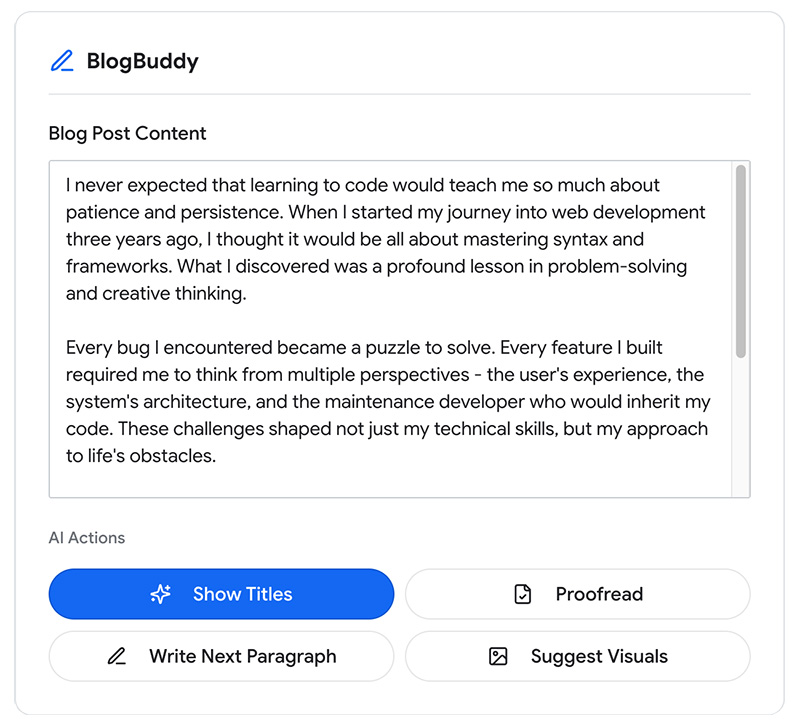
Headline generation can be a particularly challenging task. BlogBuddy uses AI to help writers offer thoughtful, contextual headlines, with minimal effort. Review the AI system blueprint for this feature.
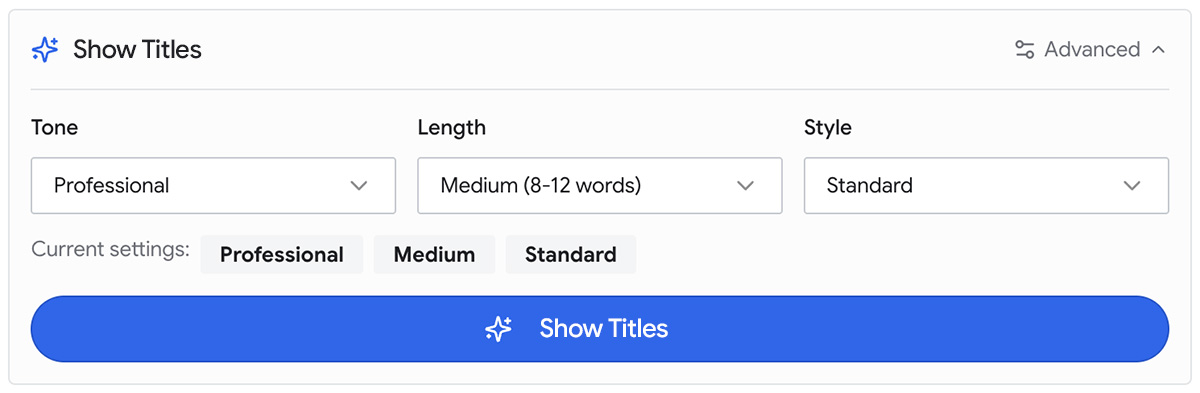
The user can click Show Titles to produce multiple drafts for evaluation and refinement.
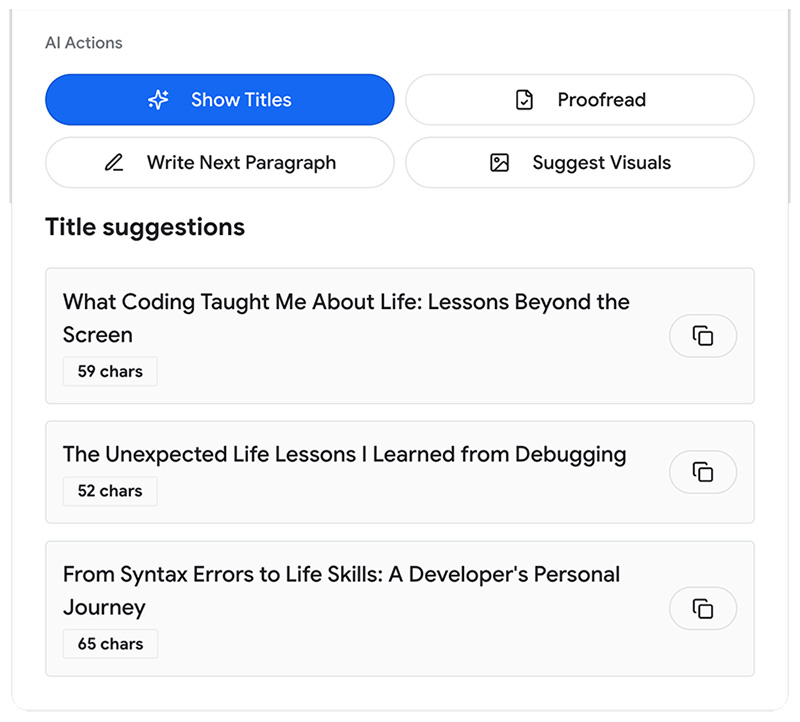
We walked through how this could be implemented with the Prompt API in Prompt engineering. Build a system prompt that encodes the task, stylistic constraints, and the output structure. Only the blog post content is dynamically passed from the UI. With client-side implementation, the feature is optimized to iterate with no setup cost.
Best practices
Your goal is to nudge users to use new features. To do so, demonstrate value and give them control over the outcome:
- Communicate clarity and confidence: Clear action labels are always preferable to generic language, such as "Ask AI." Your user should be able to intuit what's happening, beyond how it happens. If your feature latency is low, add labels that convey the result is already available. For example, Show Titles instead of Generate Titles.
- Keep the user in the loop: Add light cognitive friction to keep users alert. By offering multiple choices, you can prevent users from feeling stuck with a result they may not like. Users should be able to explicitly accept or edit results before it's saved.
- If possible, prepare the result beforehand: Especially for client-side tasks, consider precomputing the result, so it's available immediately.
- Support fast iteration: Regeneration should be easy, reversible, and cheap. Users should have the option to undo their actions. Collect these feedback signals so you can fine-tune the feature for future runs.
- If needed, provide finer-grained controls: Additional structured elements such as tone tags, length selectors, or preset styles can be used to refine results. In many cases, the need for additional control emerges over time, as user confidence and requirements evolve. Set up feedback loops that allow you to track these developments.
How to choose between background and constrained AI
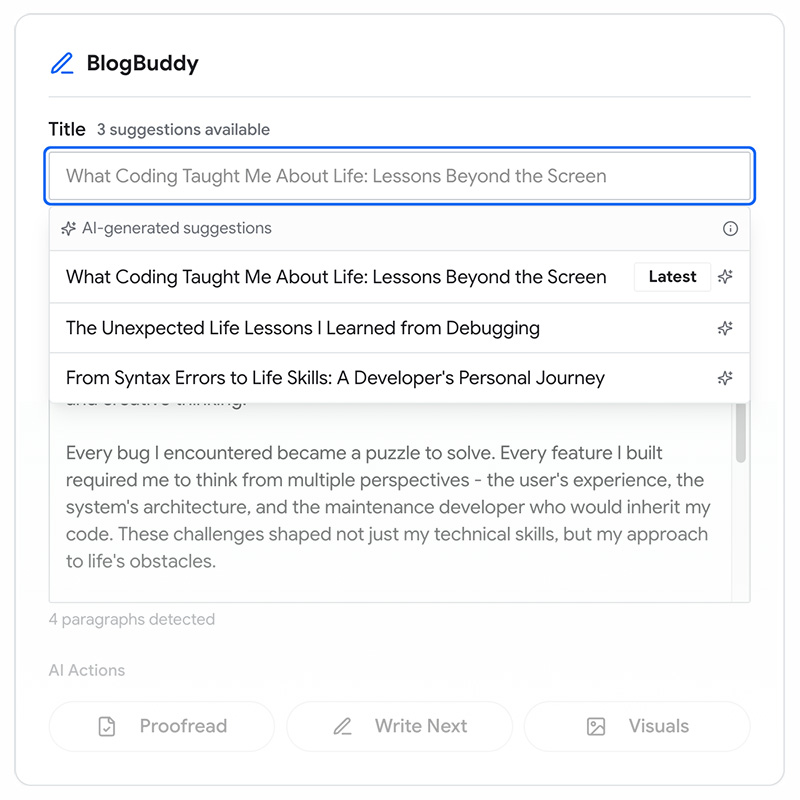
Some features can be implemented either as background or constrained AI, depending on how and when you surface them. This distinction is impacted by visibility, cognitive load, and timing, rather than available capabilities. For example, instead of requiring an explicit button click, titles could be proactively prepared in the background, while the user is writing. When the user focuses the title field, you can present suggestions.
This approach works best when:
- Inputs required by the feature are available by default
- The number of AI-powered features is small
- The cost of precomputation is low
- Suggestions can be integrated without distracting the user from their task
In contrast, constrained AI is preferable in products with multiple AI features or actions. Explicit triggers help avoid unnecessary computation, and give users a stronger sense of intent and agency.
Open-ended AI
Open-ended AI gives users direct control over an AI system's behavior with free-form input. Instead of triggering a pre-determined action, users can provide context in natural language. Once submitted, the AI system interprets intent, adds missing context, and makes its best guess about what to do next.
Inputs are highly individual and often unpredictable, and your AI system needs to be able to handle this variability. This type offers the highest flexibility, but also the highest risk to user experience:
- Ambiguous or incomplete user input
- Unpredictable outputs
- Higher likelihood of incorrect or misleading responses
- Increased risk of overtrust
- Attempts to compromise the system, for example, by making it generate inappropriate content
Example: AI-powered customer support agent
For Example Shoppe, customer support spans a wide range of issues: order tracking, returns, product questions, delivery problems, and edge cases that don't fit clean workflows. Refresh your memory of the AI system blueprint, from the Platform module.
After adding constrained AI features for the most common actions, your interface may be crowded. Instead, an open-ended AI support agent can provide flexibility.
- Resolve common issues quickly.
- Reduce wait times and support costs.
- Provide immediate assistance across many topics, without complex support flows.
The support agent's value lies in handling variability at scale. Ultimately, you need to build a system that can handle these inputs responsibly. While you hope and expect users to use their best judgement and calibrate trust, you may be liable for incorrect responses offered by the model.
Users interact open a chat with the agent, asking, "Where is my order?" or "I was charged twice—can you help?" The agent interprets intent, asks clarifying questions, retrieves relevant information, and proposes next steps or actions.
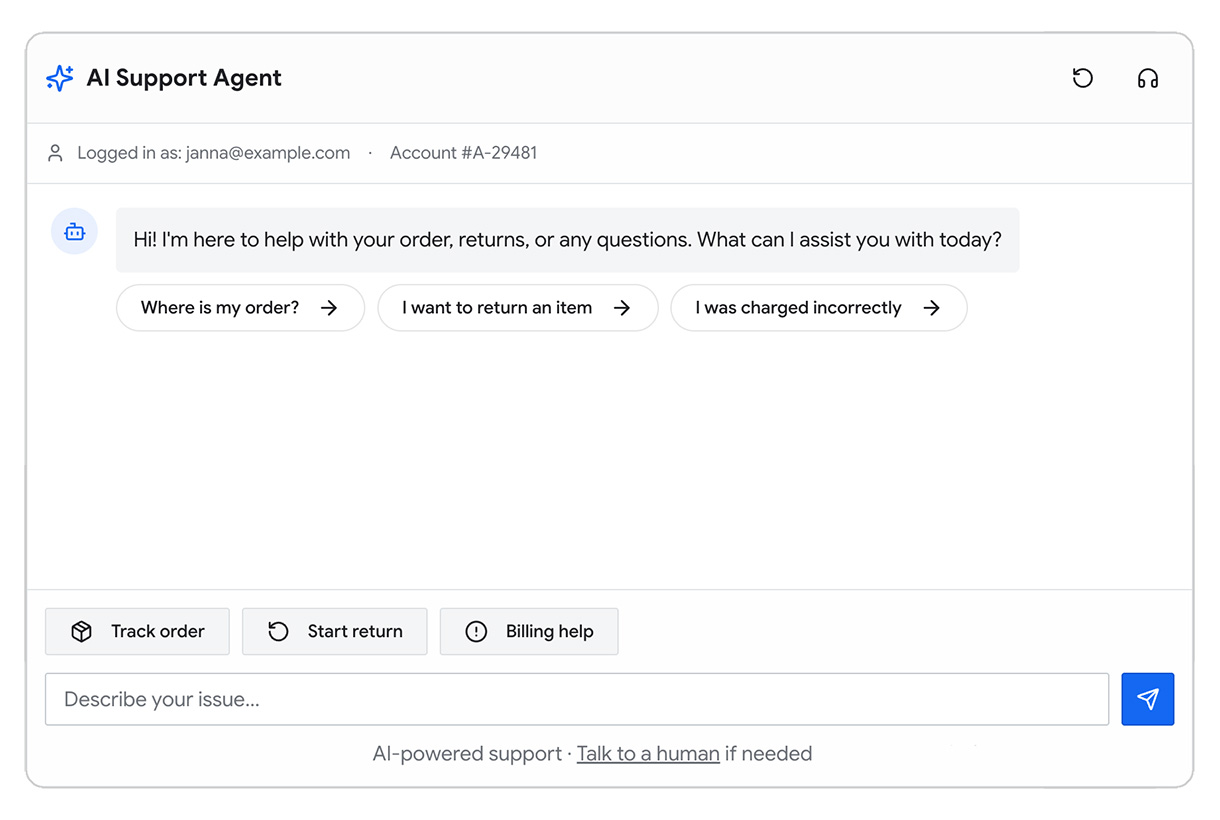
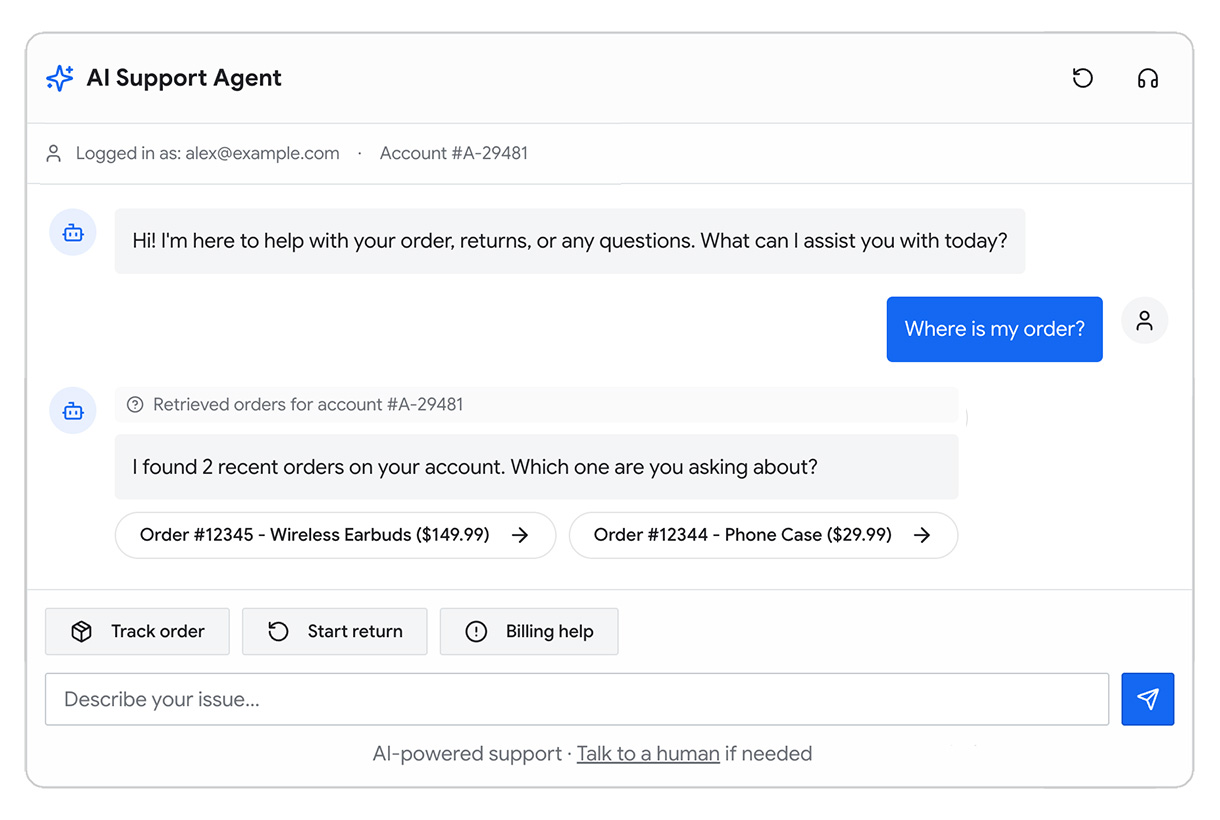
Most open-ended AI systems rely on server-side models. These can be combined with other components, like databases, external tools, and business logic, to form a compound AI system. You should to provide escalation paths to human support agents.
Best practices
Focus on transparency, trust calibration, and control mechanisms:
- Guide users to express intent clearly: Provide prompt suggestions ("I want to return an order") and suggested follow-ups to reduce ambiguity.
- Make system state and assumptions visible: The agent should clearly communicate what it understands ("It looks like you're asking about order 12345.") and what information it's using.
- Ask before acting: Before executing sensitive actions, such as returns, refunds, address changes, the agent should summarize the action and request user confirmation.
- Design for verification and correction: Users should be able to correct misunderstandings, rephrase requests, or rewind the conversation, without starting over.
- Combine with constrained AI features: Too much back-and-forth conversation may discourage users. Add structured elements as shortcuts. For example, an inferred order number can be presented as a clickable element that allows the user to search for, select, or replace it, rather than requiring them to rephrase the request in text.
- Surface uncertainty and limitations: The agent should admit uncertainty, signal missing information, and gracefully escalate to a human when confidence is low.
This type of AI experience requires your users to evaluate responses critically, and understand when to escalate.
Key takeaways
In this module, we reviewed different types of AI user experiences:
- Background AI lets you add a additional value or delight to your existing user journey.
- Constrained AI features can be used for specific, well-defined use cases that are best carried out with AI.
- Open-ended AI is needed for domains with high variability. Only use open-ended if you are very confident in the technical performance of your system.
The following table summarizes the recommended UX patterns for each type of AI:
| UX theme | UX pattern | Background | Constrained | Open-ended |
| Transparency | AI is clearly signaled | |||
| Lightweight explanation of AI behavior | ||||
| System state & assumptions visible | ||||
| Guidance | Prompt suggestions | |||
| Structured input (tags, presets) | ||||
| Control | Explicit AI trigger | |||
| Preview before applying output | ||||
| Multiple alternatives | ||||
| Regenerate | ||||
| Undo | ||||
| Trust calibration | Conservative wording | |||
| Confidence indicators | ||||
| Management of risks and failures | Intentional friction and review gates | |||
| Human handoff / escalation | ||||
| Graceful fallback without AI |
Further readings
To keep learning about UX patterns, we recommend the following resources:
- Read Google's People + AI Guidebook.
- Microsoft's HAX Toolkit, particularly their guidelines for human-AI interaction.
- The Shape of AI by Emily Campbell.
- Chapter 10 of The Art of AI Product Development.
Check your understanding
What type of UX pattern is a video call background blur?
When should you use open-ended AI as a UX pattern?