
Cross-origin isolation enables a web page to use powerful features such as SharedArrayBuffer. This article explains how to enable cross-origin isolation on your website.

This guide shows you how to enable cross-origin isolation. Cross-origin
isolation is required if you want to use
SharedArrayBuffer,
performance.measureUserAgentSpecificMemory(),
or high resolution timer with better precision.
If you intend to enable cross-origin isolation, evaluate the impact this will have on other cross-origin resources on your website, such as ad placements.
Determine where in your website SharedArrayBuffer is used
Starting in Chrome 92, functionalities that use SharedArrayBuffer
will no longer work without cross-origin isolation. If you landed on this page
due to a SharedArrayBuffer deprecation message, it's likely either
your website or one of the resources embedded on it is using SharedArrayBuffer.
To ensure nothing breaks on your website due to deprecation, start by
identifying where it's used.
If you are not sure where in your site a SharedArrayBuffer is used, there are two ways find out:
- Using Chrome DevTools
- (Advanced) Using Deprecation Reporting
If you already know where you are using SharedArrayBuffer, skip to Analyze the impact of cross-origin isolation.
Using Chrome DevTools
Chrome DevTools allow developers to inspect websites.
- Open the Chrome
DevTools on the page you suspect might be using
SharedArrayBuffer. - Select the Console panel.
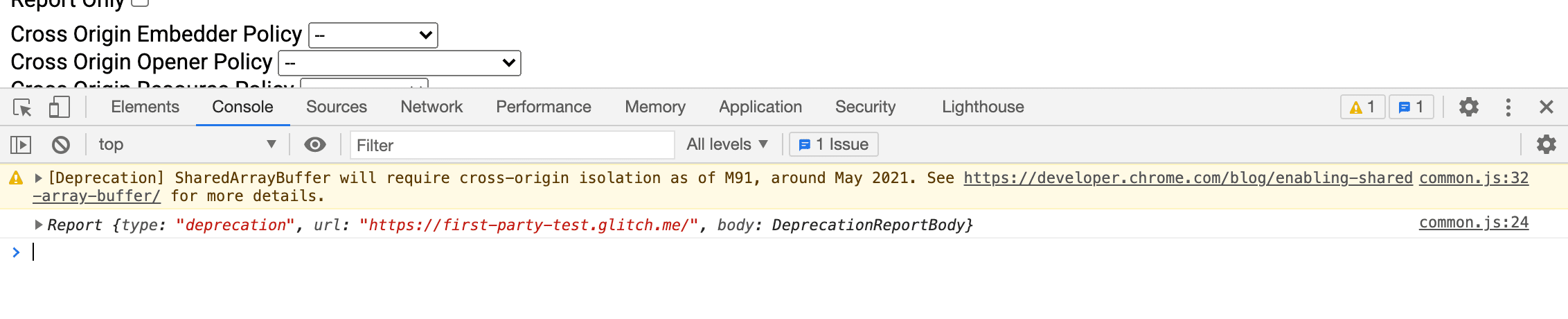
- If the page is using
SharedArrayBuffer, the following message will show up:[Deprecation] SharedArrayBuffer will require cross-origin isolation as of M92, around May 2021. See for more details. common-bundle.js:535
- The filename and the line number at the end of the message (for example,
common-bundle.js:535) indicate where theSharedArrayBufferis coming from. If it's a third-party library, contact the developer to fix the issue. If it's implemented as part of your website, follow the guide below to enable cross-origin isolation.
(Advanced) Using Deprecation Reporting
Some browsers have a reporting functionality of deprecating APIs to a specified endpoint.
- Set up a deprecation report server and get the reporting URL. You can achieve this by either using a public service or building one yourself.
- Using the URL, set the following HTTP header to pages that are potentially
serving
SharedArrayBuffer.Report-To: {"group":"default","max_age":86400,"endpoints":[{"url":"THE_DEPRECATION_ENDPOINT_URL"}]} - Once the header starts to propagate, the endpoint you registered to should start collecting deprecation reports.
See an example implementation.
Analyze the impact of cross-origin isolation
Wouldn't it be great if you could assess the impact that enabling cross-origin
isolation would have on your site without actually breaking anything? The
Cross-Origin-Opener-Policy-Report-Only and
Cross-Origin-Embedder-Policy-Report-Only
HTTP headers allow you to do just that.
- Set
Cross-Origin-Opener-Policy-Report-Only:
same-origin
on your top-level document. As the name indicates, this header only sends reports about the impact thatCOOP: same-originwould have on your site—it won't actually disable communication with popup windows. - Set up reporting and configure a web server to receive and save the reports.
- Set
Cross-Origin-Embedder-Policy-Report-Only:
require-corp
on your top-level document. Again, this header lets you see the impact of enablingCOEP: require-corpwithout actually affecting your site's functioning yet. You can configure this header to send reports to the same reporting server that you set up in the previous step.
Mitigate the impact of cross-origin isolation
After you have determined which resources will be affected by cross-origin isolation, here are general guidelines for how you actually opt-in those cross-origin resources:
- On cross-origin resources such as images, scripts, stylesheets, iframes, and
others, set the
Cross-Origin-Resource-Policy:cross-originheader. On same-site resources, setCross-Origin-Resource-Policy:same-siteheader. - For resources loadable using CORS, make
sure it is enabled, by setting the
crossoriginattribute in its HTML tag (for example,<img src="example.jpg" crossorigin>). For JavaScript fetch request, make surerequest.modeis set tocors. - If you want to use powerful features such as
SharedArrayBufferinside a loaded iframe, appendallow="cross-origin-isolated"to the<iframe>. - If cross-origin resources loaded into iframes or worker scripts involve another layer of iframes or worker scripts, recursively apply steps described in this section before moving forward.
- Once you confirm that all cross-origin resources are opted-in, set the
Cross-Origin-Embedder-Policy: require-corpheader on iframes and worker scripts (This is required regardless of same-origin or cross-origin). - Make sure there are no cross-origin popup windows that require communication
through
postMessage(). There's no way to keep them working when cross-origin isolation is enabled. You can move the communication to another document that isn't cross-origin isolated, or use a different communication method (for example, HTTP requests).
Enable cross-origin isolation
After you have mitigated the impact by cross-origin isolation, here are general guidelines to enable cross-origin isolation:
- Set the
Cross-Origin-Opener-Policy: same-originheader on your top-level document. If you had setCross-Origin-Opener-Policy-Report-Only: same-origin, replace it. This blocks communication between your top-level document and its popup windows. - Set the
Cross-Origin-Embedder-Policy: require-corpheader on your top-level document. If you had setCross-Origin-Embedder-Policy-Report-Only: require-corp, replace it. This will block the loading of cross-origin resources that are not opted-in. - Check that
self.crossOriginIsolatedreturnstruein console to verify that your page is cross-origin isolated.