Predictive AI: Turn data into insights

Predictive (or analytical) AI is a collection of algorithms that help you understand existing data and predict what's likely to happen next. Based on historical patterns, predictive AI models learn different analytical tasks that help users make sense of their data:

  • Classification: Group items into predefined categories based on patterns in the data. For example, an online shop may classify visitors by intent (research, purchase, returns), so it can adapt its recommendations accordingly.
  • Regression: Predict numeric values, such as engagement rate, session duration, or conversion probability.
  • Recommendation: Suggest items that are most relevant to a given user or context. Think "users like you also viewed" or "recommended tutorials based on your progress."
  • Forecasting and anomaly detection: The model predicts future events, such as a traffic spike, or identifies unusual behavior, such as payment anomalies or fraud.

Some products are built entirely around predictive AI, such as music discovery tools. In others, predictive AI enhances a deterministic experience, such as a streaming website with personalized recommendations. Predictive AI can also be a powerful internal enabler: you can use it to analyze product and user data to uncover insights and guide smarter next actions.

The Predictive AI loop

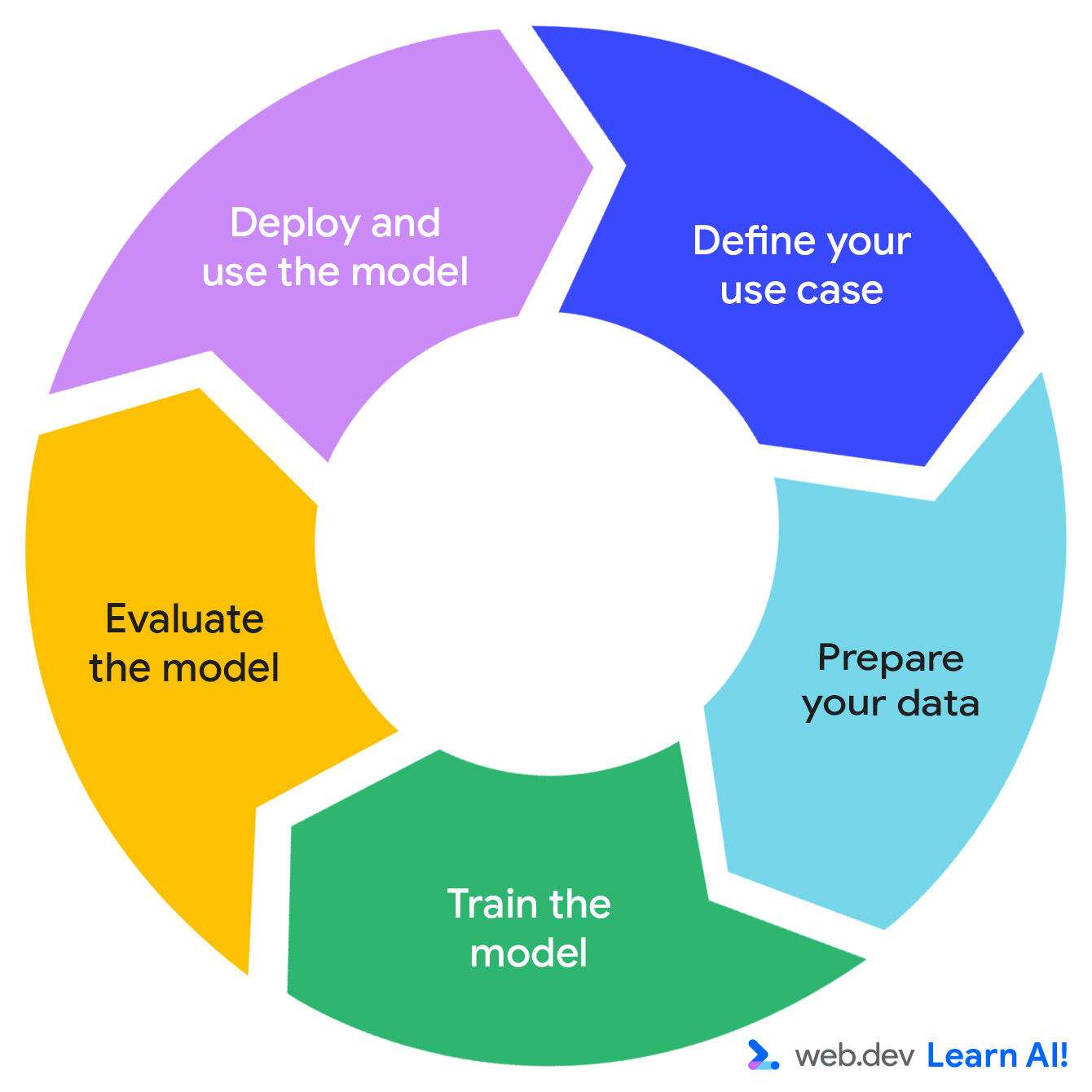
The development of a predictive AI system follows an iterative cycle: define your opportunity, prepare your data, train the model, evaluate the model, and deploy the model.

Each step points to the next step, in a continuous circle.
Figure 1. While the initial cycle starts by defining your use case, each step goes in order then starts again after deploying the model.

Imagine you are working on a subscription-based productivity app, Do All The Things. You already collect usage data such as page views, session length, feature usage, and subscription renewals. Now, you'd like to extract more actionable value from the data. Here's how you travel through the predictive AI loop.

Define your use case

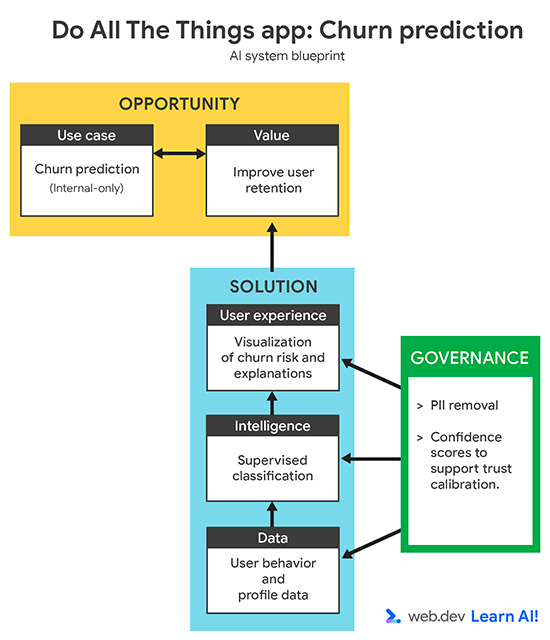
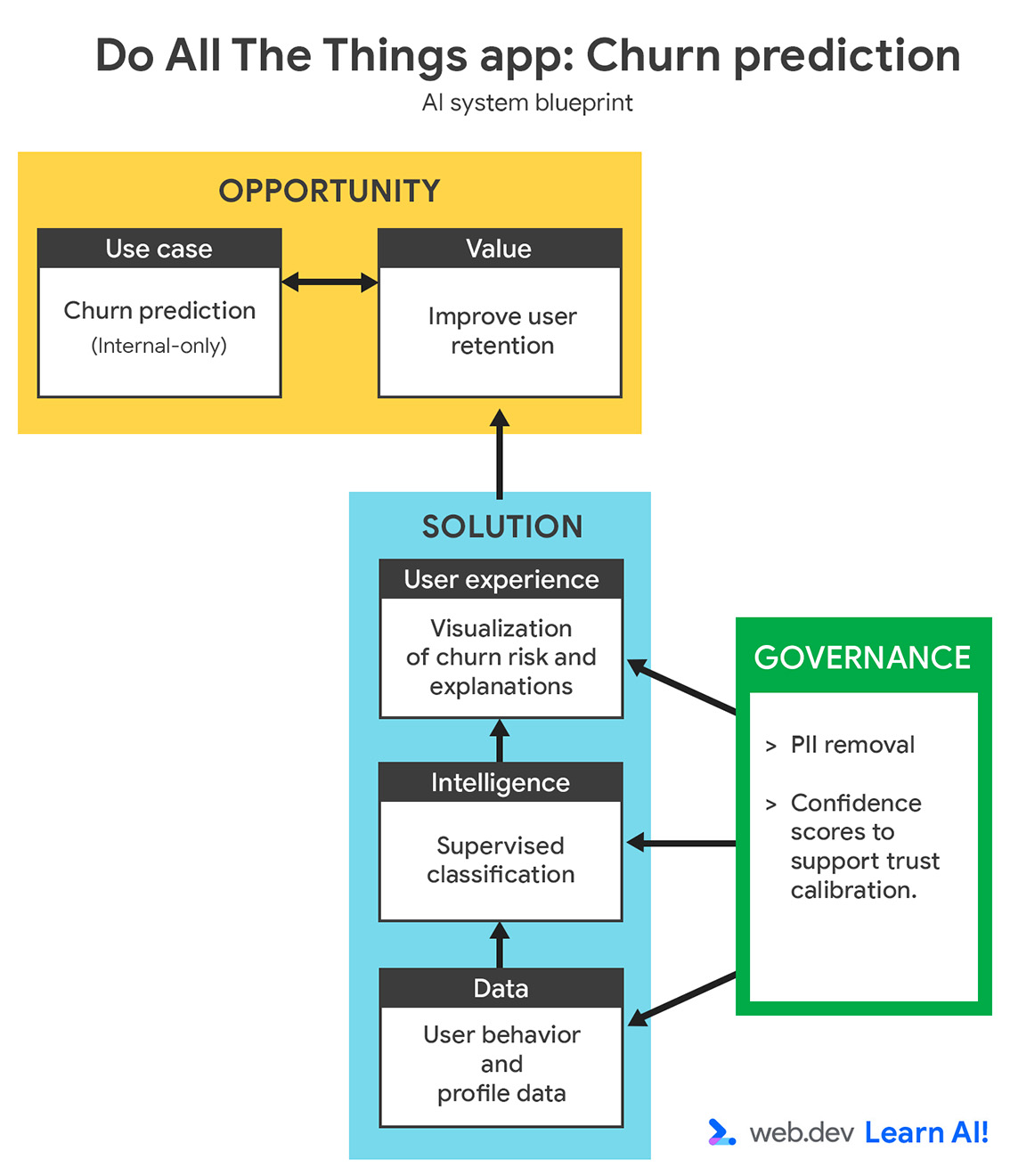
Do All The Things system blueprint.
Figure 2. Your system blueprint for the Do All the Things application. Open the full-size diagram.

Your churn rate has increased over the past three months. Instead of reacting after users cancel, you want to use predictive AI to identify users who are likely to churn, before they cancel. The goal is to support your customer success team with early signals, so they can take targeted, proactive actions to retain at-risk users.

When defining a predictive AI use case, start by validating that the question is answerable with data. This can be data you've already collected or data you could realistically collect going forward. This step often requires collaboration with domain experts, such as customer success, growth, or marketing teams, to ensure the prediction is both meaningful and actionable.

A strong problem definition should specify:

  • Goal: What business outcome are you trying to influence? For example, you want to reduce churn by enabling proactive outreach.
  • Input data: What historical signals does the model learn from? For example, you supply usage patterns, plan types, and support interactions.
  • Output: What will the model produce? For example, you want the model to create a churn probability score for each user.
  • User: Who uses or acts on the prediction? For example, this data is intended for customer success managers.
  • Success criteria: How do you measure impact? For example, you measure retention rate to determine if you've reduced churn.

By identifying these details at the beginning, you can avoid a common trap: building a custom model that is technically sound, but never gets used.

Prepare the data

To provide your model with useful learning signals, you need to label your historical data with ideal predictions. Label Do All The Things users as "churned" or "not churned."

Next, collaborate with your customer success team to identify what behavioral features are most relevant to churn prediction. Narrow your dataset to these key features and remove unnecessary fields so your model doesn't need to deal with noise. Remember to consider data privacy. Remove personally identifiable information (PII), such as names or emails, and only store aggregated behavioral data.

The following table shows an excerpt from your resulting dataset:

user_id plan_type avg_session_time (min) logins_last_30d features_used support_tickets churned
00123 premium 12.4 22 5 0 0
00124 trial 5.8 3 1 2 1
00125 free 18.1 30 7 0 0
00126 premium 9.7 12 4 1 0
00127 trial 4.2 2 1 3 1
Table 1: Excerpt from a dataset for churn prediction.

This gives your model clean numerical and categorical inputs (such as plan_type or avg_session_time) and a clear target label (churned). Categories should be converted to unique numeric identifiers.

Finally, split your dataset into three subsets:

  • Training set (usually around 70 to 80%) to teach the model,
  • Validation set (sometimes also called development set) to tune hyperparameters and prevent overfitting.
  • Test set to evaluate how the model performs on completely unseen data.

This helps your model generalize decisions instead of relying on memorized historical examples.

Train the model

Unlike generative AI, which is often built on large, pre-trained models, most predictive AI systems rely on self-trained models. That's because predictive tasks are highly specific to your product and your users. Tools like scikit-learn (Python), AutoML (no-code or low-code), or TensorFlow.js (JavaScript) make it easier to train and evaluate predictive models without worrying about the underlying math.

In our churn example, we feed the cleaned training set into a supervised classification algorithm, such as logistic regression or a neural network. Try multiple options to determine what works best for your data.

Your model learns which behavior patterns correlate with churn. At the end, it can assign a probability score to each user. For example, there's a 72% risk user X will cancel next month.

After each training iteration, evaluate the resulting model using the validation set. The performance of a model can be improved by adjusting hyperparameters, but also by making targeted improvements on your dataset.

Evaluate the model

The labels in your dataset provide the ground truth against which you can compare the model outputs. The key metrics to track are:

  • Precision: of all users flagged as "churned," how many actually churned?
  • Recall: of all users who churned, how many did the model catch?
  • F1 score: a single number that balances precision and recall, useful when you want an overall measure of accuracy without over-optimizing one at the expense of the other.

Too many false positives lead to wasted retention efforts, while too many false negatives lead to lost customers. The right trade-off depends on your business priorities. For example, your company may prefer dealing with a couple of false alarms if it makes it more likely to catch more users before they leave.

Deploy and maintain the model

Once validated, you can deploy the model with an API or as a lightweight client-side service integrated into your analytics dashboard. Each day, it can score users and update a churn risk visualization, allowing your team to prioritize outreach. To keep it accurate and reliable, adopt these lessons from machine learning operation teams (MLOps):

  • Monitor for data drift: Detect when user behavior shifts and your training data no longer represents reality.
    • For example, after launching a major UI redesign, users interact with features differently, causing churn predictions to become less accurate.
  • Learn from mistakes: Identify common patterns behind mispredictions and add targeted examples to improve the next training cycle.
    • For example, the model frequently flags power users as churn risks because they open many support tickets. After review, you add new features that distinguish troubleshooting from disengagement.
  • Retrain regularly: Even if performance looks stable, refresh the model periodically to account for seasonal patterns, product updates, or pricing changes.
    • For example, you retrain the model after introducing annual plans, as pricing structure changes how users behave before renewing.

This lifecycle is the backbone of predictive AI. With tools like MLflow and Weights & Biases, you can run this process without deep ML expertise.

Common pitfalls and mitigations

While occasional errors will occur, you can guard against common root causes that can undermine performance and user trust:

  • Low-quality data: If your input data is noisy or incomplete, your predictions will be, too. To mitigate, visualize and validate your data before training. Make sure you have the required learning signals and handle missing values. Monitor the data quality in production.
  • Overfitting: The model performs very well on training data, but fails in new cases. To mitigate, use cross-validation, regularization, and holdout data sets. This helps your model generalize beyond training examples.

  • Data drift: User behavior and environments change, but your model doesn't. To mitigate, schedule retraining and add monitoring to detect when accuracy starts dropping.

  • Bad metrics: Overall accuracy doesn't always reflect the priorities of your users. For example, sometimes, the "cost" of a specific mistake matters more. In fraud detection, missing a fraudulent case (false negative) is far worse than flagging an innocent one (false positive). To mitigate, align metrics with real-world goals for fraud detection.

Most of these issues aren't fatal. Launch your system gradually, and address the issues as they arise.

The key to this lean, flexible approach is observability. Version your models, log accuracy characteristics and tools used to build the model, track performance over time, and keep monitoring active. When something drifts or breaks, you'll be able to catch and fix the issue before users notice.

Your takeaways

Predictive AI turns your existing data into foresight, revealing what's likely to happen next and where to act. It's the most concrete and measurable form of AI. Focus on well-defined problems that can be expressed in data, keep iterating as your product evolves, and monitor performance over time.

In our next module, you'll learn about generative AI, which helps you create something new based on the available data.

Resources

Of you're interested in understanding the math behind predictive AI, we recommend you review these resources:

Check your understanding

What is the primary function of Predictive AI?

To generate new content like text or images.
Predictive AI doesn't generate new content.
To understand existing data and predict what is likely to happen next.
Great job, that's correct!
To replace all human decision-making with autonomous agents.
That's incorrect.
To create a conversational interface for users.
That's not quite right.

Which task involves grouping items into predefined categories based on patterns?

Regression.
That's incorrect. Regression is model prediction of numeric values, such as engagement rate.
Forecasting.
That's incorrect. Forecasting is when the model predicts future events or identifies unusual behavior.
Classification.
Great job, that's correct!
Recommendation.
That's incorrect.

In the "Predictive AI loop," why should you split your dataset into training, validation, and test sets?

To increase the size of the dataset artificially.
That's incorrect.
To help the model generalize decisions instead of relying on memorized historical examples.
Great job, that's correct!
To ensure the model runs faster in production.
That's incorrect.
To separate the data by user location.
That's incorrect.

Which metric balances precision and recall to provide an overall measure of accuracy?

Accuracy score
That's incorrect.
Churn rate
That's incorrect.
F1 score
Great job, that's correct!
Latency
That's incorrect.

What is data drift, and how should you mitigate it?

When the model runs out of storage space, buy more.
That's incorrect.
When the model hallucinates facts, use prompt engineering to correct the output.
That's incorrect.
When user behavior shifts and training data no longer represents reality, retrain the model.
Great job, that's correct!
When the API connection fails, use a different provider.
That's incorrect.