

Modern business architectures frequently span multiple distinct domains.
Organizations maintain dedicated environments for varying features—such as
brand.example for marketing, service-app.example for the core product, and
support-portal.example for customer service. Ideally, you want to deliver a
unified, single sign-in experience as users navigate across these properties.
However, engineering teams often integrate these domains using ad hoc
techniques that cause fragmentation. This disrupts built-in browser credential
management by breaking password manager autofill flows and stalling passkey
adoption.
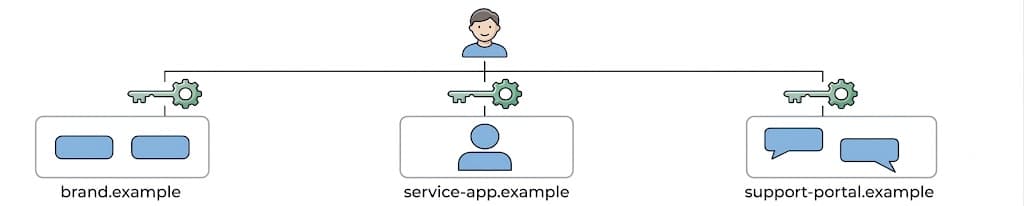
If the same account spans multiple domains, the user must recognize that the domains belong to the same organization and provide the same credentials when signing in. In the worst case, the user creates a duplicate account or gives away the password to a phishing website.
Learn how to use architectural standards and solutions (such as metadata, cross-origin iframes, identity federation, and subdomain consolidation) to resolve cross-domain identity fragmentation and deliver a seamless user journey.
Common workarounds
Organizations use several established techniques to maintain a cross-domain journey. While these methods are common, they face structural hurdles as browsers enforce stricter privacy boundaries and security standards.
CORS fetch requests
When domains operate independently, frontends frequently rely on cross-origin
fetch() requests directed at a centralized authentication API, which can be
securely permitted using
Cross-Origin Resource Sharing (CORS).
Since browsers often block or restrict cross-site cookies, developers may
explicitly design these APIs to return authentication tokens, such as JSON Web
Tokens (JWTs) within JSON payloads rather than relying on Set-Cookie headers.
Account database sharing
To unify identity on the backend without complex frontend integrations, you can centralize their user datastore. Although multiple domains authenticate against the same database, their frontend login experiences remain separate. This forces users to remember which domains they used the same credential, leading to a poor user experience.
Problems with disjointed sign-ins
While technical workarounds may achieve baseline functionality, they fail to deliver a seamless journey. Disjointed sign-in flows introduce friction points that compromise both usability and security.
Password manager fragmentation
The highest point of friction is the disruption of password managers. Password managers bind stored credentials to the specific origin where they are registered. This prevents the browser from offering autofill across different domains, even when they belong to the same organization.
When a user transitions from a domain with saved credentials to a new domain in your organization, the password manager fails to recognize the relationship and doesn't trigger the autofill prompt. This creates manual entry friction. Users must look up their credentials, reset their password, or create a duplicate account.
Because the password manager proves unreliable across these properties, users may abandon the tools for these sites. Instead they often create weak, memorable passwords to reuse elsewhere which degrades your organization's overall security.
Phishing gateway
This disruption functions as a phishing gateway. A password manager's refusal to autofill on an unrecognized domain is a primary defense mechanism. By requiring users to manually enter credentials on different URLs, you unintentionally train their users to fall victim to phishing attacks.
Passkey roadblock
Friction escalates when you use passkeys. The core security architecture of WebAuthn cryptographically binds passkeys strictly to a specified Relying Party ID (RP ID).
This creates an "RP ID Trap." A passkey registered on brand.example is
unusable on service-app.example because the browser denies cross-domain
access. To avoid prompting users to register distinct passkeys for every site,
you must consolidate these properties into a single RP ID.
Recommended approaches
To establish identity continuity, you must move away from ad hoc sign-in integrations and adopt recognized architectural standards:
- Use metadata configuration files: Host metadata files like Digital Asset Links and Related Origin Requests, to establish a cryptographic trust chain. This enables seamless credential and passkey sharing across different domains and mobile apps. This approach is a low-cost, silent fix for identity fragmentation that doesn't require a complex re-architecture of existing web infrastructure.
- Use cross-origin iframes: Embed a centralized authentication origin as an iframe within a relying party to bridge saved credentials and passkeys across different sites. This approach uses Permissions Policy and partitioned cookies to enable a seamless, in-context sign-in experience while maintaining strict security boundaries through CSP and cross-document messaging.
- Follow standard identity federation: Adopt industry-standard protocols like OpenID Connect to centralize authentication on a dedicated Identity Provider (IdP) domain. This formalizes the login journey through secure redirects, replacing fragile integrations with a reliable and scalable first-party solution.
- Consolidate subdomains: Transition to subdomains under a common root. This enables seamless session sharing through wildcard cookies and passkey continuity across the entire registrable domain. Many password managers can recognize the shared root domain and automatically suggest saved credentials across related subdomains.
Use metadata configuration files
A primary challenge of cross-domain identity is the fragmentation of saved credentials. Password managers treat different domains and apps as completely isolated entities, which prevents them from autofilling credentials saved on one property into another.
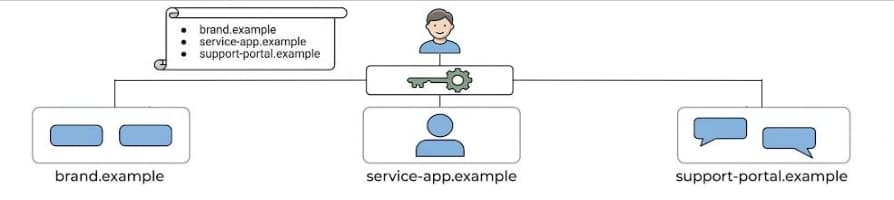
To address fragmentation, you can configure the behavior of password managers instead of altering your website structure. By hosting specific metadata configuration files, organizations can cryptographically assert that disparate domains and applications belong to the same organization. This allows operating systems, browsers, and password managers to recognize this relationship and automatically bridge the identity context, sharing passwords and passkeys across your properties. This approach is also required to share web-based passwords and passkeys with mobile applications, even if your web domains are consolidated.
Use two different configuration files to make sure you cover different platforms and ecosystems:
Google Password Manager on Android and Chrome: Host a Digital Asset Links (DAL) JSON file at
/.well-known/assetlinks.jsonto establish a verifiable trust relationship between an organization's associated apps and websites. This trust enables deep links on apps and Seamless Credential Sharing, where passwords saved on the web automatically autofill associated websites (though sharing passkeys across multiple web domains still necessitates Related Origin Requests). Learn more in the Seamless credential sharing guide.Apple Passwords on iOS and Safari: Host an Apple App Site Association (AASA) file at
/.well-known/apple-app-site-associationto establish the cryptographic trust chain necessary for bridging Apple Passwords states across iOS apps and Safari. To support third-party ecosystems, you can declare these associated domains centrally using a crowdsourced repository. Doing so ensures independent tools (such as 1Password, which explicitly ingests this repository) also recognize the shared identity context. To learn more about Apple App Site Association, read Supporting associated domains.
To enable passkeys across different web domains and address the passkey
roadblock, developers can host a
Related Origin Requests (ROR)
file at /.well-known/webauthn. ROR explicitly declares authorized domains
that are permitted to securely share the same passkey RP ID. To learn more
about Related Origin Requests, read
Allow passkey reuse across your sites with Related Origin Requests.
- Pros:
- Background fix for end users: It works entirely in the background, which automatically resolves autofill fragmentation and establishes passkey continuity at the OS or browser level without any visible changes to the UX.
- Simple implementation: This is a low-cost solution, requiring only the hosting of static JSON files. It doesn't require backend re-architecture or complex token exchange logic.
- Preserves existing infrastructure: You can significantly improve the cross-domain journey without changing your brand or consolidating your domains.
- Cons:
- Platform constraints: Platforms usually enforce strict limits on
ROR. For example, Chrome restricts a single RP ID to a maximum of 5
associated eTLD+1 labels. To illustrate,
example.co.ukandexample.deshare the sameexampleeTLD+1 label; however,example-rewards.comuses a separateexample-rewardslabel. If you manage an extensive or varied domain portfolio, these limits might be insufficient. - Increased operational latency: Resolving metadata files requires an extra network roundtrip, which adds latency when the browser processes authentication.
- Platform constraints: Platforms usually enforce strict limits on
ROR. For example, Chrome restricts a single RP ID to a maximum of 5
associated eTLD+1 labels. To illustrate,
Use cross-origin iframes
If you cannot use the metadata configuration files approach because of ROR
domain limits, cross-origin iframe elements offer a robust,
standards-supported path to solve the cross-domain sign-in challenges.
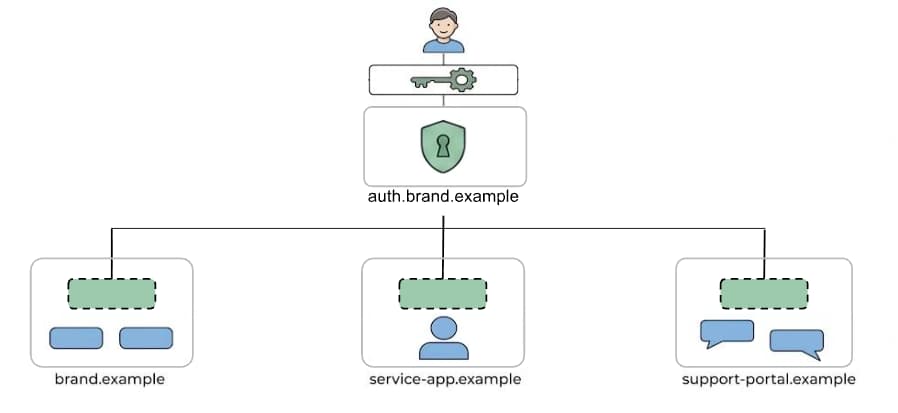
By embedding a centralized authentication origin (for example,
auth.brand.example) as an iframe within a relying party (for example,
brand.example), you can interact with both usual form fields and modern
APIs. For passwords, the browser's credential manager associates autofill
actions with the iframe's origin (auth.example). This allows users to access
their centralized credentials seamlessly across different sites.
For passkeys, the parent window must grant the iframe access using the
Permissions Policy
framework, enabling the iframe to invoke WebAuthn to authenticate against its
own origin's RP ID. In both flows,
CSP (Content Security Policy) is useful to protect
users from attacks such as clickjacking and cross-site scripting. Once
authentication succeeds, the session is established with
a partitioned cookie
and the token is securely transmitted back to the parent window using
postMessage().
- Pros:
- Centralized credentials: Sidesteps credential fragmentation. A single, centralized origin manages both saved passwords and a unified passkey RP ID, allowing distinct domains to share these credentials without needing to consolidate domains.
- Contextual authentication: The entire sign-in flow—whether autofilling a password or verification with a passkey—happens seamlessly in-context within the parent page, avoiding disruptive federated redirects.
- Resilience to tracking protections: This approach operates correctly even under strict cross-site tracking protections using partitioned cookies.
- Cons:
- Implementation constraints: This architecture demands specialized
engineering. It requires strict CSP (
frame-ancestors) to restrict embedding to trusted parent domains and prevent clickjacking, configuration of HTTP Permissions Policies to enable the WebAuthn API, and secure, validated cross-document messaging (postMessage()) to mitigate origin-spoofing and CSRF attacks. Learn best practices at Passkeys within iframes.
- Implementation constraints: This architecture demands specialized
engineering. It requires strict CSP (
Follow standard identity federation
Adopting standard identity federation such as OpenID Connect is a robust and
sustainable approach to maintaining your account system.
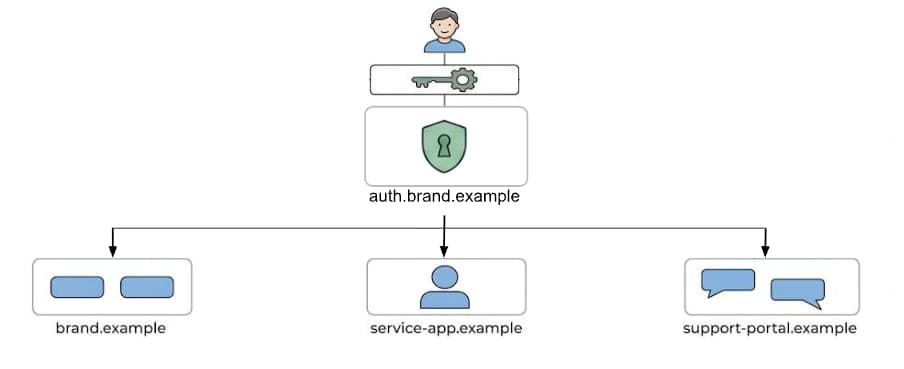
This approach formalizes the authentication workflow by consolidating it to a
single, dedicated Identity Provider (IdP) domain, such as auth.brand.example.
With an established protocol, applications redirect users to this central hub
for authentication before securely receiving a token transfer to complete the
login on the target domain. While often associated with third-party logins
(such as Sign-in with Google),
standard federation is completely valid and widely used as a first-party
solution to replace fragile workarounds.
- Pros:
- Common engineering language: Developers don't need to learn or maintain a specific, custom-built protocol; they can rely on established industry knowledge and comprehensive libraries. There are packaged solutions too.
- Battle-tested reliability: Standard protocols are proven, secure, and far less fragile than ad hoc implementations.
- Easily expandable: If the organization needs to federate with a new third-party service or integrate an acquisition later, the identity infrastructure is already equipped to provide credentials.
- Consistent UX: Users recognize the centralized IdP page as the authoritative source for the brand, clarifying exactly when and where credentials are required.
- Cons:
- High integration overhead: Developing or migrating to a centralized IdP introduces high integration overhead and requires specialized security expertise. Organizations must invest into safely refactoring all connected applications to support secure redirect-based patterns.
- Disruptive redirects: The authentication flow requires redirecting users away from the origin site to a centralized Identity Provider page, preventing a seamless, in-context sign-in experience.
Consolidate subdomains
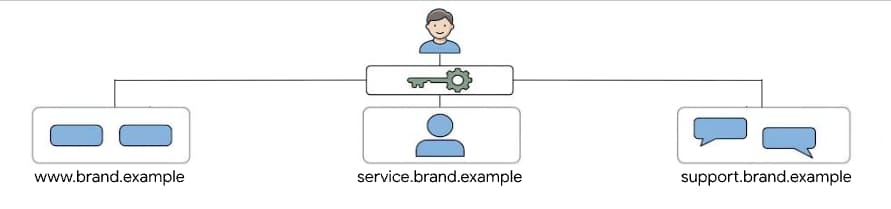
Another structural approach is to unify all the domains by moving disparate
digital properties beneath
a common registrable root domain (the eTLD+1).
This entails transitioning separate domains like brand.example and
service-app.example into subdomains such as www.brand.example and
service.brand.example.
- Pros:
- Unified credential management: Password managers can recognize the root domain and treat all subdomains as a single entry, eliminating duplicate prompts and manual entry for passwords.
- Passkey continuity: Developers can natively scope a passkey RP ID to
the registrable domain, instantly extending passkey support across all
associated subdomains. In this case, an RP ID of
brand.examplewill work at bothwww.brand.exampleandservice.brand.example. - Effortless session sharing: Consolidating the domain structure
enables sharing a single session using wildcard cookies (for example,
scoping a cookie to
Domain=brand.example).
- Cons:
- Branding and migration constraints: This approach can impose potential branding limits if your organization mandates distinct top-level domains. The migration is complex and requires careful management of HTTP redirects and extensive remediation of legacy cross-origin configurations.
Conclusion
To achieve identity continuity, you must transition from ad hoc sign-in integrations to established authentication standards. By evaluating business constraints against these established practices—such as federation, domain consolidation, iframes, or metadata—you can eliminate UX friction and improve authentication across your ecosystem.
To learn more about related topics, make sure to follow our blog and explore more resources at Chrome's identity portal.