
While predictive AI extracts insights from existing data, generative AI goes a step further and creates something new. It can write text, generate images, produce code, or even design full user interfaces. Here are some common examples of generative AI use cases:
- Content creation: AI writing assistants can create drafts and polish existing text.
- Summarization: Tools like Google AI Overviews condense long documents, meetings, or web pages into concise, actionable summaries.
- Code generation: Developer tools use generative AI to write and refactor code, increasing developer productivity.
- Image and asset creation: Using vision models, users can produce visual assets, such as banners and thumbnails.
The Generative AI loop
Most generative AI models are trained using neural networks and transformer architectures. Models learn to suggest the next element in a sequence, such as the next word, pixel, or note, based on the ones before it.
Mathematically, this isn't far from predictive AI. Both learn patterns from data. The difference lies in scale.
In predictive AI, the output options are limited to a couple of labels, like "churn" or "no churn." In generative AI, the output space can include hundreds of thousands of options. Trained on billions of examples, the prediction mechanism evolves into a powerful engine capable of generating new, unseen outputs.
The development of a generative AI system follows an iterative approach.
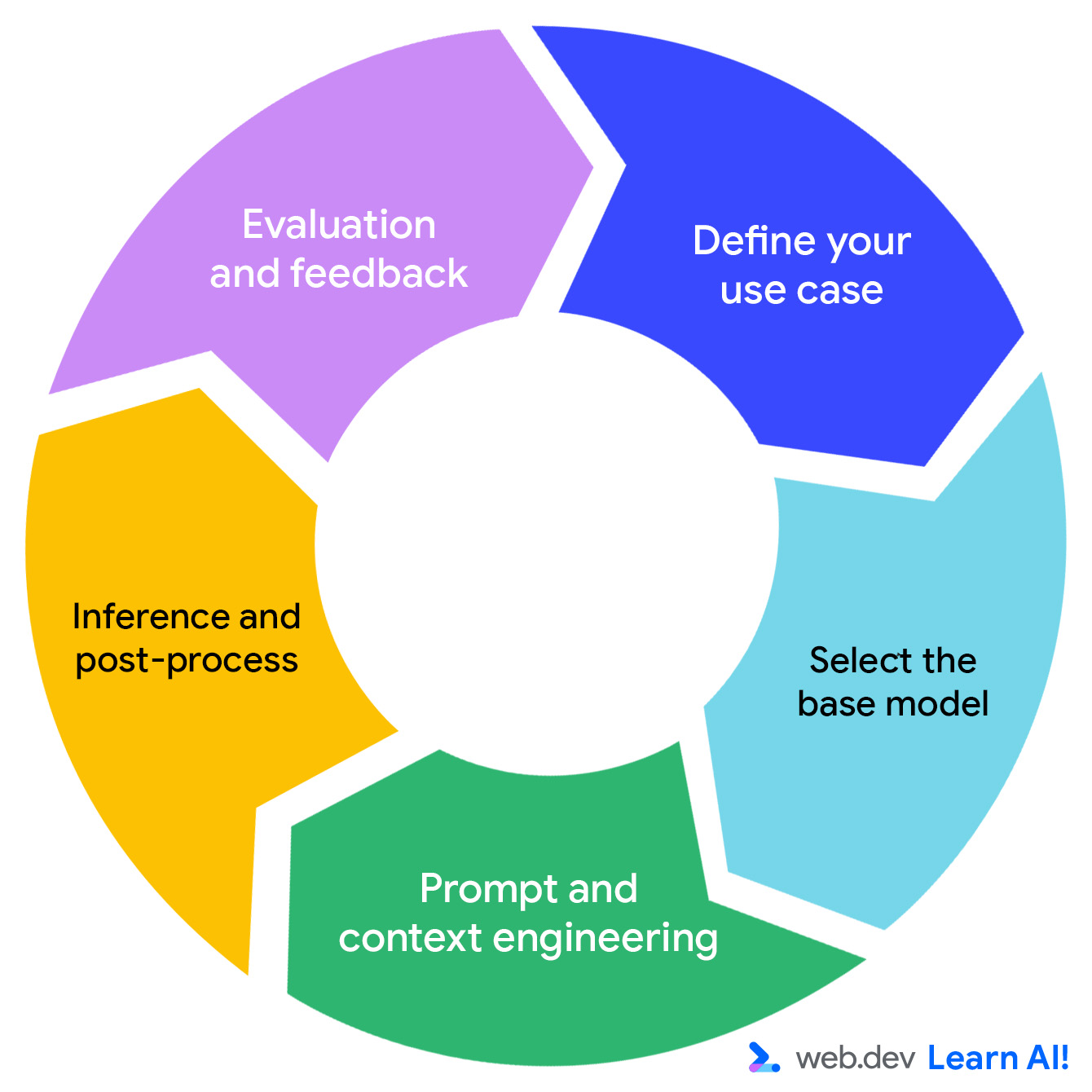
We'll walk through how this works with our sample application, BlogBuddy, a content management system assistant that helps users generate catchy descriptions and SEO-friendly article titles.
Define your use case
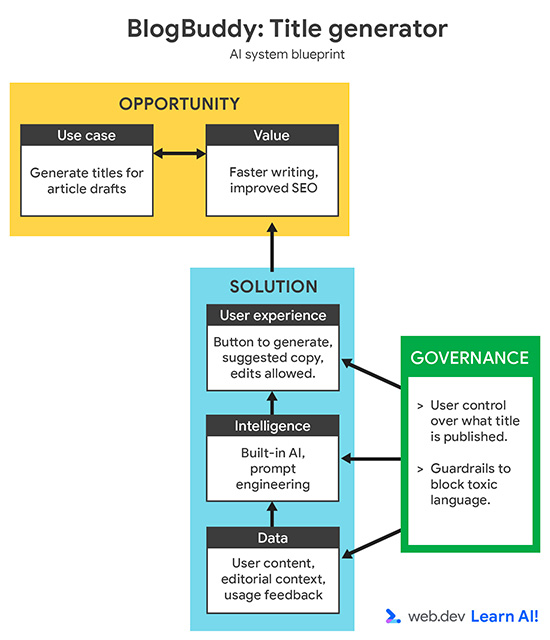
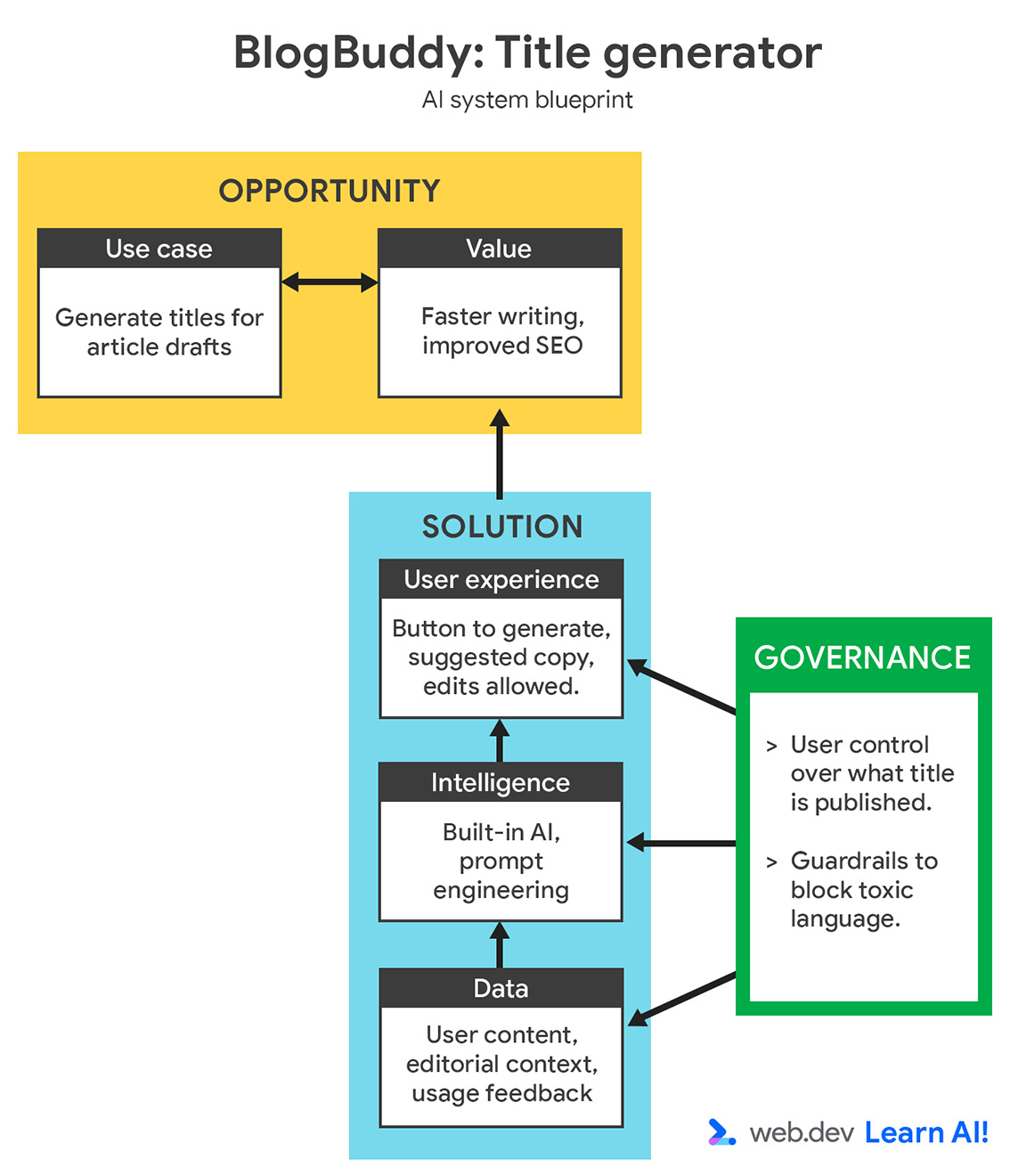
Your problem statement should include:
- Input and output modality. This can be text (prose or code), images, or audio.
- Input method. Did the content come from an upload field, free text, or other structure inputs?
- Audience. Who is performing this task? Do they have general knowledge, or do they need specialized knowledge?
BlogBuddy's features revolve around text generation. The input is semi-structured: users provide a topic or short draft, and the model returns variations. The audience is marketing, with specialized knowledge in editorial.
It's important to set a quality standard for your outputs. In our case, we want to generate short, scannable, keyword-rich text that fits the publication's tone.
Clear success metrics help you steer the rest of the process. You'll learn more about gathering success metrics in Evaluation-Driven Development.
Select the base model
There is a wide range of available models that are pre-trained on large, universal data sets. Their behavior can be adapted for specific needs. Generative AI models are typically much larger and more complex than predictive models, so it's best you build on top of an existing model, rather than building and training your own.
Your choice determines your product's capabilities, cost, customizability, and privacy boundaries. Model choice is highly interdependent with the what platform you deploy your AI system on.
Later in this course, you learn how to pick your platform.
Prompt and context engineering
Once you've chosen your model, you need to feed it the right instructions with a prompt. For BlogBuddy, we may prompt the model as follows:
Generate three short, engaging title suggestions for this article
There are multiple types of information that you can add to a prompt. For example:
- A system prompt that sets general behavior.
- Input-specific context for the current task.
- User instructions in conversational applications, such as chatbots or agents.
Inference and post-processing
Once your prompt is assembled, it's sent to the model for inference. You can change model parameters, including temperature (for creativity) and the maximum amount of tokens (for length and verbosity), to tune how the model responds. After generation, the output is often processed with additional rules and guardrails.
For example, you might reformulate gendered text, moderate tone, or filter out banned terms.
To support transparency and trust calibration, you can add a smaller, secondary model to classify or summarize the result. For example: "Intro generated from 12 related articles. Confidence: high."
Evaluation and feedback loop
As the output space for generative AI is practically infinite, most prompts don't have a single correct answer. Standardized benchmarks, such as MMLU or SQuAD, can measure general model capability, but they rarely capture the specific needs of human users. In a product context, you need to define your own mix of qualitative and quantitative metrics:
- Accuracy: Is the output factually correct?
- Helpfulness: Does the output meet the expectations set by the prompt or the user's intent?
- Readability and tone: Is the output clear and aligned with brand standards?
- Human effort: How much manual editing or curation is required?
- Domain understanding: Does the output reflect domain-specific knowledge?
To evaluate these metrics, you can combine human review and automated scoring. For example, you can ask users to rate real-life outputs, use a second model for automated evaluation (also called LLM-as-a-judge), and conduct periodic internal reviews for bias or hallucination.
Real usage data is one of your biggest assets when building with generative. If possible, log these interactions to tweak prompts and contexts, test different models, or adjust parameters over time. Each user interaction, correction, or rating becomes feedback that can help you determine your next optimization steps:
- Unexpected user inputs can help you determine if you're solving for the right problem.
- Recurring domain-specific requests can inform model choice. You may switch from a large, general LLM to a small, fine-tuned model.
- Frequent hallucinations can point to a lack of specific context in your prompts.
- Heavy edits can signal insufficient shared context. The model is not aware of information that is taken for granted by the user.
Over time, these feedback loops transform your generative AI feature from a static model call into a living system that continuously adapts to the needs and preferences of your users.
Common pitfalls and mitigations
Because generative AI operates in an open-ended space of inputs and outputs, its risk surface is far broader than in predictive systems. Beyond just producing incorrect outputs, it can generate toxic, biased, or misleading content, or even manipulate users unintentionally. These failures can erode trust and expose your company to financial or legal consequences.
That's why generative AI requires a proactive, ongoing risk management approach. Here are some of the most common risks:
- Hallucination: The model fabricates facts or misstates details. To mitigate, use RAG for factual grounding.
- Over-trust: Users assume outputs are always correct. To mitigate, encourage a review and edit flow, rather than auto-publishing. In AI governance: Building responsibly, you'll learn how to help users calibrate their trust.
- Inconsistency: Outputs vary wildly across runs. To mitigate, use prompt templates, temperature control, or few-shot examples to stabilize tone and structure.
- Toxic or harmful content: The model produces biased, offensive, or manipulative text. To mitigate, apply moderation filters and toxicity classifiers before display. Continuously test outputs with real prompts and keep a feedback loop to flag and retrain on edge cases.
- Latency and cost: Large models can be slow and expensive. Especially if you aim for large-scale adoption, it can be difficult to estimate the cost and resource usage of models upfront. To mitigate, use caching, batching, and smaller models for short tasks.
Your takeaways
In short, generative AI turns raw ideas into tangible content such as texts, images, code, or conversations. It thrives where creativity and adaptability matter more than precision.
As a web developer, your success depends on designing the right prompts, grounding your model in the right data, and continuously aligning the system with user preferences.
Resources
Read about choosing smaller and sustainable models. For more advanced learning:
- Take the Machine Learning Crash Course on Generative AI.
- Review the Responsible Generative AI Toolkit.
- To learn more about the different types of base models in generative AI, read chapter 5 in The Art of AI Product Development.
Check your understanding
What's the key difference between generative AI and predictive AI output?
What is the role of model temperature?
Why are standardized benchmarks often insufficient for evaluating generative AI?
Which of the following is a common mitigation for hallucations?
What should you do with user feedback, according to the generative AI loop?